Monitor problem

Collapse
X
 
  • Time
  • Show
Clear All
new posts
  • chris1968
    Newbie
    • Feb 2009
    • 14

    #1

    Monitor problem

    Last week my HP pavilion LCD monitor packed in. The standby light does not illuminate but the monitor can be heard to make a quiet put....put...........put.....noise when switched on.

    Temporarily I have replaced it with my LCD TV which can be used as a monitor, whilst I find somewhere to repair the monitor.

    The TV has now also packed in, with the standby light flashing red when switched on.

    This makes me think that the video card on my PC has gone bad and has somehow spiked the TV/monitor.

    Just wondering if anyone has had this happen to them, or any ideas, advice?
  • Street Hawk
    Top Poster
    • Nov 2008
    • 156

    #2
    I cant say that i have heard of this actually happening before, what model of computer do you have? system spec ?is it a desktop (if so what size power supply is in it>), or is it a laptop? also can you no longer get a picture or anything with your TV since its been disconnected from your computer at all?

    Comment

    • chris1968
      Newbie
      • Feb 2009
      • 14

      #3
      The PC is a desktop, HP Pavilion t3000, not sure of the power supply size, but a sticker on the back of the unit says:

      AC input 100-127v 6.0A
      50/60Hz 200-240v 3.0A

      A local electronics shop who I got quoted for monitor/TV repair, opinion was that it's normally an external source that causes it, but not impossible that the power supply could have spiked it through the video/graphics card.

      It's all surge protected, so power supply seems more likely than my theory and obviously why you asked about the size of my power supply.

      Monitor plugged in and switched on - black screen-no standby lights but making a put put put noise. (not connected to pc also the same)

      TV disconnected apart from power lead- black screen, red flashing standby light.

      For the cost of a power supply, I will replace this first.

      Thanks for your reply, what are your thoughts?

      Comment

      • ntsif
        Newbie
        • Mar 2010
        • 1

        #4
        Usually the noise you've mentioned - means something gets shorted - so your power supply protection goes on and off.

        Comment

        • Meat-Head
          V.I.P. Member
          • Oct 2009
          • 32000

          #5
          Right not sure about the tv, but rip the back off the monitor and after removing the tin, you will (in theory) see two circuits boards laughing at you, one which has wires which disapear into the screen, and one where the power supply comes, in.

          this will give you the confedance to have a go
          Repairing a vs19e

          The power supply board, remove it and look closely at the capacitors, black or blue cyclinder things, chances are they are crap, goto

          Harrison Electronic Components ORDER HIGH TEMP ONES

          and download the replacement ones, fit them and see what damage it causes, properbly cost you appox ?5 for the bits and 1 hour to fix

          sigpicWas Banned For Being Certifiably Insane and Stupid

          Comment

          • chris1968
            Newbie
            • Feb 2009
            • 14

            #6
            Cheers, thanks for the replies.

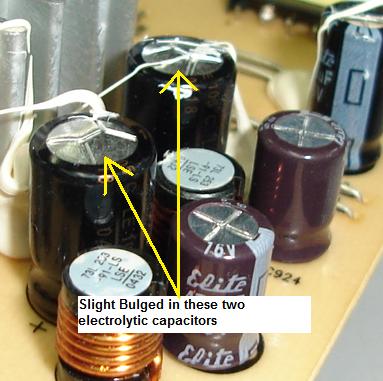
            Took the back of the monitor today and found 2 bulged capacitors. Did some googling on capacitors and came across this picture.


            Which by coincidence is from the same monitor and the same 2 capacitors.

            Going to order some replacements and have ago myself, looks straight forward enough.

            Maybe it's been a case of Sods law and the TV just packed in at tha same time, but going to replace the power supply on my pc to be on the safe side.

            Many thanks again, I'll post the outcome when done.

            Comment

            • chris1968
              Newbie
              • Feb 2009
              • 14

              #7
              Update on the monitor.


              Replaced the 2 bulged capacitors (shown in the pic in the above post).

              Monitor back up and running, at a total cost of ?0.84p, plus an hour of my own time.

              I'm guessing the TV must be a different fault, a quick call to the makers suggested that a flahing red stanby light was a software issue within the TV, I'll tackle this one at a later date, just happy to have a fixed monitor at the moment.

              Thanks for your help.
              Chris

              Comment

              • marginal
                DK Veteran
                • Feb 2010
                • 399

                #8
                Why don't you run a video test on your PC?
                Est Modus in Rebus !!!

                Comment

                • chris1968
                  Newbie
                  • Feb 2009
                  • 14

                  #9
                  marginal

                  Monitors fixed now, but interested in what you have said, can you explain how I do this.

                  I'll do some google research now anyway.

                  Comment

                  • marginal
                    DK Veteran
                    • Feb 2010
                    • 399

                    #10
                    Hi Chris.

                    There are all kinds of tests for computer hardware, many of them are free of charge.
                    I don't remember exactly what were the names and the companies, but you can find that info easily.

                    Good luck :-).
                    Est Modus in Rebus !!!

                    Comment

                    • bob1303
                      Newbie
                      • Feb 2010
                      • 11

                      #11
                      Chris try astra32 this will give you a full scan of your hardware, if you have a problem with capisters would suggest u also replace your power supply

                      Comment

                      Working...