blackberry curve 8520 app error 523 ??

Collapse
X
 
  • Time
  • Show
Clear All
new posts
  • kingy999
    Top Poster
    • Nov 2008
    • 181

    #1

    blackberry curve 8520 app error 523 ??

    hi

    everytime my blackberry powers up i get app error 523 reset ??

    anyone heard or no how to get around this ..

    many thanks
  • teerak2uk
    DK Veteran
    • Apr 2009
    • 6074

    #2
    Re install the O/S then should be ok
    Oh and by the way if my post has been at all helpfull
    please press the little THANKS tab

    Comment

    • Watts
      Newbie
      • Mar 2010
      • 1

      #3
      yup just reinstall and wolla

      Comment

      • martinlfc
        Newbie
        • Mar 2010
        • 3

        #4
        how do you reinstall the o/s(what does that mean) on a blackberry curve 8520?

        Comment

        • martinlfc
          Newbie
          • Mar 2010
          • 3

          #5
          Originally posted by martinlfc
          how do you reinstall the o/s(what does that mean) on a blackberry curve 8520?
          can anybody help me got a blackberry 8520 curve when powered on it reads app error 523 reset. wat do i need to do to get it working

          Comment

          • martinlfc
            Newbie
            • Mar 2010
            • 3

            #6
            Originally posted by teerak2uk
            Re install the O/S then should be ok
            what is o/s and how do your re install???? someone said go on blackberry.com but i can't seem to find the software

            Comment

            • Jim.Mahoney
              V.I.P. Member
              • Feb 2010
              • 4249

              #7
              Take it to a dealer if you are not 100% OK doing the following:

              The error is caused by an installed application failing and damaging the BlackBerry Operating system in the process. The fix is to simply erase and reinstall the operating system to your phone. This sounds difficult but isn?t too hard in practice. It?s something you can do yourself on your home PC using BlackBerry Desktop Manager. If you don?t feel confident in doing this yourself then you can take it to a BlackBerry repair centre and they?ll carry the repair out for you, but you might have to wait a couple of weeks for them to do it and if you?re out of warranty you?ll probably have to pay for it.

              In most cases, the 12 steps listed below should get your handset working again & the process is exactly the same if you want to upgrade your firmware to a newer version. Before you start though I?d recommend that you check the following:

              The battery in your BlackBerry handset is fully charged.

              *Internet Explorer is needed to download latest version of BlackBerry Firmware. BlackBerry Desktop Manager isn?t an essential part of the process, but it will make managing your device a lot easier.

              Once you?ve downloaded and installed the latest versions, it?s time to start updating your phone. You?ll need to be patient though, as this isn?t the fastest process in the world and it will take some time to erase everything and then reinstall the software. When I ran through it for this post it took around 45 minutes on a BlackBerry Curve 8310 upgrading to 4.5.0.163 on a PC running Windows XP SP3.

              To be on the safe side, I?d close any other applications on your computer and go make yourself a coffee while you wait for the update to finish.

              It?s extremely important that once you start this process you don?t disconnect your BlackBerry from your computer or switch your computer off until the update has completed and you?re told it is safe to do so by the update application.


              6. If you?re asked for a password, type in your BlackBerry password and click Next.
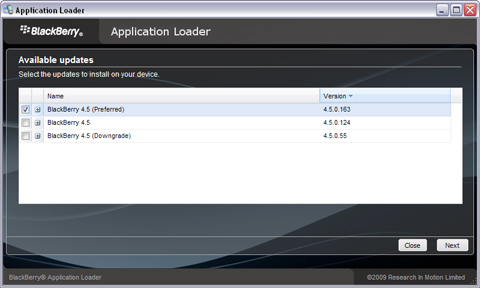
              7. The Device Application Selection screen appears. Select the applications to be loaded onto your BlackBerry smartphone.


              Update BlackBerry Firmware - Select Applications to Install

              8.If the Device Backup screen appears, choose whether or not to automatically back up the BlackBerry smartphone. Click Next.

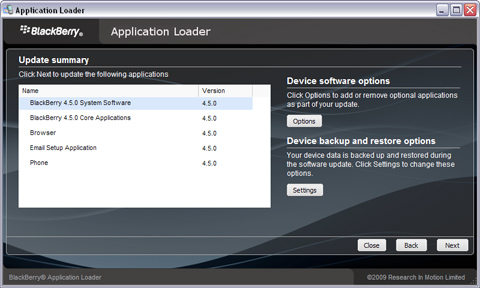
              9.Click Next. The ?Completing the Application Wizard? screen will appear and display all the software that will be loaded to your BlackBerry smartphone.

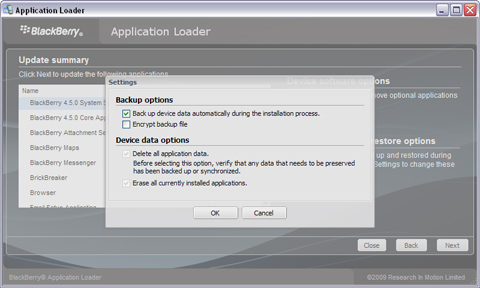
              10.Click the Advanced button and make sure that Erase all application data and Erase all currently installed applications are both selected. Note: If the Application Loader is not able to access all of the BlackBerry smartphone data, then both Erase all application data and Erase all currently installed applications will be grayed out.


              Update BlackBerry Firmware - Check 'Erase all' boxes


              11.Click Next, You?ll be asked if you want to be notified of future updates, enter your email address and then click Next again.

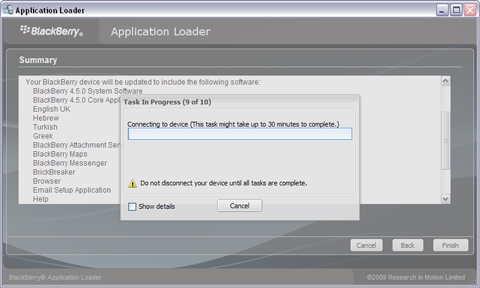
              12.Click Finish. The BlackBerry firmware will now be updated on your BlackBerry. You?ll need to be patient though as this will take around 45 minutes to complete ? maybe longer.


              Update BlackBerry Firmware - Software will take around 45 minutes to udpate

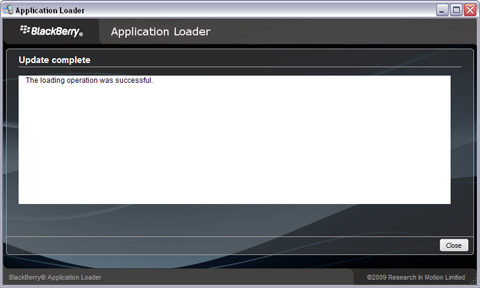
              13.That?s it ? All done. Once you see the update successful screen it is safe to disconnect your phone from your computer.


              Update BlackBerry Firmware - Update Complete


              If you get any error messages at any point, you may need to start the process again. If you try 3 times and it still won?t work, you?ll need to take your handset to your nearest repair centre or contact BlackBerry for help.

              Comment

              • karate
                Newbie
                • Apr 2010
                • 2

                #8
                Originally posted by teerak2uk
                Re install the O/S then should be ok
                How do you reinstall o/s and what is os?

                Comment

                • teerak2uk
                  DK Veteran
                  • Apr 2009
                  • 6074

                  #9
                  Originally posted by karate
                  How do you reinstall o/s and what is os?
                  for what model and what network
                  Oh and by the way if my post has been at all helpfull
                  please press the little THANKS tab

                  Comment

                  • karate
                    Newbie
                    • Apr 2010
                    • 2

                    #10
                    Originally posted by teerak2uk
                    for what model and what network
                    a blackberry 8520?
                    could you also tell me what o/s is?
                    and its on 02

                    Comment

                    • teerak2uk
                      DK Veteran
                      • Apr 2009
                      • 6074

                      #11
                      o/s is operating system basically best to keep it updated to the latest using blackberry desktop manager

                      here

                      BlackBerry - BlackBerry Desktop Software - BlackBerry Software at BlackBerry.com

                      and choose your o/s from here

                      BlackBerry - BlackBerry Desktop and Device Software Download Sites
                      Oh and by the way if my post has been at all helpfull
                      please press the little THANKS tab

                      Comment

                      • cator
                        Newbie
                        • Sep 2010
                        • 1

                        #12
                        this was very helpful mate, thanks, but i didnt need to complete all the tasks to get the blackberry to work, all it needed was a system update to v5.0.0.2

                        Comment

                        • freeman2001
                          Member
                          • Apr 2010
                          • 48

                          #13
                          do as what's bro teerak2uk said to u just need to delete vendor file from your system to able reflashing your phone


                          br

                          Comment

                          • mindsocket
                            Newbie
                            • Feb 2011
                            • 2

                            #14
                            Originally posted by Jim.Mahoney
                            Take it to a dealer if you are not 100% OK doing the following:

                            The error is caused by an installed application failing and damaging the BlackBerry Operating system in the process. The fix is to simply erase and reinstall the operating system to your phone. This sounds difficult but isn?t too hard in practice. It?s something you can do yourself on your home PC using BlackBerry Desktop Manager. If you don?t feel confident in doing this yourself then you can take it to a BlackBerry repair centre and they?ll carry the repair out for you, but you might have to wait a couple of weeks for them to do it and if you?re out of warranty you?ll probably have to pay for it.

                            In most cases, the 12 steps listed below should get your handset working again & the process is exactly the same if you want to upgrade your firmware to a newer version. Before you start though I?d recommend that you check the following:

                            The battery in your BlackBerry handset is fully charged.

                            *Internet Explorer is needed to download latest version of BlackBerry Firmware. BlackBerry Desktop Manager isn?t an essential part of the process, but it will make managing your device a lot easier.

                            Once you?ve downloaded and installed the latest versions, it?s time to start updating your phone. You?ll need to be patient though, as this isn?t the fastest process in the world and it will take some time to erase everything and then reinstall the software. When I ran through it for this post it took around 45 minutes on a BlackBerry Curve 8310 upgrading to 4.5.0.163 on a PC running Windows XP SP3.

                            To be on the safe side, I?d close any other applications on your computer and go make yourself a coffee while you wait for the update to finish.

                            It?s extremely important that once you start this process you don?t disconnect your BlackBerry from your computer or switch your computer off until the update has completed and you?re told it is safe to do so by the update application.


                            6. If you?re asked for a password, type in your BlackBerry password and click Next.
                            7. The Device Application Selection screen appears. Select the applications to be loaded onto your BlackBerry smartphone.


                            Update BlackBerry Firmware - Select Applications to Install

                            8.If the Device Backup screen appears, choose whether or not to automatically back up the BlackBerry smartphone. Click Next.

                            9.Click Next. The ?Completing the Application Wizard? screen will appear and display all the software that will be loaded to your BlackBerry smartphone.

                            10.Click the Advanced button and make sure that Erase all application data and Erase all currently installed applications are both selected. Note: If the Application Loader is not able to access all of the BlackBerry smartphone data, then both Erase all application data and Erase all currently installed applications will be grayed out.


                            Update BlackBerry Firmware - Check 'Erase all' boxes


                            11.Click Next, You?ll be asked if you want to be notified of future updates, enter your email address and then click Next again.

                            12.Click Finish. The BlackBerry firmware will now be updated on your BlackBerry. You?ll need to be patient though as this will take around 45 minutes to complete ? maybe longer.


                            Update BlackBerry Firmware - Software will take around 45 minutes to udpate

                            13.That?s it ? All done. Once you see the update successful screen it is safe to disconnect your phone from your computer.


                            Update BlackBerry Firmware - Update Complete


                            If you get any error messages at any point, you may need to start the process again. If you try 3 times and it still won?t work, you?ll need to take your handset to your nearest repair centre or contact BlackBerry for help.
                            above mentioned instructions are very informative but i am having the same problem and when i connect my BB 8520 to BB Desktop manager it does not recognizes the phone and the same error appears. what to do in this situation to get connected to the desktop manager?

                            Comment

                            • mindsocket
                              Newbie
                              • Feb 2011
                              • 2

                              #15
                              Originally posted by kingy999
                              hi

                              everytime my blackberry powers up i get app error 523 reset ??

                              anyone heard or no how to get around this ..

                              many thanks
                              the easiest way to get rid of that problem is by following the instructions on the video whose link is as follows.

                              [ame=http://www.youtube.com/watch?v=WM9v3pgkeno]YouTube - BlackBerry Curve App Error 523.wmv[/ame]

                              i had a same problem and i have tested it on my BB 8520.

                              Comment

                              Working...