Free Huawei Modem Unlocking and Support Thread

Collapse
This is a sticky topic.
X
X
 
  • Time
  • Show
Clear All
new posts
  • Jim.Mahoney
    V.I.P. Member
    • Feb 2010
    • 4249

    #1

    Free Huawei Modem Unlocking and Support Thread

    Now you can generate your own Huawei modem unlocking codes!

    You can get the code generator by clicking >
    HERE

    How to use your Huawei Unlock code:

    1. Ensure that you modem has been completely installed on your
    PC. If this has not been done, you will not be able to unlock the device. USB devices have built-in CDROM emulation and installing is as simple as plugging the device in and waiting for the task to end!

    2. The correct way to unlock is by inserting a non-accepted SIM card into the device. You should get a box appear asking for the code and once entered the modem is unlocked! Remember that you only get 10 attempts so don't keep trying codes if you get errors!! Some providers have their dashboard software "doctored" so that it doesn't ask for the unlock code! The simple way around this is to download a PC install version of the generic (i.e. unbranded) Mobile Partner dashboard software, you can get that HERE

    3. You may want to de-brand your device by flashing new dashboard software to the device itself, for most Huawei devices you can get the upgrade tool HERE

    4. Remember that once you have unlocked your device, you will need to set up a new connection profile for the new network. This is done using the dashboard profile management setting under Tools.

    Things to remember:

    Any Vodafone USB modem with a -Z suffix to it's model number is made by ZTE and thus can not be unlocked with Huawei unlock codes!

    The "Flash Code" that is usually also given is only used should you need to upgrade your devices firmware to a version not authorized by your original network. In most cases you will never need to use the Flash Code but if you do, take care that you really understand what you are doing!!

    Only ever attempt to upgrade firmware and/or dashboards (unless PC installed versions) with the same model number. For example the E160 and E160G will not use the same firmware because the devices are quite different internally!!

    Another useful tool is MDMA (Mobile Data Monitoring Application) this allows for a detailed signal read-out and a host of other features, you can also use it as a dashboard replacement! Although MDMA does not (currently) support SMS it does however support USSD commands which many using pre-pay SIM's will find handy. The MDMA Tool can be downloaded from HERE

    I hope this gives you all of the answers before they even needed to be asked!

    If you want to download you must have at least one valid post on the forum!
    Last edited by Jim.Mahoney; 14 January, 2012, 09:02.
  • Jim.Mahoney
    V.I.P. Member
    • Feb 2010
    • 4249

    #2
    How to use in four simple steps:

    1. Click on Huawei Tab.
    2. Select Modem Model (not absolutely necessary but good if your emailing the codes to someone).
    3. Enter FULL IMEI of modem all 15 digits!
    4. Click on Calculate!

    Done!


    Comment

    • Jim.Mahoney
      V.I.P. Member
      • Feb 2010
      • 4249

      #3
      Historically, the Huawei E220 has always been a problem to unlock! You can't generate codes for these but they can be unlocked at home with a few free tools, a little bit of reading and a dash of patience!

      This site has all you need to know plus links to the required software:


      Unlock E220: Unlock Huawei E220 HSDPA Modem

      Several DK members have already unlocked their modems successfully via this route...

      Comment

      • Jim.Mahoney
        V.I.P. Member
        • Feb 2010
        • 4249

        #4
        Unlocking Vodafone Branded Huawei Modems:

        There are some issues with unlocking Vodafone Huawei devices via code and indeed trying to use the Vodafone Mobile Connect software with a SIM from a non-Vodafone network is all but impossible!


        Here's what to do:
        If you insert a non-Vodafone SIM and it doesn't ask for the unlock code, remove the dongle and uninstall Vodafone Mobile Connect (via Windows Control Panel) and then install the PC version of Huawei Mobile Partner.


        If the Vodafone software tries to re-install itself, cancel it!


        Because the Vodafone Mobile Connect software doesn't allow another SIM to be recognised even when the modem is unlocked, you'll probably want to leave Mobile Partner installed on your PC. Remember you'll need to setup a new profile in Mobile Partner for your new network.

        You can flash a Huawei dashboard to the modem but it's really not necessary.


        A PC installed copy of Mobile Partner can be found here:

        DC-unlocker is universal, fast and easy to use unlocking tool. Supports Huawei, ZTE, Sierra Wireless and other modems, routers and phones.


        and also here:


        Comment

        • Jim.Mahoney
          V.I.P. Member
          • Feb 2010
          • 4249

          #5
          More on Vodafone Devices:

          Some with Vodafone 'K' Series modems may have had a problem with USSD commands when using Mobile Partner!

          USSD commands are especially handy for those using pre-paid SIM cards for checking balances etc.

          The cure is to edit DeviceInfo.XML which can be found in
          C:\Program Files\Mobile Partner

          You can use Windows Notepad to edit the file....

          Check that the file is not "read only" by right clicking on it and selecting Properties. If the Read Only box is checked, un-check it now!

          You need to add just one line with the model of your modem...

          Look for the section:


          <UssdUnEncode>
          <item devicename="E660"></item>
          <item devicename="E800"></item>
          <item devicename="E800A"></item>
          <item devicename="E800B"></item>
          <item devicename="E630"></item>
          <item devicename="E220"></item>
          <item devicename="E180"></item>
          <item devicename="E230"></item>
          <item devicename="E170"></item>
          <item devicename="E172"></item>
          <item devicename="E17X"></item>
          <item devicename="E270"></item>
          <item devicename="E272"></item>
          <item devicename="E870"></item>
          <item devicename="E169"></item>
          <item devicename="K3520"></item> <<< The added line for a K3520
          </UssdUnEncode>

          Now save your edited file, restart Mobile Partner and your USSD command will now work!


          Comment

          • Jim.Mahoney
            V.I.P. Member
            • Feb 2010
            • 4249

            #6
            Mobile Partner - Quick Exit!

            Do you find having to click on Yes to confirm exit from Mobile Partner annoying?

            Here is the answer:


            Go to: C:\Program Files\Mobile Partner\plugins\XFramePlugin

            Just in case, make a backup of Config.xml

            Now edit Config.xml


            <splash>true</splash>
            <splashscreenstoptime>3</splashscreenstoptime>
            <layoutmaginwidth>0</layoutmaginwidth>
            <helpfile>usermanual</helpfile>
            <style>0x00000011</style>
            <exitprompt>0</exitprompt> <<< Just change the 1 to a 0
            <exitpromptdisconn>1</exitpromptdisconn>
            <addtitle>false</addtitle>

            You should also be able to see settings for Exit and Disconnect plus Splash screen time...

            Note you may need to edit the file attributes of Config.xml from Read only to be able to save your changes...

            Comment

            • Jim.Mahoney
              V.I.P. Member
              • Feb 2010
              • 4249

              #7
              UK 3G Profile Settings - All use Static Profile

              Be aware that some networks have different pre-pay and contract settings and using the incorrect set may cost you extra money!


              Vodafone
              APN (contract): internet
              APN (PAYG): pp.vodafone.co.uk

              Username: web
              Password: web

              Orange
              APN: orangeinternet
              Username: leave blank
              Password: leave blank

              O2

              APN (contract): mobile.o2.co.uk
              APN (PAYG): m-bb.o2.co.uk

              Username: web
              Password: web

              T-Mobile
              APN: general.t-mobile.uk
              Username: leave blank
              Password: leave blank

              Three
              APN:3internet
              Username: leave blank
              Password:leave blank

              Tesco Mobile (uses the O2 network)
              APN: prepay.tesco-mobile.com
              Username: tescowap
              Password: password

              Virgin Mobile (uses the T-Mobile network)
              APN: goto.virginmobile.uk
              Username: user
              Password: leave blank

              BT Mobile (uses the Vodafone network)
              APN: btmobile2.bt.com
              Username: bt
              Password: bt

              GiffGaff
              APN: giffgaff.com
              Username: giffgaff
              Password: password

              ASDA Mobile (uses the Vodafone network)
              APN: asdamobiles.co.uk
              Username: web
              Password: web

              Manx Telecom (Isle of Man)
              APN: 3gpronto
              Username: leave blank
              Password: leave blank

              Sure Mobile (Guernsey & Isle of Man)
              APN: internet
              Username: leave blank
              Password: leave blank

              Wave Telecom (Guernsey)
              APN: pepper
              Username: leave blank
              Password: leave blank

              Airtel Vodafone (Guernsey)
              APN: airtel-ci-gprs.com
              Username: leave blank
              Password: leave blank

              Sure Mobile (Jersey)
              APN: internet
              Username: leave blank
              Password: leave blank

              Jersey Telecom(Jersey)
              APN: pepper
              Username: leave blank
              Password: leave blank

              Airtel Vodafone (Jersey)
              APN: airtel-ci-gprs.com
              Username: leave blank
              Password: leave blank
              Last edited by Jim.Mahoney; 2 July, 2011, 11:21.

              Comment

              • Jim.Mahoney
                V.I.P. Member
                • Feb 2010
                • 4249

                #8
                Popular Huawei modem's and Some Comments:

                This is by no means an exhaustive list of devices but more a guide to buying one second hand for unlocking. E-Bay is still the number one source for me! I buy in the UK, import, unlock and sell here in South Africa. However, the prices here are finally dropping to match those in the UK so I buy more locally now plus devices are sold here network unlocked by law!


                E220 - My all time favourite

                Plus points:
                7.6mbps with latest firmware
                Very Reliable
                Quite Robust

                Downside:
                SIM Holder Easily lost!
                No receive diversity
                Unlocking is not as easy as other devices
                Antenna Socket not accessible unless case drilled!
                HSDPA on 2100MHz only - EDGE on all other bands
                ---------------------------------------------------------
                E160 - The Best Basic USB modem!

                Plus points:
                Very Reliable
                Antenna Socket
                microSD Memory Card Slot
                Unlocking Simple

                Downside:
                Maximum Receive Speed 3.6mbps
                SIM holder can be lost!

                Look for the E160E over the plain E160
                E160E supports HSDPA on 2100MHz and 900MHz
                ---------------------------------------------------------
                E272 - My second all time favourite

                Plus points:
                7.6mbps download
                2.0mbps upload
                Very Reliable
                Quite Robust
                No SIM holder to lose!

                Downside:
                Antenna Socket not accessible unless case drilled!
                HSDPA on 2100MHz only - EDGE on all other bands
                ---------------------------------------------------------
                E170 - Looks a bit cheap!

                Plus points:
                Reliable
                Unlocking Simple
                7.6mbps download
                2.0mbps upload

                Downside:
                No microSD Memory Card Slot
                No Antenna Socket
                SIM holder can be lost!
                ---------------------------------------------------------
                E1550 - Exercise Caution when buying!!

                Plus points:
                Reliable
                microSD Memory Card Slot

                Downside:
                Maximum Receive Speed 3.6mbps
                Some Globe versions are impossible to unlock!
                HSDPA on 2100MHz only - EDGE on all other bands

                This modem is generally cheap even new! But be
                aware that some networks have custom firmware
                that makes unlocking impossible. The Globe network
                market such customised devices. Most of those from
                other networks unlock quite easily... Buyer beware!
                ---------------------------------------------------------
                K3520 - Vodafone Branded Huawei

                Plus points:
                Very Reliable
                microSD Memory Card Slot
                7.6mbps download
                HSDPA on 2100MHz and 900MHz
                Unlocking Simple


                Downside:
                No Antenna Socket
                SIM holder can be lost!
                VMC Dashboard *

                * Can be replace by Mobile Partner
                ---------------------------------------------------------
                K3765 - Vodafone Branded Huawei

                Plus points:
                7.6mbps download
                2.0mbps upload

                Downside:
                Bad on Signal - Very Bad
                Unlocking NOT easy! No free codes!
                No Antenna Socket
                SIM holder can be lost!
                VMC Dashboard *

                * Can be replace by Mobile Partner

                Avoid this modem unless it's given to you free!
                ---------------------------------------------------------
                K4505 - Vodafone Branded Huawei

                Plus points:
                Very Fast!
                28mbps download
                5.6mbps upload
                HSPA+ on 2100MHz and 900MHz

                Downside:
                Unlocking NOT easy! No free codes!
                No Antenna Socket
                Not supported by any routers.
                VMC Dashboard **

                ** There have been reports that flashing a Huawei
                Mobile Partner dashboard to this device can brick
                the modem! Use the PC installed version instead!

                If you can find this modem unlocked - Buy it!
                ---------------------------------------------------------

                If your modem isn't listed don't worry. I have only quoted the modems that I have worked with extensively over a period of time.

                Buying a locked modem on E-Bay often results in paying half the price of the same unlocked device. Most sellers listing locked modems probably have no idea how easily they can be unlocked.

                Comment

                • Jim.Mahoney
                  V.I.P. Member
                  • Feb 2010
                  • 4249

                  #9

                  Alternative Dashboard Software:

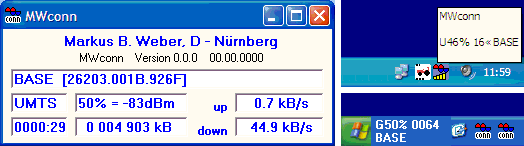
                  MWConn is customisable and requires only the Huawei drivers to be in place. You can use SMS and USSD commands. It does need a bit of tinkering to get everything right but it's worth the effort!


                  Download here: MWconn

                  There is also a version for Ubuntu Linux called IXconn at the same download address.

                  Comment

                  • Jim.Mahoney
                    V.I.P. Member
                    • Feb 2010
                    • 4249

                    #10
                    Alternative Dashboard Software:

                    Already referred to in the first post, MDMA is a tiny program that can be used to more accurately monitor signal (that's where it gets its name Mobile Data Monitoring Application) plus send USSD and works as a connection tool.


                    As a connection tool it works very well with a very tiny overhead on resources! It's also excellent for antenna alignment. On the down side it does not currently support SMS.

                    Download here: MDMA - a Mobile Data Monitoring Application

                    Comment

                    • Bluebird22
                      Newbie
                      • Jun 2011
                      • 7

                      #11
                      Hi Jim

                      Thanks for all these detailed instructions.
                      Unlocked a E160G (3 branded). Have not flashed modem, but using Mobile Partner dashboard. Connection still fine with 3 SIM, but get error code with Orange SIM. Picks up signal & trys to authenticate but comes back error code 619 connection to remote computer could not be established.

                      Have put Orange settings into dashboard but must be making some schoolboy error! Any advice please.

                      Comment

                      • Jim.Mahoney
                        V.I.P. Member
                        • Feb 2010
                        • 4249

                        #12
                        Originally posted by Bluebird22
                        Hi Jim

                        Thanks for all these detailed instructions.
                        Unlocked a E160G (3 branded). Have not flashed modem, but using Mobile Partner dashboard. Connection still fine with 3 SIM, but get error code with Orange SIM. Picks up signal & trys to authenticate but comes back error code 619 connection to remote computer could not be established.

                        Have put Orange settings into dashboard but must be making some schoolboy error! Any advice please.
                        Huawei Mobile Partner allows for as many profiles as you can to enter! This can cause problems when you forget to select the one that you want to use before connecting!

                        If you are going to use Orange on a regular basis, then make it the default profile. The 619 error usually means that it's a setting issue and probably just a typo at that!

                        Sometimes old dial up profiles are still on the PC. Without knowing if you are running Windows XP, Vista or 7 - talking you through this is not easy.

                        I've attached a APN updater which probably only works under Windows XP. Ignore the "out of date" warning when running. It should add just about any network profile you care to name.

                        Go back and edit your Orange Profile and for add the following: User Name: user Password: pass This shouldn't be needed but worth a try!

                        If this doesn't work, switch the modem to another USB port if possible, let the drivers load but cancel the 3 software install if it tries to load.

                        If still no joy, let me know what Windows you are using.
                        Attached Files
                        Last edited by Jim.Mahoney; 4 July, 2011, 19:35.

                        Comment

                        • Bluebird22
                          Newbie
                          • Jun 2011
                          • 7

                          #13
                          Thanks Jim

                          Not sure what I had typed incorrectly, but after redoing everything am enjoying full access with Orange card. ( Quicker than my adsl home broadband)!

                          Thanks for all your advice.

                          Comment

                          • Jim.Mahoney
                            V.I.P. Member
                            • Feb 2010
                            • 4249

                            #14
                            Technically, any changes should work immediately... But it's Windows!

                            Comment

                            • Jim.Mahoney
                              V.I.P. Member
                              • Feb 2010
                              • 4249

                              #15
                              Apart from the Huawei E220 what else can't be unlocked easily?

                              As mentioned earlier E1550 from Globe is doctored so that it can't be unlocked!

                              Most modems that have 04 as their 7th and 8th digit in their IMEI. e.g: ******-04-******-* as these seem to have a new lock algorithm. They can be unlocked but not for free!!

                              Routers like the B960, B970 and E58xx series can not be unlocked by free code. These can only be unlocked by cable and "paid for" software.

                              All of the stand alone 3G/Wi-Fi devices are also on the "not for free" list.

                              Most can be unlocked using www.dc-unlocker.com but you'll need to buy credits.

                              Don't even bother if you have a Globe E1550 that came in a red box, these are currently impossible to unlock by any method!

                              Comment

                              Working...