Search setup for dm800se

Collapse
X
 
  • Time
  • Show
Clear All
new posts
  • greig1983
    Newbie
    • Nov 2008
    • 16

    #1

    Search setup for dm800se

    I finally got the sr4 flashed with openpli. I have virgin at the moment but don't know how to set the box up?

    I've went through different settings such as astra and connect my cable into one of the dvb connections but cannot get any channels.

    Does anyone know how I can set this up correctly? Thanks a lot
  • VirtuallyMore
    Member
    • Dec 2012
    • 98

    #2
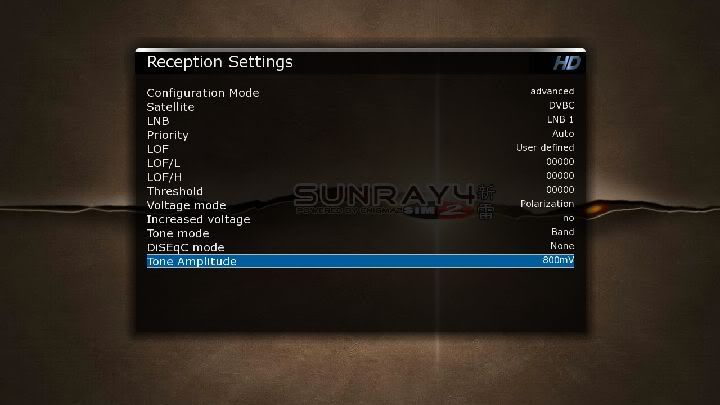
    You should ignore tuner B and C (if you are using a trialtuner image) and just focus on tuner A, by editing satellites.xml (located in ftp://(dreamboxip)/etc/tuxbox/ ), add a new satellite called DBVC or whatever you wanna call it, and input your cable transponder details for your area, with all the frequencies of 01. This will tell the box to use the DVB-C port on the tuner card.

    example:
    (use fec_inner="0" for QAM64, and fec_inner=5 for QAM256)
    (and replace your_fequency and your_symbol_rate with your details)

    Code:
    	<sat name="DVBC" flags="1" position="1">
    		<transponder frequency="01(your_frequency)" symbol_rate="(your_symbol_rate)" polarization="0" fec_inner="5" inversion="0" modulation="0" system="0"/>
    		<transponder frequency="01(your_frequency)" symbol_rate="(your_symbol_rate)" polarization="0" fec_inner="5" inversion="0" modulation="0" system="0"/>
    		<transponder frequency="01(your_frequency)" symbol_rate="(your_symbol_rate)" polarization="0" fec_inner="5" inversion="0" modulation="0" system="0"/>
    	</sat>
    an example of frequency would be 01234567 and symbol rate of 6699. (you may have to put 000 after your symbol rate)

    then set it up like this below, and do an auto scan, and it will scan those frequencies.


    I only know my local frequencies because my starview box scans multiple ranges at both 64 and 256 qam, but i dunno how u will find your local info.

    I hope this is somewhat helpful.
    Last edited by VirtuallyMore; 26 December, 2012, 23:41.

    Comment

    • greig1983
      Newbie
      • Nov 2008
      • 16

      #3
      Thanks for your reply but am totally lost not sure how to do those things.

      Comment

      • greig1983
        Newbie
        • Nov 2008
        • 16

        #4
        I'm I better just buying a motorised satellite dish?

        If so which would be the best to use?

        Comment

        • VirtuallyMore
          Member
          • Dec 2012
          • 98

          #5
          The cheaper option would be to use cable if you are already paying for cable internet (required) as you can use the same line.
          If you own your own property then for long term yes, using sat would be better as there are more channels available. But if you are renting of move around a lot you may find many places do not allow you to put up a dish, and for these people the cable route is the only option.

          It also depends if you are planning to decrypt the scrambled channels or not.
          On virgin cable u get about 22 channels unencrypted, and only 2 of them are HD (ITV1 and some Chinese news channel).
          But on sat, (on dvb-s2 boxes like yours) you will get many more unencrypted channels to chose from, including about 14 unencrypted HD channels.

          FTA HD Channels:
          Astra 1N / Astra 2A / Astra 2B / Astra 2D / Astra 2F / Eutelsat 28A / Eutelsat 28B (28.2E) - HDTV - frequencies - KingOfSat

          FTA SD Channels:
          Astra 1N / Astra 2A / Astra 2B / Astra 2D / Astra 2F / Eutelsat 28A / Eutelsat 28B (28.2E) - TV - frequencies - KingOfSat
          Last edited by VirtuallyMore; 27 December, 2012, 23:08.

          Comment

          • greig1983
            Newbie
            • Nov 2008
            • 16

            #6
            Thanks very much. I've been at this box for days and days now without any luck. I live in Glasgow but cannot find any frequencies codes.

            I've order a motorised satellite so will probably install this and get virgin taken away since if I get more channels with the dreamox there will be no point having virgin. Shame was told it works with cable but as I said I cannot find any frequencies for my area.

            Cheers

            Comment

            • VirtuallyMore
              Member
              • Dec 2012
              • 98

              #7
              If you really do want cable, there is only one sure fire way to find out your local frequency details.

              Most DM800SE images which have trialtuner (3 tuners) install a file onto the box called cables.xml, (located in the /etc/tuxbox/ folder on the flash memory, accessible via ftp to the box), which in there contains symbol rates for basically every major country and many towns in the UK, including Glasgow.

              Code:
              <cable name="Glasgow 1" flags="1">
              	<transponder frequency="755000000" inversion="2" symbol_rate="6887000" fec_inner="3" modulation="3"/>
              	</cable>
              <cable name="Glasgow 2" flags="1">
              	<transponder frequency="619000000" inversion="2" symbol_rate="6952000" fec_inner="3" modulation="3"/>
              	</cable>
              (as you can see, your symbol rate could be either 6887 or 6952)

              So that's fine for symbol rate info, as this is public knowledge, but actual frequencies, it only lists one as a example for you to add your own lines, and the only way I know of to obtain this info, is to get a frequency scanner of some sort, or as I did, use a cable digi box made for the uk like some of the starview boxes, which can scan all frequencies at a specified symbol rate (eg 6699 or whatever) and from this info, start editing the cables.xml or satellites.xml file on your dm800 box (depending if using trialtuner or not).

              but as i said, this is a very complicated process for very few channels, if you can install a dish and u have a clear signal with that dish then this is the easier option to set up, as all dish frequencies details are generic to each sat, so no configuration is required, just pick the sat and auto scan, and away u go.
              Last edited by VirtuallyMore; 28 December, 2012, 22:23.

              Comment

              Working...