Can't reset my keys

Collapse
X
 
  • Time
  • Show
Clear All
new posts
  • jerrell
    Junior Member
    • Nov 2008
    • 24

    #1

    Can't reset my keys

    Ok here goes. Firstly Hello & Good morning. As I am new here and joined yesterday I have been reading alot of info. I came across how to manually update your keys. Unfortunately, it has not worked for me yet. I at one point late last night deleted all my keys fron keylist. This morning when I checked my box the keys reappeared. It still does not fix my problem no sky 1 etc.
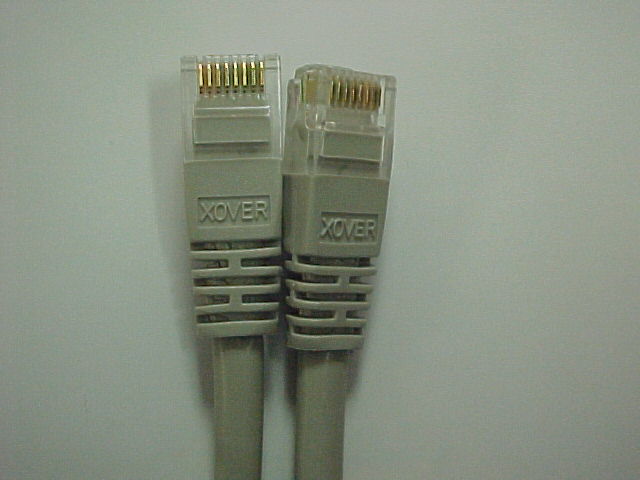
    I would like to know what a cross over cable looks like e.g. be greatful for a pic of one.

    Please could someone tell me what I need to change. I have a Dream 500 box 2.12 evocam and does the AU need to be changed if so where do I change this.

    Thanks in advance
  • Jaffa
    V.I.P. Member
    • Mar 2008
    • 1612

    #2
    Crossover cable looks like below. You can get them on ebay for about ?1 or probably in a good computer shop for ?2-?3

    You can use the guide below to turn off AU.


    sigpic

    Comment

    • Devilfish
      Administrator
      • Feb 2008
      • 7872

      #3
      This is the cable you need.

      Crossover Cat5e RJ45 Ethernet Network Cable UTP XBox 2M on eBay, also, Network Cables RJ45, Cables Connectors, Computing (end time 01-Dec-08 17:35:40 GMT)

      At the start of the lines of keys, what are the first 5 characters, i.e. N 5A01, N 5401, N 5C01 ???

      Comment

      • jerrell
        Junior Member
        • Nov 2008
        • 24

        #4
        Devilfish it is N 5A01

        Thnaks in advance

        Comment

        • Jaffa
          V.I.P. Member
          • Mar 2008
          • 1612

          #5
          Originally posted by jerrell
          Devilfish it is N 5A01

          Thnaks in advance
          Use the TW keys from the keymaster.

          To alter the AU, when you are in tuxbox commander, instead of highlighting keylist, go down and highlight camd_cfg and press 4.
          Then go down to you see what is below.

          # AU
          # 00 is ignored (default)
          # 01 enable AU
          # 02 AU Auto
          A: { 02 }


          Make sure it says 02 in the brackets.
          sigpic

          Comment

          Working...