Null Modem Cable

Collapse
X
 
  • Time
  • Show
Clear All
new posts
  • Skiboy
    Top Poster
    • Jul 2008
    • 151

    #16
    You cant select m8..its jumping 1,3,4 with the start button below it, when I press start its then say's the reciever was not detected, if you want to download firmware in bootmode click ok button?


    cheers

    Comment

    • HiTeck
      V.I.P. Member
      • Oct 2008
      • 996

      #17
      Are you just using a null modem cable or a USB adapter aswell?

      Comment

      • pip.22
        Newbie
        • Feb 2009
        • 1

        #18
        hi thanx

        hi thanx for all the info will help me a lot

        Comment

        • Skiboy
          Top Poster
          • Jul 2008
          • 151

          #19
          Originally posted by HiTeck
          Are you just using a null modem cable or a USB adapter aswell?
          Hi m8...I've tried both, usb with null modem on vista with lappy and just the null modem on desktop with xp, just wondering if there's something wrong with this box now, on both machines comm port 1


          cheers

          Comment

          • HiTeck
            V.I.P. Member
            • Oct 2008
            • 996

            #20
            In device manager of the PC using JUST the null modem cable with XP change com to com port 3 and try flashing it again.

            Comment

            • Skiboy
              Top Poster
              • Jul 2008
              • 151

              #21
              Just the same m8..I dont think any of the pc's can see the box, maybe the socket on box knackered?

              cheers

              Comment

              • HiTeck
                V.I.P. Member
                • Oct 2008
                • 996

                #22
                Have a read through this and try everything mentioned http://www.digital-kaos.co.uk/forums...om-port-28345/

                Comment

                • Skiboy
                  Top Poster
                  • Jul 2008
                  • 151

                  #23
                  Already tried everything in that thread ..just ordered a new null modem cable just in case..although this one does dreamboxes and dboxes just as a last resort, will let you know how I get on.
                  cheers

                  Comment

                  • HiTeck
                    V.I.P. Member
                    • Oct 2008
                    • 996

                    #24
                    Ok mate best of luck.

                    Comment

                    • Skiboy
                      Top Poster
                      • Jul 2008
                      • 151

                      #25
                      Got the new null modem cable and connected to box but getting a message saying..firmware not fit for your receiver? anyone had this before.


                      cheers

                      Comment

                      • HiTeck
                        V.I.P. Member
                        • Oct 2008
                        • 996

                        #26
                        Yes you must be using the wrong firmware this is the one you need if you have an ex5000 PVR. >> Digital Kaos - Downloads - UK UFL EX5000 with Autosort 051208

                        Comment

                        • Skiboy
                          Top Poster
                          • Jul 2008
                          • 151

                          #27
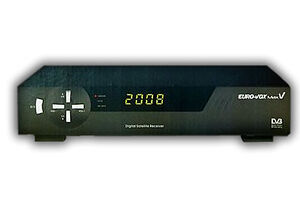
                          Hi mate..tried that getting same message, this box is black and on the front it say's euro-vox max v, checked it again in case it's a clone but it seems genuine,even tried some earlier firmware and still the same.


                          cheers

                          Comment

                          • HiTeck
                            V.I.P. Member
                            • Oct 2008
                            • 996

                            #28
                            I thought you said it was a ex5000 PVR?

                            This is for the Max V >> Digital Kaos - Downloads - UK Max V Autosort Fix 051208

                            Comment

                            • Skiboy
                              Top Poster
                              • Jul 2008
                              • 151

                              #29
                              Sorry for the confusion m8...Im confusing myself here , inside the box it has a slot for the hardrive and written in pen is pvr, but on the outside it looks like the photo on your last post with the same writing, I've tried to load both firmware versions and it say's the same "this firware is not fit for your receiver" I think I'll just give up before it drives me insane. pmsl


                              cheers

                              Comment

                              • HiTeck
                                V.I.P. Member
                                • Oct 2008
                                • 996

                                #30
                                What does it say on the outside of the box, is it [eurovox max V] [Eurovox ex5000 PVR] or [eurovox ex5100 PVR]??? will it take a hard drive, when you pull the cover down on the front is their an open hole for it to be fitted.

                                Comment

                                Working...