I-connector software/ firmware & Loader required

Collapse
X
 
  • Time
  • Show
Clear All
new posts
  • Raj3sh
    Junior Member
    • May 2013
    • 28

    #46
    Thank you DW190,

    I am going to an Internet cafe today, a place where the TLM DOWNLOADER opened up fully and was fully functional (basically not on my computer or laptop). I will follow your instructions explicitly; and let you know how i get on.


    Kindest regards

    Comment

    • Raj3sh
      Junior Member
      • May 2013
      • 28

      #47
      Dear Members,I tried to flash the I-conn this afternoon with the firmware at an Internet cafe: I connected up the RS232 null modem cable to the I-conn and the computer: I opened up the TLM Downloader, so far so good! I selected the i-conn software (bin file) by pressing the open button and the path of the bin file shows in the window. I selected the port on the computer where the RS232 was secured; made sure the power on the I-conn box was off. Hit the Start button on the TLM Downloader, and then powered on the i-conn box; after a about 5 seconds a small box opened up called Module updater and on the box it said 'Download Fail'. I tried again and again. I even tried keeping the i-conn powered on and then hit the start button; again I kept getting 'Download Fail'.I then went to see a friend and tried again many times on HIS computer; No problems with the TLM DOWNLOADER opening; followed the Instructions; but everytime after 5-6 seconds, a small box appears with 'Download Fail'I'm exhausted and fresh out of ideas Members; I've successfully flashed my KV A750 box half a dozen times; No problems whatsoever; so any suggestions on why this hasn't worked? My i-conn remains the same with one green light (when Powered on, or attached to my Kv box with Internet connection plugged in)If anyone can help, please reply; alternatively you are welcome to send me a PM, if you can help me to sort out this problem.Thank you

      Comment

      • cactikid
        V.I.P. Member
        • Sep 2008
        • 12017

        #48
        have you used this cable before if so good,on the downloader did you change com 1-2-3 or 4 to see if they work?

        Comment

        • Raj3sh
          Junior Member
          • May 2013
          • 28

          #49
          Dear Members,

          I tried to flash the I-conn this afternoon with the firmware at an Internet cafe: I connected up the RS232 null modem cable to the I-conn and the computer: I opened up the TLM Downloader, so far so good! I selected the i-conn software (bin file) by pressing the open button and the path of the bin file shows in the window. I selected the port on the computer where the RS232 was secured; made sure the power on the I-conn box was off. Hit the Start button on the TLM Downloader, and then powered on the i-conn box; after a about 5 seconds a small box opened up called Module updater and on the box it said 'Download Fail'. I tried again and again. I even tried keeping the i-conn powered on and then hit the start button; again I kept getting 'Download Fail'.

          I then went to see a friend and tried again many times on HIS computer; No problems with the TLM DOWNLOADER opening; followed the Instructions; but everytime after 5-6 seconds, a small box appears with 'Download Fail'

          I'm exhausted and fresh out of ideas Members; I've successfully flashed my KV A750 box half a dozen times; No problems whatsoever; so any suggestions on why this hasn't worked? My i-conn remains the same with one green light (when Powered on, or attached to my Kv box with Internet connection plugged in)


          If anyone can help, please reply; alternatively you are welcome to send me a PM, if you can help me to sort out this problem.

          Thank you

          Comment

          • Raj3sh
            Junior Member
            • May 2013
            • 28

            #50
            Dear cactikid,

            I have used this RS232 null modem cable many times before, admittedly to flah my Kv box.

            I tried most of the ports; after a while the ones not in use come up with a message that theres no activity from the port.

            Kindest regards

            Comment

            • cactikid
              V.I.P. Member
              • Sep 2008
              • 12017

              #51
              ok cable is good,internet cafe i dont think they have rs232 connection like on rear of box do they? if it was usb adaptor you would have to load the disc for the usb first before plugging in.
              so was it just a cable from icon to laptop?
              or was a usb adaptor used also?

              Comment

              • TheCoder
                DK Veteran
                • Jun 2011
                • 693

                #52
                ................deleted reply
                Last edited by TheCoder; 8 June, 2013, 01:02.

                Comment

                • Raj3sh
                  Junior Member
                  • May 2013
                  • 28

                  #53
                  The Internet Cafe did have VGA ports (9 pins) on the back of their computers; but just in case I had a USB to serial port adaptor cable with software (PL-2303 USB-to-serial); as I use to use this to Flash my Kv box using my Laptop


                  Also I tried it again several times with my mates computer; and every time I got a
                  'DOWNLOAD FAIL'


                  Kindest regards

                  Comment

                  • cactikid
                    V.I.P. Member
                    • Sep 2008
                    • 12017

                    #54
                    vga is a monitor only not for flashing,it will be identical to the icon so thats your problem there.


                    and look here again

                    Last edited by cactikid; 8 June, 2013, 10:09.

                    Comment

                    • Hadron
                      V.I.P. Member
                      • Nov 2012
                      • 2102

                      #55
                      Originally posted by Raj3sh
                      The Internet Cafe did have VGA ports (9 pins) on the back of their computers; but just in case I had a USB to serial port adaptor cable with software (PL-2303 USB-to-serial); as I use to use this to Flash my Kv box using my Laptop


                      Also I tried it again several times with my mates computer; and every time I got a
                      'DOWNLOAD FAIL'


                      Kindest regards
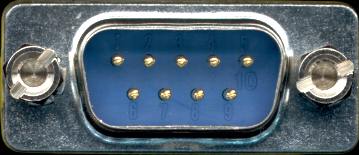
                      Was that a slip of the keyboard, or did you mean COM ports (9 pins)? VGA ports are phsically the same size as COM ports, but they squeeze 15 pins into the same space as the COM ports 9 pins.

                      Has your mate's pc got a COM port, or did it need the USB adapter? If it needed the adapter, don't forget that it may need drivers to be installed for it to run.

                      Comment

                      • Raj3sh
                        Junior Member
                        • May 2013
                        • 28

                        #56
                        Dear Members;

                        All I know is I counted 9 pins on the back of the computer(s); and when I select com 1 or com 2 in ports (Downloader) there's definitely a response.

                        But if there's a minute chance that I've been sticking into the wrong port; then you can bet your bottom dollar, that's probably exactly what I've been doing!

                        Just in case I have used the wrong port(s), I can always use my USB Adaptor cable, (which I've used with my laptop when flashing kv software onto my kv box).
                        I'm going to try that making sure I have the right drivers software depending on what Operating System I'm using. At the Internet cafe they use Windows 7. Let's give that a whirl.
                        I know you will all be rooting for me; whilst simultaneously rolling on the floor laughing; Fingers crossed!.... you've got to laugh otherwise you just end up crying

                        Thank you all Dear Members

                        Comment

                        • cactikid
                          V.I.P. Member
                          • Sep 2008
                          • 12017

                          #57
                          does the kv box say rs232 on it if so thats the one to use,if you have flashed the box before use the same stuff again just updated file.

                          Comment

                          • Raj3sh
                            Junior Member
                            • May 2013
                            • 28

                            #58
                            Yes it does say RS232 beside the 9 pin port on the Kv box. Thats the port I've used for one end of the RS232 Null modem cable; the other going into the back of my computer (com ports) and not Vga port as I have been reliably informed (Thanks Hadron). Basically the port I've always used to flash my Kv box with updated firmware. (it has two circles with a bar at the top joining the two circles). it's always worked, never had any problems with that.

                            It was not knowing if I was using the right port at the internet cafe; there is only only one port that looks like a 9 pin serial com port.


                            ANYWAY BREAKING NEWS DEAR FORUM MEMBERS!! Latest Update!!!!

                            I did go to the Internet Cafe; I loaded tlhe latest drivers for USB to serial adaptor, effectively dismissing any doubts of which is the right port on the computer.
                            Uploaded the i-conn firmware & the TLM Downloader (previously extracted from their rar filess.

                            Followed Instructions from Forum member DW190; and kept getting a Module Fail............. But wait there's more!!!

                            Feeling exasperated; and on the verge of jumping up & down on my I-conn box; I asked the owner of the Internet cafe if he knew anything about my problem. He replied No; but knew someone who deals with C_b_e b_x_s all the time.

                            So I got his mobile no. gave him a call; ......... he said he could sort it; & low & behold he managed to flash my i-conn with the firmware. But said that I had a FAULTY RS232 Null modem cable.

                            Since then I bought a new Null Modem cable; plugged eeverything together and HALLELUJAH!!!!! Everything works. Four Lights on my i-conn.

                            OKay ; so I got a little Help; who cares; It works doesn't it; until the next time. (Let's cross that bridge as & when)

                            Even so a MASSIVE RESPECT AND A SPECIAL BIG THANK YOU TO ALL YOU FORUM MEMBERS who replied to my posts and never gave up on me; especially HADRON, CACTIKID, DW190,

                            keep you posted;

                            Thank You

                            Comment

                            • cactikid
                              V.I.P. Member
                              • Sep 2008
                              • 12017

                              #59
                              its the end result that we care about,out of curiousity might you have had 2 cables that looked the same,the new cable put a label round it so you know its correct for you
                              well done

                              i would have been surprised if you could have got it to work there as an exe file you would have had no access on their machines or do you use your own there as i forgot to ask.
                              Last edited by cactikid; 15 June, 2013, 12:12.

                              Comment

                              • ASEK
                                DK Veteran
                                • Feb 2010
                                • 1686

                                #60
                                perhaps if u visited forum more often instead of waiting until box fails, u would have updated at times when s/w was released, just an idea.

                                Comment

                                Working...