If this is your first visit, be sure to
check out the FAQ by clicking the
link above. You may have to register
before you can post: click the register link above to proceed. To start viewing messages,
select the forum that you want to visit from the selection below.
Redsn0w has been updated to bring jailbreak support for the newly released final version of iOS 4 for iPhone 3G and iPod touch 2G. Available for both Windows and Mac, redsn0w jailbreak tool additionally also enables options for multitasking and background wallpapers on iPhone 3G and iPod touch 2G which otherwise are disabled by Apple.
Redsn0w beta has been updated to hacktivate iOS 4.0 for iPhone3G (in addition to jailbreaking the iPhone3G and iPod Touch 2G). For now, the redsn0w beta release supports only the iPhone3G and iPod Touch 2G at today?s 4.0. It?s still a beta, so you?ll need to let Cydia reorganize, reload, and update after using redsn0w.
Follow the step by step guide posted below to jailbreak your iPhone and iPod touch using Redsn0w: Step 1: Download iOS 4 (final version) for your version of iPhone and iPod touch. Download links are posted here. Step 2: Update to this latest firmware using the iOS file you just downloaded via iTunes 9.2. Step 3: Start Redsn0w 0.9.5b5-3 (download here) and point it to the original iOS 4 firmware file to proceed.
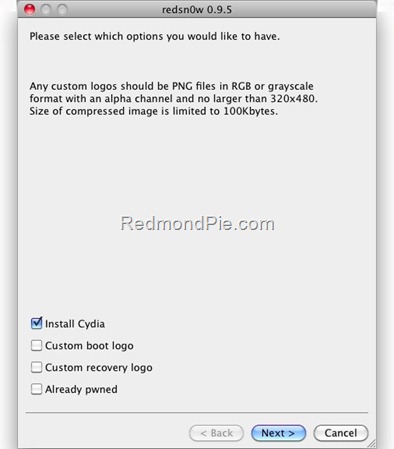
Step 4: Now select ?Install Cydia? and click ?Next?.
Step 5: Now make sure your device is both OFF and PLUGGED IN to the computer before you click ?Next?. Step 6: Connect your device in recovery mode by pressing the Power and buttons continuously.
At this stage you will be presented with a screen where you will have to quickly hold ?Power? button and then while holding the ?Power? button, you will now have to hold ?Home? button too. Now after few seconds release ?Power? button but keep holding ?Home? button until installation begins. Step 7: Sit back and enjoy while redsn0w will do all the rest for you. Once done, your iPhone and/or iPod touch will restart automatically and you will find it jailbroken on the latest iOS 4 firmware. If you notice a blank white icon for Cydia with no sources. Go to the Sources panel and add Index of /cydia-3.7/ repo. Now restart your phone and you should see the regular standard Cydia logo with all the sources now. How to Unlock 05.13.04, 05.12.01 to 04.26.08 on iOS 4 Using Ultrasn0w Follow the complete step by step guide posted here to unlock iPhone 3G, on iOS 4, on any baseband using Ultrasn0w 0.93. Disclaimer: This guide is for testing & educational purposes only. I?m not responsible for any loss of important data or malfunctioning of your iPhone.
then fuzzyband to downgrade the baseband
Fuzzyband has been upgraded to support the latest baseband 05.13.03 in iPhone OS 4.0Beta. The following instructions will only help downgrade iPhone 3G which is currently on iPhone OS 4 Beta with 05.13.03 baseband and older bootloader 05.08. This wont work with iPhone 3GS. If your iPhone meets the above criteria, you can then use the latest version of Fuzzyband which supports iPhone 4.0 Beta to downgradeyour 05.13.03 baseband to the older 04.26.08. Once you have downgraded your baseband, you can then use ultrasn0w to unlock your iPhone on iPhone 4.0 firmware. Here?s how you do it:
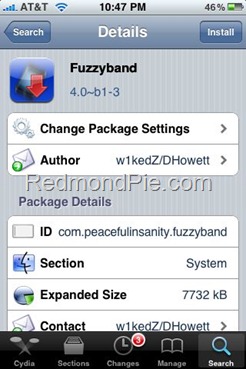
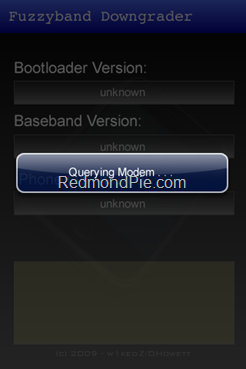
Step 1: To downgrade your baseband from 05.13.03 to 04.26.08, you must first jailbreak your iPhone 3G running firmware 4.0 Beta by following the step by step guide posted here. Step 2: Once you have jailbroken your iPhone, Go to ?Cydia? on your iPhone and Search for ?Fuzzyband? and then install this application. Step 3: Start ?Fuzzyband? app and touch on ?Downgrade? button to downgrade your Baseband from 05.12.01 to 04.26.08.
Step 4: You should now be able to perfectly unlock your iPhone 3G using the latest version of ultrasn0w by following the step-by-step guide posted here. NOTE: For those of you who don?t know your bootloader, simply run Fuzzyband and it will report the version number for you.
then ultrasn0w to unlock via cydia Now that we have a jailbreak (developers only) foriPhone OS 4 Beta, and an upgraded version of Fuzzyband (Baseband downgrader). Technically, iPhone 3G can now be unlocked on the latest iPhone OS 4 Beta, provided that you have one of those rare iPhone 3G?s with 05.08 bootloader that is downgradable to 05.13.03 baseband of OS 4 to 04.26.08 so that ultrasn0w can unlock it. Here?s how you do it:
NOTE: I haven?t tested this on my iPhone 3G. This is only for iPhone 3G with 05.08 bootloader. Proceed only at your own risk. Step 1: First follow the complete step by step guide posted here to jailbreak iPhone 3G on iPhone OS 4 Beta firmware. Step 2: Using Fuzzyband, downgrade your baseband 05.13.03 to 04.26.08. Step by step instructions for downgrading baseband can be found here. Step 3: Now start ?Cydia? on your iPhone and touch on ?Manage? tab on the bottom. Now touch on ?Sources? as seen in the screenshot below: Note: T-Mobile users should disable 3G before installing ultrasn0w.
Step 4: Touch on ?Edit? and then on ?Add?. You will be prompted to enter a url source as seen in the screenshot below. Type ?ultrasn0w.com?and touch on ?Add Source?.
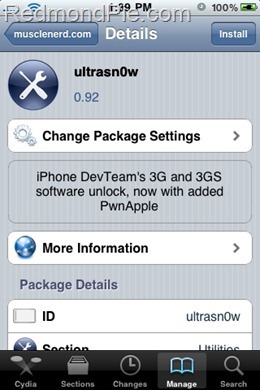
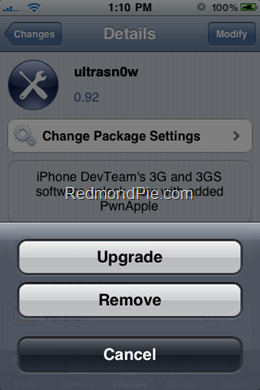
Cydia will now automatically update your sources by following a series of automated steps. Step 5: Once the repository has been added successfully, Search for ?ultrasn0w? in Cydia and install this application.
Step 6: Now simply restart your iPhone. If all goes well, you should now have an unlocked iPhone 3G running on iPhone OS 4 Beta.
Oh and by the way if my post has been at all helpfull
please press the little THANKS tab




Comment