
hi,i have just got the acekard 2i for my daughter,trouble is some games wont load,just get a white screen,any help please.
-
-
which firmware are you running?
which games dont load?
the firmware you should have is akiou 1.8.1 firmware.
i have uploaded it to download section..... -
hi,the firmware is 1.8.1,some games that dont work are,tracey beaker,toy story,and some others.Comment
-
some of the very new games may not work.
its a right cat and mouse game at the minute.
new firmware comes out,
then games come out that don't work,
then new firmware is released that fixes non working roms
and it goes round and round.
that is why i prefer acecards.
firmware gets updated all the time.
toystory should definatley work.....
i have uploaded the rom from my card.
i have tested it and it is working 100%
give this a go:
(delete the existing toystory rom AND SAV file from your sd card first)
test the game and post back results,
also post a list of roms you are having problems with..
Comment
-
Have you switched the anti piracy feature on on your Acekard ???Comment
-
hi,tried toy story,just get white screen after load,other roms that dont work are,tracey beacker,sherlock holmes,crime lab body of evidence,tropical lost island,hidden mysteries buckingham palace,some have white screen some say error code4Comment
-
how do i turn anti piracy on.Comment
-
summit is wrong then. that game i posted should work on your card.
this is what i suggest you do.
1. delete your _aiou folder and akmenu.nds file from your sd card
2. copy all your games and sav files to your pc.
3. format your sd card (fat 32)
4. copy all games back to sd card
5. dowload a fresh akiou 1.8.1 file AKAIO.1.8.1.rar
6. extract files and copy _aiou folder and akmenu.nds file back onto your sd card.
see if that works...
ps. to check anti piracy.
1. power on dsi.
2. hit start.
3. hit system options from drop down menu.
4. look at top of bottom screen, you will see a left and right arrow,
hit left arrow.
5. you will see antipiracy bypass option at bottom of list....
it should be "disabled"Comment
-
thanks what a star,got toy story working,but as far as getting anti piracy turned off no joy,when i turn dsi on and press start,i press system settings,there is no system options,there is no left right arrow to press to find anti piracy,sorry for being so thick,but any more help,thanks.Comment
-
what about the rest of your games?
when you press start, you will have a drop down menu.
copy
cut
delete
paste
system options
cheats
more
highlight system options, press "A"
your screen should now look similer to this:
(but diffrent depending on which skin ytou have)
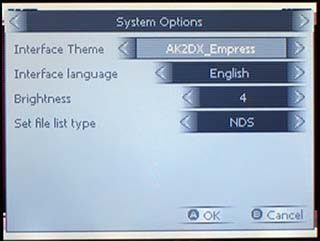
now, you see the two arrows at top, left and right on the system option bar.
you tap the screen on the left arrow, which will bring up the menu with anti piracy option...
i wouldnt worry about it, default option is "disabled" and thats what you need it on anyway.....Last edited by barrowmanandrew; 26 November, 2010, 17:53.Comment
-
[quote=colly8979;862443]To play the latest games you need to enable it.It bypasses the anti piracy on thLast edited by barrowmanandrew; 27 November, 2010, 00:20.Comment
-
It actually overrides the anti piracy checks I have enabled it on all the Acekards Ive done and have never found a game it wont play including the latest games Super Scribble Nauts etc.The only problem you have with enabling it is it seems to break single card download play so its disabled by default.You can leave it on constantly or switch it on/off depending on which rom Check out the posts in the link below
http://gbatemp.net/t260209-akaio-1-8-0?&st=0
CheersComment
-
thanks,for all help now know what to do,if game still not working is it just a matter of waiting for new firmware.Comment


Comment