
Cut all files from you sd and store on pc for later
unrar files to sd
once you have files on sd
*put it in Wii
*click sd menu
*load hackmii
*install hbc
*install dvdx
*install bootmii as boot2 (if you can)
*install bootmii as iso
*reboot
*goto hbc press home on the Wii remote launch bootmii
*you will have 4 icons

Use the power/reset/eject buttons to navigate the Bootmii menu
select settings
on the next page select back up to sd

The back up takes about 10 mins and its normal to have a few bad blocks
Put the SD card into PC and copy the NAND backup somewhere safe, you can now delete it from your card. If you installed Bootmii as boot2 then also copy the Bootmii folder to your PC .
Now copy the original files back to sd
[ame="http://www.youtube.com/watch?v=FPTpOCBYbzM&feature=player_embedded"]YouTube - Wii Soft-mod step2[/ame]

Priiloader is a modded version of Preloader. just like preloader, Priiloader places itself in boot sequence before the system menu.
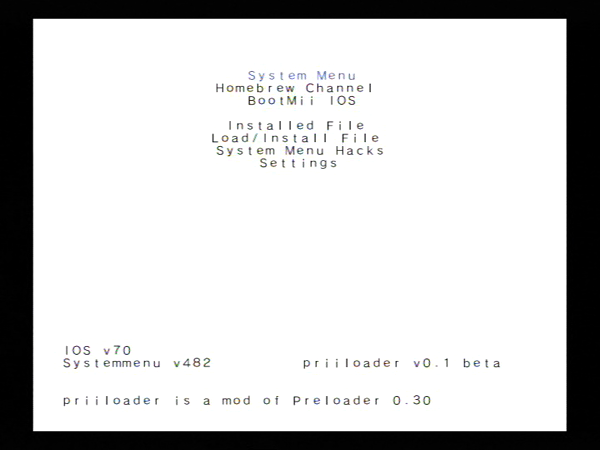
You cant wright priiloader over preloader
never delete ios
If you are on 4.2 you need to have IOS70-patched.wad installed
If you are on 4.1 you need to have IOS60-patched.wad installed
Copy priiloader file to apps file on sd
Then copy hacks.ini to the root of the sd card
Go into HBC and select Priiloader, then load.
Hold + and B to install
Exit
Go to Priiloader menu and select system menu hacks
Then just enable skip disc update check and the region free ones
Save then go into settings
Autoboot = system menu
Return = system menu
Save.
When checking Priiloader is working, power off and then on holding the reset button until Priiloader screen comes up make sure you can get into the HBC.
Booting to USB loader GX
*place sd card in pc
*goto apps file
*then to usbloader gx
*copy boot.dol and paste to the root of sd
*place sd card in wii
*power off and then on holding the reset button
*it will boot into Priiloader screen
*click on load/install file
*select boot.dol
* A to install, once installed press B
*go to settings
*set Autoboot = installed file
On boot up your wii will boot in to usbloader gx. I have read this works with configurable usb loader. But still have to confirm
unrar files to sd
once you have files on sd
*put it in Wii
*click sd menu
*load hackmii
*install hbc
*install dvdx
*install bootmii as boot2 (if you can)
*install bootmii as iso
*reboot
*goto hbc press home on the Wii remote launch bootmii
*you will have 4 icons
Use the power/reset/eject buttons to navigate the Bootmii menu
select settings
on the next page select back up to sd
The back up takes about 10 mins and its normal to have a few bad blocks
Put the SD card into PC and copy the NAND backup somewhere safe, you can now delete it from your card. If you installed Bootmii as boot2 then also copy the Bootmii folder to your PC .
Now copy the original files back to sd
[ame="http://www.youtube.com/watch?v=FPTpOCBYbzM&feature=player_embedded"]YouTube - Wii Soft-mod step2[/ame]
Priiloader is a modded version of Preloader. just like preloader, Priiloader places itself in boot sequence before the system menu.
You cant wright priiloader over preloader
never delete ios
If you are on 4.2 you need to have IOS70-patched.wad installed
If you are on 4.1 you need to have IOS60-patched.wad installed
Copy priiloader file to apps file on sd
Then copy hacks.ini to the root of the sd card
Go into HBC and select Priiloader, then load.
Hold + and B to install
Exit
Go to Priiloader menu and select system menu hacks
Then just enable skip disc update check and the region free ones
Save then go into settings
Autoboot = system menu
Return = system menu
Save.
When checking Priiloader is working, power off and then on holding the reset button until Priiloader screen comes up make sure you can get into the HBC.
Booting to USB loader GX
*place sd card in pc
*goto apps file
*then to usbloader gx
*copy boot.dol and paste to the root of sd
*place sd card in wii
*power off and then on holding the reset button
*it will boot into Priiloader screen
*click on load/install file
*select boot.dol
* A to install, once installed press B
*go to settings
*set Autoboot = installed file
On boot up your wii will boot in to usbloader gx. I have read this works with configurable usb loader. But still have to confirm


Comment