PS3 overheating help

Collapse
X
 
  • Time
  • Show
Clear All
new posts
  • krazylegz
    V.I.P. Member
    • Mar 2008
    • 2834

    #1

    PS3 overheating help

    My sons spare old PS3 ( fat 80gb ) that he keeps at my parents house. Recently it's sort if started to overheat. The fan comes on at full speed and sounds like a plane taking off.


    I was gunna clean it all down inside and try replacing the thermo compound, however I'm seeing conflicting things on this. Some are saying use a card to spread compound evenly then put a small blob in the middle, others are saying just a blob. Which one is correct?


    Also is there any other tips to make it quiet again?
    PS3= krazylegz120282


    please read the rules >>>>http://www.digital-kaos.co.uk/forums/f5/forum-rules-2/


    if you're new to forums and want to make your first post please read here>>>>http://www.digital-kaos.co.uk/forums...ul-tips-30279/

    if you like what people say please use the reputation or thanks button, dont just make a post to say thanks
  • teerak2uk
    DK Veteran
    • Apr 2009
    • 6074

    #2
    You can do either but more than likely needs reballing
    Oh and by the way if my post has been at all helpfull
    please press the little THANKS tab

    Comment

    • krazylegz
      V.I.P. Member
      • Mar 2008
      • 2834

      #3
      What's reballing? Is it worthwhile doing it or just wait till it dies and get a new one for him?

      Sent from my iPhone using my fingers n thumbs
      PS3= krazylegz120282


      please read the rules >>>>http://www.digital-kaos.co.uk/forums/f5/forum-rules-2/


      if you're new to forums and want to make your first post please read here>>>>http://www.digital-kaos.co.uk/forums...ul-tips-30279/

      if you like what people say please use the reputation or thanks button, dont just make a post to say thanks

      Comment

      • teerak2uk
        DK Veteran
        • Apr 2009
        • 6074

        #4
        All explained here and is good price since not so long ago people were charging ?50+ but that's prob down to the release of ps4 now

        Check out this item I found on eBay: http://pages.ebay.com/link/?nav=item...d=291039281023
        Oh and by the way if my post has been at all helpfull
        please press the little THANKS tab

        Comment

        • krazylegz
          V.I.P. Member
          • Mar 2008
          • 2834

          #5
          Cheers for the link mate

          Think it needs reballing, redone it using the credit card to smooth the paste out and it's still the same, okay until start playing a game then fans kick in full speed

          Sent from my iPhone using my fingers n thumbs
          PS3= krazylegz120282


          please read the rules >>>>http://www.digital-kaos.co.uk/forums/f5/forum-rules-2/


          if you're new to forums and want to make your first post please read here>>>>http://www.digital-kaos.co.uk/forums...ul-tips-30279/

          if you like what people say please use the reputation or thanks button, dont just make a post to say thanks

          Comment

          • teerak2uk
            DK Veteran
            • Apr 2009
            • 6074

            #6
            Yep reballing or I think ps slims are at ?99 now I heard I think with Argos
            Oh and by the way if my post has been at all helpfull
            please press the little THANKS tab

            Comment

            • Frogger
              DK Veteran
              • Oct 2012
              • 422

              #7
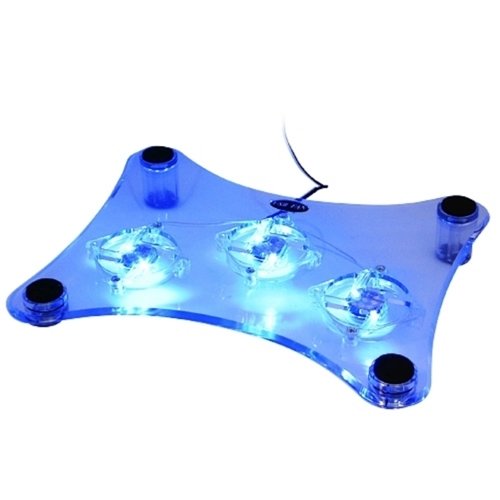
              I drilled holes in mine (underneath the hard drive and the top cover above) and then bought one of these of http://www.amazon.co.uk/Xett-Horizon...keywords=3+fan amazon and its no longer over heating.

              Problem solved...........
              Attached Files

              Comment

              • teerak2uk
                DK Veteran
                • Apr 2009
                • 6074

                #8
                Unfortunately they are too late for that and the fat units are of bad design hence noisy fan as even new out of the box they would run hot
                Oh and by the way if my post has been at all helpfull
                please press the little THANKS tab

                Comment

                • dunkler
                  Top Poster
                  • May 2009
                  • 146

                  #9
                  Why reball if the GPU is still working? I mean all balls makes proper contact otherwise the console would throw YLOD. Any ball not making any contact will result in YLOD. His problem is about overheating and has nothing to do with BGA yet! I would recomand for him to take the IHS off and replace that compound too. krazylegz be careful with CPU to not damage. Cut the rubber with a razor blade. GPU is more easy since you can pop off the IHS with tiny screwdriver but be careful to not push hard or you'll damage the chip. Also if you console is old and you're trying to do this, BGA *MAY* be broken during this operation.

                  Comment

                  Working...