Windows 8 downgrade to windows 7 ??

Collapse
X
 
  • Time
  • Show
Clear All
new posts
  • worcestersauce
    Top Poster
    • Nov 2008
    • 136

    #1

    Windows 8 downgrade to windows 7 ??

    Hi all, my lovely wife has had a laptop recently with windows 8 installed on it, and like everyone else (or so it appears) she hates it.
    Was wondering if there is a way to downgrade to windows 7 without any extra cost ????

    I'm sure someone will have the answer, thanks all
  • ajax2061
    DK Veteran
    • Nov 2012
    • 395

    #2
    find out if you can get all the driver in win7 format, if so download a image and windows loader

    Comment

    • worcestersauce
      Top Poster
      • Nov 2008
      • 136

      #3
      Thanks Ajax, i have been told there might be a problem with drivers and it sounds a bit technical for tbh, but cheers anyway.

      On lots of websites, the good wife keeps getting a message about shockwave flash plug-in needing to be the newest version but windows 8 wont let her download the newest version for some reason.
      This is the main reason she hates windows 8.......(I'm still on vista so i'm no help )

      So if anyone knows how to get this shockwave flash plug-in working on windows 8, please help me be "hubby of the year" and get this sorted !!

      Comment

      • ajax2061
        DK Veteran
        • Nov 2012
        • 395

        #4
        a lot of the I see this its just activex filtering turned on.

        Alt F to get menu then tools then untick activex filtering, Your flash player is probaly upto date already (win8 and win7 both use ie10 now)

        Comment

        • Reapers
          Top Poster +
          • Jan 2009
          • 242

          #5
          is it the way it looks? i understand not everyone likes the metro style but
          Operating Systems always want innovation and try to move forward and
          people either reinstall older windows or make the windows 8 look like theirs
          with themes or customized versions because windows 8 will get the future
          updates and continued support for a longer time frame

          example
          Welcome to Classic Shell
          Last edited by Reapers; 20 June, 2013, 16:17.

          Comment

          • worcestersauce
            Top Poster
            • Nov 2008
            • 136

            #6
            ajax mate, that Alt F only brings up file but you mentioned ie10, she is using firefox so it maybe a different way to get to untick activex filtering which i havent found yet, dont know if you know but any more advice very much appreciated, thank you

            Comment

            • worcestersauce
              Top Poster
              • Nov 2008
              • 136

              #7
              Reapers, she has got it looking like the old style windows though i'm not sure which program she is using (didnt cost though) and she is still using windows 8 at the minute its just this update problem thats pi**ing her off, maybe once we have worked out where this activex filtering is, and get it unchecked, it may well be fine. Thanks anyway mate

              Comment

              • Reapers
                Top Poster +
                • Jan 2009
                • 242

                #8
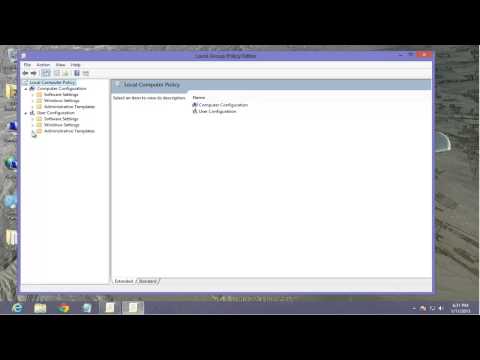
                maybe this will help?

                Comment

                • Lodger
                  Newbie
                  • Mar 2010
                  • 4

                  #9
                  How about partitioning your drive and installing win7 with an option of dual boot?

                  Comment

                  • krazylegz
                    V.I.P. Member
                    • Mar 2008
                    • 2834

                    #10
                    I've just took windows 8 off mine and put good old 7 back on. I hated it with a passion, seemed complicated to do something simple like access control panel, the only thing I liked was how fast it booted up


                    Sent from my iPhone using fingers and thumbs!
                    PS3= krazylegz120282


                    please read the rules >>>>http://www.digital-kaos.co.uk/forums/f5/forum-rules-2/


                    if you're new to forums and want to make your first post please read here>>>>http://www.digital-kaos.co.uk/forums...ul-tips-30279/

                    if you like what people say please use the reputation or thanks button, dont just make a post to say thanks

                    Comment

                    • worcestersauce
                      Top Poster
                      • Nov 2008
                      • 136

                      #11
                      Originally posted by Reapers
                      maybe this will help?

                      Thanks again reapers, still not quite there as windows 8 home edition doesnt use group policy and my wife uses firefow not IE 10, but you are on the right wavelength i think. Cheers for the reply again........anything else perhaps ????

                      Comment

                      • ajax2061
                        DK Veteran
                        • Nov 2012
                        • 395

                        #12
                        seams a few ppl getting this error some say to uninstall then reinstall in safe mode, heres where I have been reading cant help too much though as running ie10 stopped using FF years ago when it had memory hole issues


                        Code:
                        http://support.mozilla.org/en-US/questions/960667

                        Comment

                        • Reapers
                          Top Poster +
                          • Jan 2009
                          • 242

                          #13
                          the only real way would be in Firefox is to try disable JavaScript but a lot of sites use JavaScript in their code to work

                          did you try updating adobe shockwave player?
                          Adobe Shockwave Player

                          ajax2061, on them memory leak's its when firefox uses too much ram it was corrected a while back
                          in future patches.their was also there was a manual plug/stopgap for the previous versions

                          when on firefox

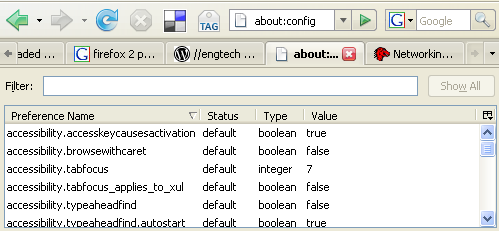
                          go to your address bar type about:config


                          right click in the window, choose New, Boolean

                          type in the following text:

                          config.trim_on_minimize set this as true , this will allow firefox to run at lower memory when idle and use less paging file resource


                          Last edited by Reapers; 2 July, 2013, 10:51.

                          Comment

                          • Chadleynet
                            Junior Member
                            • Aug 2010
                            • 30

                            #14
                            For me, the issue was the new start menu. I hated it, the simplest thing I did was install "Classic Start" from Ninite - Install or Update Multiple Apps at Once . In two clicks, I had the classic Windows start menu back, and was back in action.

                            Comment

                            • Saltire
                              DK Veteran
                              • Apr 2008
                              • 1361

                              #15
                              Just install a hard drive wiping, clearing, formatting programme and scrub the hard drive then install windows 7 (version of your choice), simple as that, make sure to delete the extra part of the partition that that serves as a backup section too, its just a tiny part of the hard drive but it will be mentioned in drive management or in the scrubbing tool you use, scrub the lot mate and then install your windows 7, easy peasy !

                              p.s
                              just realised this thread is now several weeks old, ohh well, maybe this will help someone else doing same thing, and this info gives me even more info myself to avoid windows 8 for a while yet "unless I can get it to act and look exactly like windows 7", can I ?, let me know anyone please ???

                              I havent looked into it much as the early reviews of windows 8 were enough to put me right off it.......Cheers.
                              Last edited by Saltire; 20 July, 2013, 06:39.

                              Comment

                              Working...