
This should help you folks who have pirated copies of WIN7
I stole the images and the tut from a different website. I rewrote it ENTIRELY. The only thing I stole were the screens.
If you don't have a valid key there are plenty of kind folks on this site who would be happy to give you a valid product key.
If you have a non OEM copy heres how:
1. START>RIGHT CLICK ON "COMPUTER" AND CHOOSE "PROPERTIES"
2. Wait a few seconds while your activation info refreshes/populates
3. Click on "Change Product Key" after your Windows 7 activation details are populated.
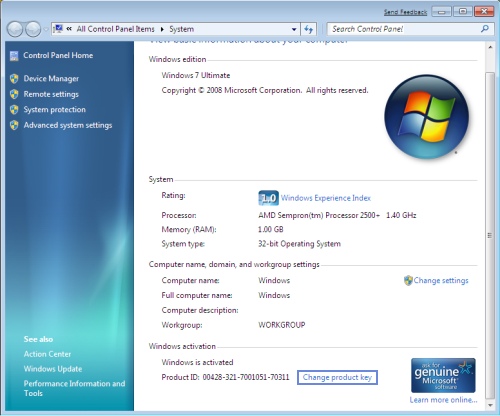
FOR THE RECORD this image isn't my crappy computers index, Mine is a 5.9
4. Enter your new key and click on next to activate your windows 7
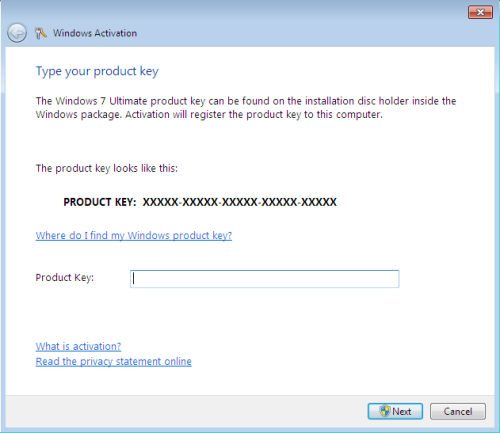
Now for those of you who don't see the "Change Product Key" option on the All Control Panel Items>System window this means that you have OEM. The process to change an OEM serial number with DOS is as follows:
1. GOTO START>ALL PROGRAMS>ACCESSORIES>Right Click on COMMAND PROMPT and choose "RUN AS ADMINISTRATOR"
2. Now type following command:
Code:
slmgr.vbs -ipk insert your new product key here
3. Wait a few seconds for a confirmation that your new key was installed correctly and click Ok
4. Now type the following command:
slmgr.vbs -ato
That is it now just go back to your computer properties and see that you have successfully changed your keyt and activated. You are now ready forWindows Activation Technologies and should be able to leave updates on just fine. Updates are at your own risk. The danger of getting busted is = to the quality of the source of your new key.
Regards:
Alun
I stole the images and the tut from a different website. I rewrote it ENTIRELY. The only thing I stole were the screens.
If you don't have a valid key there are plenty of kind folks on this site who would be happy to give you a valid product key.
If you have a non OEM copy heres how:
1. START>RIGHT CLICK ON "COMPUTER" AND CHOOSE "PROPERTIES"
2. Wait a few seconds while your activation info refreshes/populates
3. Click on "Change Product Key" after your Windows 7 activation details are populated.
FOR THE RECORD this image isn't my crappy computers index, Mine is a 5.9
4. Enter your new key and click on next to activate your windows 7
Now for those of you who don't see the "Change Product Key" option on the All Control Panel Items>System window this means that you have OEM. The process to change an OEM serial number with DOS is as follows:
1. GOTO START>ALL PROGRAMS>ACCESSORIES>Right Click on COMMAND PROMPT and choose "RUN AS ADMINISTRATOR"
2. Now type following command:
Code:
slmgr.vbs -ipk insert your new product key here
3. Wait a few seconds for a confirmation that your new key was installed correctly and click Ok
4. Now type the following command:
slmgr.vbs -ato
That is it now just go back to your computer properties and see that you have successfully changed your keyt and activated. You are now ready forWindows Activation Technologies and should be able to leave updates on just fine. Updates are at your own risk. The danger of getting busted is = to the quality of the source of your new key.
Regards:
Alun


Comment