
is there any way of seting windows 7 to stop the hard disc from sleeping until the drive is needed. it bugs me and when im listning to internet radio on my HTPC the audio stops for a second untill the drive starts up again. any help..??
-
-
1. Open Power Options to change the advanced power settings, and expand Sleep and Hibernate after. (see screenshot below)2. Under Hibernate after, set the Setting (Minutes) to Never. (see screenshot above)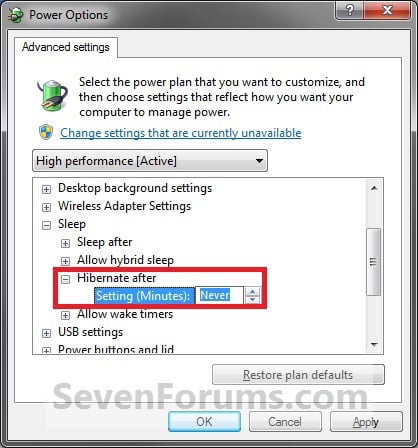
3. Under Allow hybrid sleep, set Setting to Off. (see screenshot below step 4)
4. Click on OK. (see screenshot below step 4)'If you are neutral in situations of injustice, you have chosen the side of the oppressor. If an elephant has its foot on the tail of a mouse and you say that you are neutral, the mouse will not appreciate your neutrality.'
-Bishop Desmond Tutu -
cheers for that m8.. spot onComment
-
i cant find advanced power options m8Comment
-
just found it m8...
Comment
-
cant find allow hybrid sleep. no pic for itComment
-
power saver.....change power settings'If you are neutral in situations of injustice, you have chosen the side of the oppressor. If an elephant has its foot on the tail of a mouse and you say that you are neutral, the mouse will not appreciate your neutrality.'
-Bishop Desmond TutuComment
-
changed turn harddisc after setting to never, is that it? cand find what u were talking about...Comment
-
yeah, that should do the job for you !'If you are neutral in situations of injustice, you have chosen the side of the oppressor. If an elephant has its foot on the tail of a mouse and you say that you are neutral, the mouse will not appreciate your neutrality.'
-Bishop Desmond TutuComment
-
cheers m8...!!Comment


Comment