help with tv audio through home cinema please?

Collapse
X
 
  • Time
  • Show
Clear All
new posts
  • m9g
    DK Veteran
    • Dec 2009
    • 704

    #1

    help with tv audio through home cinema please?

    Struggling to work out how to get tv audio to play through home cinema system which is a blu-ray player, 5 speakers and a sub

    All the speakers connect to the blu-ray player and the blu-ray player connects to the tv through hdmi

    I have a virgin box which also connects to tv through hdmi

    I know i need to connect the virgin box to the input of the blu-ray player

    heres what has what...

    Virgin box: HDMI and optical audio out

    LG blu-ray player: HDMI out and Audio AV in

    Toshiba Regza smart 3DTV: 4 HDMI in and Optical audio


    I just cant see how to route this even if its possible

    Any ideas would be appreciated


    DONT FORGET TO CLICK THE THANKS BUTTON IN THE BOTTOM LEFT CORNER OF THE POST IF ANYONE HELPED YOU
  • rob3rto
    Newbie
    • Mar 2010
    • 16

    #2
    Model numbers would help

    Comment

    • m9g
      DK Veteran
      • Dec 2009
      • 704

      #3
      sorry

      tv is a Toshiba 42VL863 3DTV

      Home cinema is an LG BH4120S

      Virgin box is a Samsung Vbox - model number 00214C0085C2


      DONT FORGET TO CLICK THE THANKS BUTTON IN THE BOTTOM LEFT CORNER OF THE POST IF ANYONE HELPED YOU

      Comment

      • cactikid
        V.I.P. Member
        • Sep 2008
        • 12017

        #4
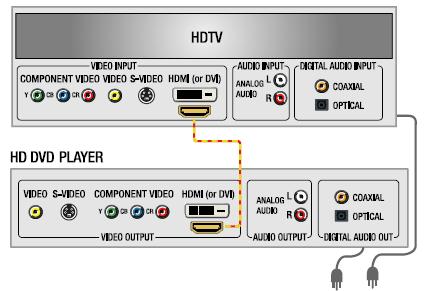
        ok tv and other units hdmi,and what i do for 5-1 sound is for say a sat box is to run a spdif/optical from the out socket to the in socket of spdif/optical as this will give you the 5-1.
        so vm box - amp or tv- amp

        HD-DVD Diagram, Connection Diagram shows connection options for for a HD-DVD
        Last edited by cactikid; 23 October, 2012, 22:58.

        Comment

        • m9g
          DK Veteran
          • Dec 2009
          • 704

          #5
          OK thanks for advice

          LG customer services said just connect an optical cable from the tv to the blu-ray player - simples

          Yeah would be if the bloody LG blu-ray player had an optical socket so now they are saying get an optical cable and an optical to analogue converter - sod that for an extra ?50 bloody rubbish thing going back to shop later, ggrrrrrr


          DONT FORGET TO CLICK THE THANKS BUTTON IN THE BOTTOM LEFT CORNER OF THE POST IF ANYONE HELPED YOU

          Comment

          • Cod3waX
            Banned
            • Mar 2011
            • 1011

            #6
            have u tried any different hdmi cables?

            Comment

            • lagerland
              V.I.P. Member
              • Sep 2010
              • 6031

              #7
              On mine m8 its just a case audio out of tv into the audio system hdmi from tv to box you will need to check your tv and see if it has audio return channel capability...............
              I know you believe you understand what you think i said


              >>>>>>>>>>>>>>>> BUT <<<<<<<<<<<<<<<<
              I am not sure you realise that what you heard is not what i meant ! sigpic

              Comment

              • Shamonee
                Top Poster
                • Dec 2011
                • 119

                #8
                What's the AV audio in on the Blu-Ray player, is it a phono connection?
                You may have to carry the audio from the virgin box via phono to the player, won't be 5.1, just the same coming out all.

                Oops...just read it has optical out? I don't have one of these boxes, no other connections?


                Sent from my GT-I9100 using Tapatalk

                Comment

                • polako
                  Member
                  • Oct 2012
                  • 43

                  #9
                  well i can see the im of your ht system and it has the composite audio (rca) jack so it does not matter if you use optical to composite converter you will get just 2 ch st and what you need to do is to connect the composite wires and simulate the 5.1 on your unit by using dec a.f.d. multi because i dont see the ARC (audio return channel) feature on your unit so you can retuirn the audio channel from the tv to the ht system. so you have to simulate the 2 ch st to 5.1 using the audio codec so you need to talk with LG tech support about how to simulate 5.1 using audio in source

                  Comment

                  • cactikid
                    V.I.P. Member
                    • Sep 2008
                    • 12017

                    #10
                    buy one of these badboys
                    Google Image Result for http://www.productwiki.com/upload/images/onkyo_tx_nr905_black_rear.jpg

                    Comment

                    • m9g
                      DK Veteran
                      • Dec 2009
                      • 704

                      #11

                      hehehe nice, i'l have two

                      I took the system back to the shop and told them it was rubbish and bought a samsung system with 3D blu-ray player and yay it has an optical connector - oh no optical cable ggrrrrrr - optical cable ordered.

                      Thanks for all your help guys really appreciate it


                      DONT FORGET TO CLICK THE THANKS BUTTON IN THE BOTTOM LEFT CORNER OF THE POST IF ANYONE HELPED YOU

                      Comment

                      • cactikid
                        V.I.P. Member
                        • Sep 2008
                        • 12017

                        #12
                        only downside is the loads of cables in nearly every port .

                        Comment

                        • m9g
                          DK Veteran
                          • Dec 2009
                          • 704

                          #13
                          Originally posted by cactikid
                          only downside is the loads of cables in nearly every port .
                          tell me about it, it's like a bowl of spaghetti behind my tv unit now.


                          DONT FORGET TO CLICK THE THANKS BUTTON IN THE BOTTOM LEFT CORNER OF THE POST IF ANYONE HELPED YOU

                          Comment

                          • Shamonee
                            Top Poster
                            • Dec 2011
                            • 119

                            #14
                            Best solution is an AV receiver, then you put all your devices into that then out to the TV.
                            It will then do, all the sound for you.

                            Glad you got sorted

                            Sent from my GT-I9100 using Tapatalk

                            Comment

                            • athmetropits
                              Newbie
                              • Oct 2010
                              • 2

                              #15
                              Thi is the best solution

                              Comment

                              Working...