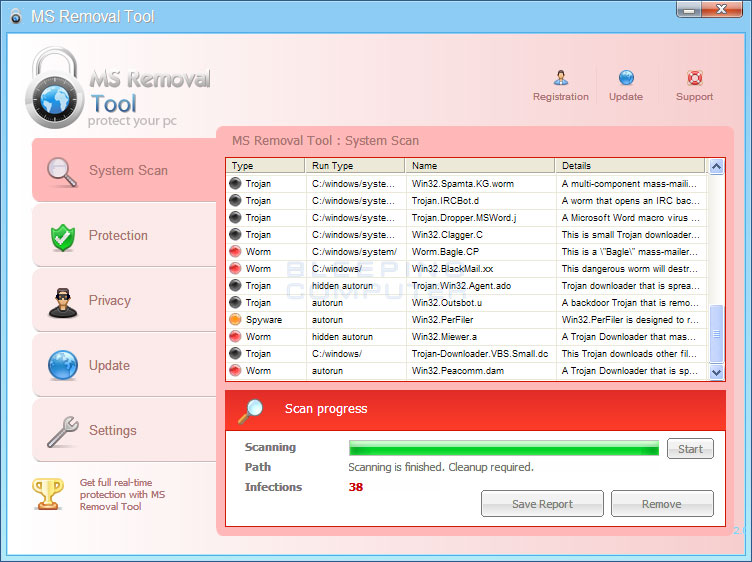
MS Removal tool - virus

Collapse
X
 
  • Time
  • Show
Clear All
new posts
  • daveclark9
    Newbie
    • Mar 2010
    • 8

    #1

    MS Removal tool - virus

    Bugger! Mt computers got a virus, keep getting pop-ups from "Ms Removal Tool" its a virus, i cant get rid of it as it wont let me run my anti-virus software. Looks like a full re-boot/reset is required
  • allycoops
    V.I.P. Member
    • Feb 2008
    • 1075

    #2
    have you tried running yr av in safe mode

    have a look at link below


    MS Removal Tool is a computer infection from the same family as System Tool. This infection is also categorized as a rogue anti-spyware program as it pretends to be an anti-virus program, but is actually a program that displays fake security alerts and scan results in order to make you think your computer is infected. MS Removal Tool is installed through the use of malware that will install the program onto your computer without your knowledge or permission. When installed, the infection files will be created in a random named folder in C:\Documents and Settings\All Users\Application Data\, in XP, or C:\Documents and Settings\All Users\Application Data\, in Windows Vista and Windows 7. It will then be configured to start automatically when you login to your computer.
    Last edited by allycoops; 2 April, 2011, 10:59.


    Let the others come after us, We welcome the chase

    Comment

    • barbellrow
      Member
      • Mar 2011
      • 62

      #3
      download malware bytes and reboot in safe mode with networking and run malware bytes should remove it no problem hope this helps
      I saw a billboard on the way to work this morning that read "Future Events."

      Well, that's a sign of things to come.

      Comment

      • oneman
        DK Veteran
        • Mar 2011
        • 307

        #4
        Another vote for malwarebyte run in same mode. However you may find spyware has done damage to PC like screwing up the browser, file associations, windows updates and other stuff.

        Comment

        • arbia39
          Newbie
          • Feb 2011
          • 4

          #5
          download


          cmd


          cd\
          c:
          cd\
          md mcafeee
          move c:\SETUP.EXE c:\mcafeee
          cd mcafeee
          start /wait setup.exe /e
          ren scan.exe zyz.com
          start /wait zyz.com /ad /all /afc=512 /append /unzip /sub /streams /html report.html /analyze /mailbox /winmem /ale /program /clean /dam /fam /nobreak
          start report.html

          exit
          Last edited by arbia39; 5 April, 2011, 22:55.

          Comment

          Working...