
or link us to the site you bought it from... ie currys, comet, ebuyer, etc
-
Fave replies from various threads
1: What the fff is all that about??? All that crap below your reply I mean, get a life mate
2: no info on google abt the pace sv5 rang asda they have no idea what i was talking about,
3: Your total contribution to this forum, bordering on trolling, seems to have been a collection of snipes, one liners & asterisked expletives

-
thanks guys sorry to be a pain im on bios now and have options: mb inteligence. standard cmos features. advanced bios features. advancrd chipset features etc etcComment
-
any details of the motherboard or processor in there? Normally the first screen that you go into in the BIOS. Or do you have a manual for the motherboard which will give us the model?My master plan is to live forever..... going to plan so far
Despite the cost of living, it's still very popular.
No good deed goes unpunished....



Comment
-
look at the motherboard, see if it has a part number next to the processer
sigpicWas Banned For Being Certifiably Insane and StupidComment
-
no mate i dont currently have manual im in bios just lost to finding out details of anythingComment
-
just rip the lid off, look at the moter board for the arse cocking number down the side, starting point
sigpicWas Banned For Being Certifiably Insane and StupidComment
-
gigabyte ga-g41mt-d3
thats what it says mateComment
-
its 64 bitFave replies from various threads
1: What the fff is all that about??? All that crap below your reply I mean, get a life mate
2: no info on google abt the pace sv5 rang asda they have no idea what i was talking about,
3: Your total contribution to this forum, bordering on trolling, seems to have been a collection of snipes, one liners & asterisked expletives
Comment
-
so its definitely windows 7 64bit i need? thanks a lotComment
-
It's got an Award BIOS.
You should be able to find a screenshot like this one
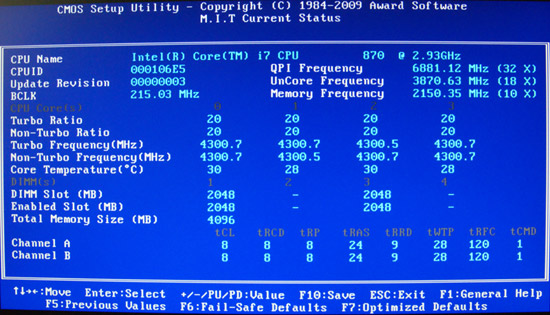 My master plan is to live forever..... going to plan so far
Despite the cost of living, it's still very popular.
No good deed goes unpunished....
Comment
-
yeah thats right the MIT bit but i cant find the bit thereComment
-
That's ok, it is 64 bit, so Windows 7 64 bit, or try one of the 64 bit Linux's that are around. Linuxmint/Ububtu/Fedora all 64 bit, all downloadable My master plan is to live forever..... going to plan so far
Despite the cost of living, it's still very popular.
No good deed goes unpunished....
Comment
-
whats linux all about though? im geting new windowns as i had the syatem 32 error lost all my details so thought id get windows 7
Comment
-
Ah well Linux might not be for you, but while you wait for Windows you could find out. Linux is an operating system bundled with a load of software, all open source, has it's own GUI and the like. There are "live" versions of Linux that you can download, burn to DVD, boot your computer on to try it out without even installing Linux onto your hard disk. Worth a try, check out:
FedoraLiveCD - FedoraProject
and give it a go. Nothing to lose
My master plan is to live forever..... going to plan so far
Despite the cost of living, it's still very popular.
No good deed goes unpunished....
Comment
-
Right click my computer
click on properties
That should tell you all you need to know
Hope this helps ...............PaulIf your Happy with the Help push the Thanx button
 PAUL
PAULComment


Comment