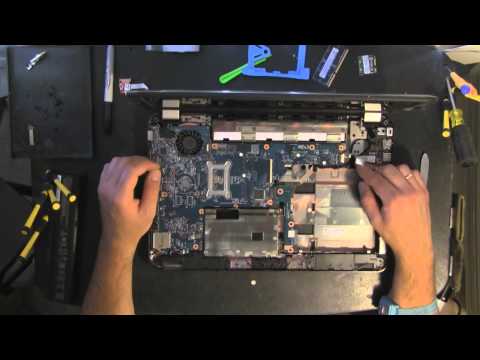
Replacemewnt cooling fan for hp laptop query

Collapse
X
 
  • Time
  • Show
Clear All
new posts
  • clem58
    DK Veteran
    • Aug 2009
    • 819

    #1

    Replacemewnt cooling fan for hp laptop query

    I have a hp pavilion g6 1220sa. The cooling fan packed a week ago and now needs replacing. I have for the last few days been searching for a replacement. The nearest i can get to it is a hp pavilion dv6 1220sa. Do any of you guys know if the latter is a compatable cooling fan for the g6 1220sa ? . I won't open the lappy to find out it is comparable with the 1 online. But i need to buy it to get new 1 installed in next few days. Any ideas folks?
  • Canker_Canison
    V.I.P. Member
    • May 2010
    • 3904

    #2
    Open the laptop & check if the fan can be removed from the heatsink without breaking it.

    It might be possible to fit just a fan rather than the complete unit. And far easier to source.

    Ok, you don't need to open it up yet. Found this on ebay, should be easy to fit.

    You might as well clean & repaste the heatsink while you're there.
    Last edited by Canker_Canison; 1 May, 2013, 01:01.
    Canker

    "Animal, vegetable or mineral... I'll do anything, to anything, with anything"
    - The Baby Eating Bishop of Bath & Wells
    [COLOR=Green]

    Comment

    • clem58
      DK Veteran
      • Aug 2009
      • 819

      #3
      Originally posted by Canker_Canison
      Open the laptop & check if the fan can be removed from the heatsink without breaking it.

      It might be possible to fit just a fan rather than the complete unit. And far easier to source.

      Ok, you don't need to open it up yet. Found this on ebay, should be easy to fit.

      You might as well clean & repaste the heatsink while you're there.


      Thank you for taking the time to find the link. best price I've seen. I a bit anxious bout opening the lappy in case i do some damage. I have never attempted it before. I have someone who will though but i will have to wait until Friday before he can have a look. Thanks again, i will send him the link.

      Comment

      • Canker_Canison
        V.I.P. Member
        • May 2010
        • 3904

        #4
        Most laptops are easy to open. You can usually find a removable panel to access the heatsink & fan. The heatsink is held in place by 4 screw and spring pieces, once those are unscrewed it just lifts off. Not forgetting to unplug the fan connector.

        You will have to clean & repaste the processor/heatsink. So you'll need some nail varnish remover, cotton buds or kitchen roll & some new paste. You can get better paste, like artic silver, but it costs more.
        Canker

        "Animal, vegetable or mineral... I'll do anything, to anything, with anything"
        - The Baby Eating Bishop of Bath & Wells
        [COLOR=Green]

        Comment

        • Canker_Canison
          V.I.P. Member
          • May 2010
          • 3904

          #5
          Ok, your laptop isn't so easy to access. If you've never ventured inside a computer before you might want to get some help with this.
          <br>
          Canker

          "Animal, vegetable or mineral... I'll do anything, to anything, with anything"
          - The Baby Eating Bishop of Bath & Wells
          [COLOR=Green]

          Comment

          • clem58
            DK Veteran
            • Aug 2009
            • 819

            #6
            I open her up and closed it again , have since learned, that to get at the fan i will need to more or less take the whole thing to bits (big cheer for that designer ,not) Bought the paste and alcohol wipes. maybe if it gets a good clean it might restart , unlikely though. I'm gonna tackle it it on saturday noon. Need your prayers . Also thanks for your support.

            Comment

            • ajax2061
              DK Veteran
              • Nov 2012
              • 395

              #7
              sometimes its not the fan but the fan controller that goes try disconnecting the yellow wire and that might ramp it on at full speed all the time, also sometimes you wont need a new fan cause dust bunnys get jammed in the fan and stop it from spinning.

              If it is the fan controller playing up and the yellow wire trick does not work then soldering to a 5v rail will do the same, normally the easiest one to get to without metering everywhere is the back of a usb socket, just do not use that usb afterwards with large drawing equipment like external hdds etc

              Good luck and hope you get it sorted, top tip though HP never make it easy to clean fans but a dell 1545 for nice easy fan cleans

              Clean The Fan - YouTube watch for a giggle

              Comment

              • clem58
                DK Veteran
                • Aug 2009
                • 819

                #8
                With the aid of large brown envelopes and postits, i took the plunge and took it apart, as you said dirt was the problem, not much but enough. I repasted it give everything a good clean , now we is up and running. Gonna order fan just in case i do need it. less than a fiver. ease of mind . Thanks folks appreciated your help n support. found some great wee vids. if i learn how to post the links properly i will post them on site. ta chaps

                Comment

                Working...