Computer keeps restarting

Collapse
X
 
  • Time
  • Show
Clear All
new posts
  • lee_hdi
    DK Veteran
    • Oct 2009
    • 928

    #1

    Computer keeps restarting

    Hi,
    Been having a little trouble with my tower PC recently, it just restarts itself on its own accord and sometimes when you turn it on I don't get a picture on my monitor

    All the connections in the rear are secure.

    Any idea what the problem could be?

    It had a new power supply and motherboard about a year ago.

    Its running XP Media Center if that makes a difference.

    Thanks,
    Don't let failure go to your heart, don't let success go to your head.
  • Shady
    Shite Link King
    • Dec 2010
    • 6404

    #2
    Do you have a separate graphics card as well as onboard?
    If you're running the graphics card, try running on onboard graphics instead
    Fave replies from various threads

    1: What the fff is all that about??? All that crap below your reply I mean, get a life mate
    2: no info on google abt the pace sv5 rang asda they have no idea what i was talking about,
    3: Your total contribution to this forum, bordering on trolling, seems to have been a collection of snipes, one liners & asterisked expletives


    Comment

    • lee_hdi
      DK Veteran
      • Oct 2009
      • 928

      #3
      Nah just the onboard one I think. Never added anything since I bought it from the shop
      Don't let failure go to your heart, don't let success go to your head.

      Comment

      • Shady
        Shite Link King
        • Dec 2010
        • 6404

        #4
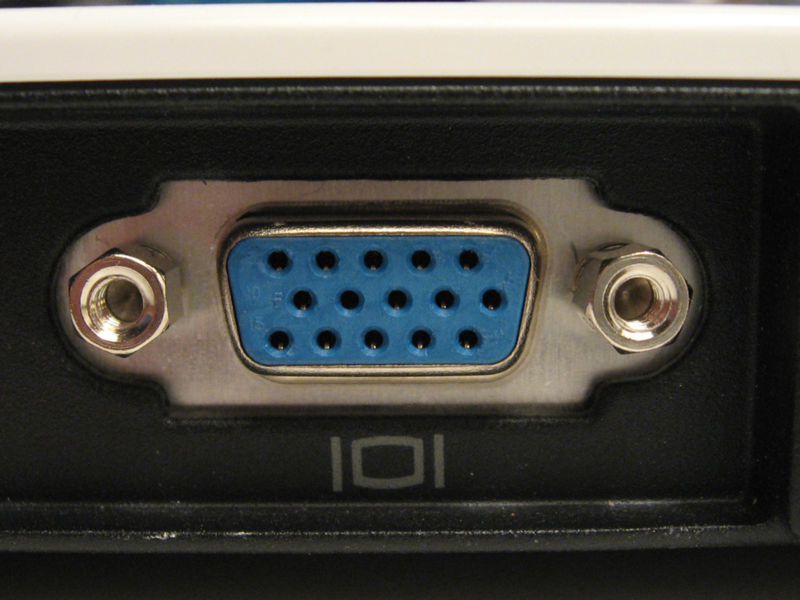
        how many vga ports does it have on the back? 1 or 2?
        Fave replies from various threads

        1: What the fff is all that about??? All that crap below your reply I mean, get a life mate
        2: no info on google abt the pace sv5 rang asda they have no idea what i was talking about,
        3: Your total contribution to this forum, bordering on trolling, seems to have been a collection of snipes, one liners & asterisked expletives


        Comment

        • lee_hdi
          DK Veteran
          • Oct 2009
          • 928

          #5
          Its got one like this.....


          Then one similar, but instead of having the holes, it has the pins
          Don't let failure go to your heart, don't let success go to your head.

          Comment

          • frankharrison
            Member
            • Jun 2008
            • 88

            #6
            Check all PC is dust and fluff free on the inside and out and all fans working (not noisey).

            When on try running a good spyware and antivirus program. It could help.

            Is your onboard battery ok?

            Also check Harddrive is ok.

            My computer was doing this.
            Tried everything then found power supply fan was stuck for some reason and computer was shutting down to stop damage. I know you have new one but you never know.

            Frank

            Comment

            • cunny
              V.I.P. Member
              • Jan 2009
              • 4915

              #7
              is it giving a blue screen saying stop : 0x ect if so you need the stop code
              sigpic

              "Make it idiot proof and someone will make a better idiot."

              Comment

              • lee_hdi
                DK Veteran
                • Oct 2009
                • 928

                #8
                Originally posted by cunny
                is it giving a blue screen saying stop : 0x ect if so you need the stop code
                Nah I don't get that. When the monitor doesn't come on it just says "No Signal".

                Then sometimes when the PC restarts itself, I get that screen where you can start windows in safe mode, or from last know good config.

                Originally posted by frankharrison
                Check all PC is dust and fluff free on the inside and out and all fans working (not noisey).

                When on try running a good spyware and antivirus program. It could help.

                Is your onboard battery ok?

                Also check Harddrive is ok.

                My computer was doing this.
                Tried everything then found power supply fan was stuck for some reason and computer was shutting down to stop damage. I know you have new one but you never know.

                Frank
                The fan doesn't seem any louder then normal, but I'll try that anyway. Give it a good clean.

                Thanks
                Don't let failure go to your heart, don't let success go to your head.

                Comment

                • mamifero
                  Newbie
                  • Jan 2011
                  • 3

                  #9
                  Hi
                  Lets see, try this first start the PC and press F8 key to get this menu:


                  and choose "Last Known Good Configuration "
                  and press Enter lets try that first.
                  Good Luck

                  Comment

                  • ciaranezy
                    Newbie
                    • Dec 2009
                    • 9

                    #10
                    Check your heat sink on the CPU and if necessary replace the Thermal Paste and re-set it tightly!!!

                    Comment

                    • lf2
                      Newbie
                      • Jan 2011
                      • 1

                      #11
                      if you dont get the blue screen (no hardware problem)

                      then open your pc...try taking one memory out and then the other (start up)
                      clean the dust in the pc...if its clean and still restarting...

                      your cpu is getting too hot...take it out and do new paste (clean the old one)

                      this will fix it 100% (got the same problem,almost hang myself)

                      Comment

                      • monsi
                        Newbie
                        • Dec 2010
                        • 1

                        #12
                        Hi
                        I had the same problem with some pc
                        Remain if the problem can then there is abnormality in the supply
                        1. Problem with power supply
                        or
                        2. Problem with motherboard(sometimes inflated the capacitors)

                        Sorry for my english.

                        Comment

                        • lee_hdi
                          DK Veteran
                          • Oct 2009
                          • 928

                          #13
                          Sorted it I think, took it all to bits and gave it a good clean

                          There was loads of dust in there.

                          It actually seems a bit quicker as well now, happy days

                          Thanks again lads.
                          Don't let failure go to your heart, don't let success go to your head.

                          Comment

                          Working...