Silvercrest SL35 HDMI Box

Collapse
X
 
  • Time
  • Show
Clear All
new posts
  • Frogger
    DK Veteran
    • Oct 2012
    • 422

    #16
    Originally posted by digicon
    Hi Frogger,
    But according to that information your chip ID information does not match the patchable one


    Regards
    Well after reading (german to english) I now know all them boxes are patchable and I have one. I am determined to patch it and get her going. Be nice to see what EMUs run on it.

    Well I joined the comag forums and used google translation.

    what do you think of my first post LOL.

    ..................

    I posted the following.......


    Hallo Leute. Neues Mitglied hier. Ich bin mit Google, um aus dem Englischen ins Deutsche zu ?bersetzen.

    I in Belfast leben im Vereinigten K?nigreich...........Nordirland.

    Ich habe einen SilverCrest SL35 Box. Ich will wissen, wie es zu patchen, damit ich gute neue Kan?le empfangen k?nnen. Ich habe die Box ge?ffnet, entfernte den silbernen K?hlk?rper und der ALI-Chip verf?gt ?ber diese Nummern auf sie.

    ALI

    M3329C F1

    0952 TG51

    XD9HLB0000GB


    Welche Software brauche ich, um an den SL35-Box anschlie?en, um die Firmware zu flashen. Ich habe eine feste statische satelite (nicht motorisiert) in Gro?britannien. Kann ich patchen dieses SL35? Ich habe Fotos von den Screenshots und der Hardware..

    Ich kann hochzuladen mehr Bilder von den Screenshots und dem SL35 Feld, wenn Sie mir, dies f?r Sie tun m?ssen

    Vielen Dank an alle....................

    Frogger


    What dya think?


    NOTE TO Digicon...Sorry about the link to the german forum pal.
    Last edited by Frogger; 9 March, 2013, 23:04. Reason: Link to Forum

    Comment

    • digicon
      V.I.P. Member
      • Jul 2009
      • 8261

      #17
      Hi Frogger,


      Glad you got sorted i am sorry i ahve had to remove the link as it is against forum rules: Do not post links to other forums with similar content your post is fine.

      If you manage to get it completely sorted out i am sure many others with a similar box on here would appreciate it if you could share the information with DK


      Regards

      Comment

      • Frogger
        DK Veteran
        • Oct 2012
        • 422

        #18
        Originally posted by digicon
        Hi Frogger,


        Glad you got sorted i am sorry i have had to remove the link as it is against forum rules: Do not post links to other forums with similar content your post is fine.

        If you manage to get it completely sorted out i am sure many others with a similar box on here would appreciate it if you could share the information with DK


        Regards
        Funny you should say that. It would be a pleasure to share Digicon. Anyhow..... Im close to patching this (I think)

        I understand all the forum rules fine Digicon pal.


        I posted that other post way too quick with that link embedded as I wanted to get more info on this onto DK.

        Finding the SW to download-obtain for Sl35 is a bitch, as no-one wants to discuss it on them forums you removed the link from as The board rules don `t allow any discussion about illegal viewing from encrypted pay TV channels

        Understandable........

        .
        Anyhooooo.....

        [pb]EDIT::>>I Just obtained a stack of confirmed working software for the SL35 box. After reading up on the SL35 myself, and seeing the amount people CURRENTLY discussing this stb, which is years old, who are discussing repairing them, downgrading them, and other mods to them, all certainly points in the direction of $$$ channels.

        Im certain. The box is capable of what I / we would like to do with it.

        Ive been linked to this by a good german guy. German to english but ya get the drift.

        In slimline design - to receive all unencrypted digital TV and radio programs via satellite
        Suitable for connection of LCD-/Plasma-Empfangsger?ten via HDMI - high quality playback
        of video and audio signals through digital transmission
        Manageable with 4,500 presets, 800-page Super fast teletext and sleep timer function
        8-way multifunction timer *** with EPG (Electronic Program Guide) coupled
        Signal meter to align the antenna optical and acoustic performance:


        MPEG-2 and DVB compliant
        Automatic choice of NTSC / PAL and video converter
        4:3 / 16:9; audio formats, subtitles, languages selectable
        With 3 games: Tetris, Snake, Othello
        16-times zoom function
        Skip button to previous channel
        9-fold multi-picture function
        Childlock
        Receiver is pre-programmed current
        OSD selectable in 19 languages, including German, English,
        French, Italian, Spanish and Swedish
        Standby power consumption: <2W


        How to update the firmware / secure?
        Basics

        You need an update bodied receiver, a null modem cable and a computer / laptop with a serial port (Com Port), which should also be enabled and configured! Now you need two small downloads, the software first, and second to the program still aufzuspielen sameness!

        Determines first which chipset and flash type has your receiver and invite you download the appropriate firmware file from the Database! How is determined the chipset & Flash in this thread described ... firmware play first All files in a folder unpack second Receiver to power off but rear third The null modem cable to the COM port of the computer and connect to the receiver 4th System Loader start, click "Browse" button and select the firmware (*. Bin or *. Abs File) 5th Select Com Port 6th * Type and select Upgrade Mode 5th Click "Next", it shows "Test serial port status"

        6th Switch on the receiver (possibly with remote enable) 7th achieved 100 percent wait until the ninth Next press and NOT INTERRUPT 9th Press when finished flashing is "Finish" * The firmware consists of several components. It is only possible to load a part of a firmware in the receiver (channel list, Boot Logo, ...). For this you select the System tool from the following: types of upgrade "allcode" - Complete firmware without bootloader "otaloder" - Loader for Satellittengruppe) "main code (AL-mx)" - firmware (main program) "keyinfo" - Keys for User font " logo "- startbild "logo menu" - picture for radio mode and background "default db" - default (Satellite, Channel, Settings) "user db (64 +64)" - User setting (channels, volume, etc ...) "allcode + bootloader "- Complete firmware with bootloader Normally flashed it only "allcode" or if you want to retain its settings and transmitter "Main code" into the receiver, unless it is expressly stated here that a different boot loader is used, then "allcode + Bootloader".

        Flashed just get the "main code" or "allcode" you can always load a new firmware without the risk of killing the box, ... fashion selection "PC-STB" - the firmware flashed into the receiver "STB-PC" - created a backup from the receiver (dump) Firmwaredump / Create backup first Receiver at the power switch off second The null modem cable to the COM port of the computer and connect to the receiver third System loader start and bottom option "STB-PC" click fourth Now the top select a directory and enter a name for the fifth Bottom press "Next" and receiver enable (if neces-with remote control)

        6th Wait until 100% are achieved receiver clones can If you have 2 identical receivers can also easily from one device to the firmware (must be the same chip and bootloader!) cloning first Both receivers via null modem cable to connect the second Master receiver to the TV connect third Both the receiver to the mains power supply (master switch at the main switch, slave switch off the main switch) fourth Turn on the television and the master receiver in "MENU -> SETTINGS -> SOFTWARE UPDATE -> (if PIN) -> UPDATE ON 232" select 5th Upgrade Select type (see above) 6th Start and confirm with the OK button 7th Slave receiver on the main switch on 8th Wait until transmission is complete and burning.


        FAQ / troubleshooting

        Connection problems between PC / laptop and receiver


        wrong COM port selected on the PC

        Schittstelle control, sometimes block other applications, the COM port or the COM port in the BIOS disabled


        Wrong setting of the COM interface

        bits per second: 115200
        Data bits: 8
        Parity: none
        Stop bits: 1
        Flow control: none Incorrect or faulty cable D-sub 9-pin null modem cable defects COM interface in the receiver ., it sometimes occurs that the com port has board contact to the housing and thus may lead to short circuits.

        upload process stops at 99 % from

        the COM port in the Windows Device Manager to uninstall and start again. After restarting the PC, the COM port installed automatically and configured! process priority adapt older system: - Open System Loader - "Windows Task Manager" menu by pressing "Ctrl + Alt + Delete" - on "Processes" button - Right click on "Systemloader_Ohne_R?fung.exe" "Set Priority" mouse over and click on "real time" - - click "Yes" and close Task Manager


        Thats all for nigh folks as I am busy checking german SW files out to see which one will connect to my COM port and sh!t....

        Ive Partitioned my Lenovo 7099N7G Win 7 x64 desktop PC and set it to Dual Boot wth XP 32 on it and all the tools for you know what....

        A true com port is built into this PC whic is weird for a Win 7 PC. Anyhoo.. There should be a few clues in that info above for someone.

        On we go......Im excited with this stb.

        Ther are 2 types of the same box (except the SL35 on the left here has 2 scart sockets and the blue Sivercrest SL35 on the right is HDMI only.

        Heres the pic of them as I was shown. Mines (the one I have) is the blue box on the right. HDMI...


        I wil upload the software once I index it all, and rar or zip it. Theres a program called LogiEdit Ver 109_201 which looks good in screen shots.

        Heres some of the stuff I managed to download for this box.

        LogiEdit (All Versions)

        Channel list editor of Wolfgang Litzinger Is Now the firmware version 3.xx when Logisat 1700 & 1900 & Comag SL HD models! / For LogiSat 230/240/245/340/350/360 and for the LogiSat 1700/1900/1900 II / 4400 4500 and Comag HD & SD receivers.

        Comag SLxx System Loader Without testing 1.0

        The system loader without testing for SLxx HD when using the internal RS232 interface must be flashed!

        ================================================== =========================================
        LogiEdit 1.03a
        LogiEdit 1.03a
        New from 04.04.2011


        LogiEdit for convenient sorting the list of programs
        for LogiSat 230/235/240/245/340/350/360
        and for the LogiSat 1100/1200/1700/1900/1900 II / 4400/4500
        Still not suitable for LogiSat 55S
        ================================================== =======================================

        LogiEdit for convenient sorting the list of programs for LogiSat 230/235/240/245/340/350/360 and for the LogiSat 1100/1200/1300/1700/1900/1900 II / 4400/4500 LogiSat 55S and with limitations also for 2350 HD + / 2550 HD + light / 2550 + HD / 2750 HD + and identical Comag models!

        LogiEdit_V109-201.zip
        ===============================================

        Repair defective bootloader Comag SL Series (ALi 3329C) with serial chipset, sodas in most cases no complicated JTAG is necessary to save the receiver! This tool also bypasses the "no rs232" bootloader contained in the new firmwares from June 2011 and prevent an upgrade via RS232 interface! geschied use at your own risk!

        Comag SL Series Recovery Tool v1.0.0.3.zip
        ===========================================
        Tuesday 1, February 2011, 08:49

        Silvercrest SL35 HDMI - 0 4 0 9CQ
        Bootloader: 1 5 7 0 2009-05-22
        Main code: LDL-0 4 0 2010-01-13 9CQ


        Will up the entire set of pluck once sorted this end.

        BTW heres a channel List I put in a simple text file, which I managed to pull from a few varying places.

        LDL-0409CQ 2010-01-13.rar is the original firmware for SL35 HDMI
        Attached Files
        Last edited by Frogger; 16 March, 2013, 09:00.

        Comment

        • Frogger
          DK Veteran
          • Oct 2012
          • 422

          #19
          Does anyone else even have one of these?

          Comment

          • Frogger
            DK Veteran
            • Oct 2012
            • 422

            #20
            I am now using this box to watch channels I cant get on my openbox f3. My Sealion is deceased and needs revival.

            If I manually enter the details-freq of the channel the channel comes on. Im getting quite a few music channels as well.

            The odd $$ channel comes through for a minute or two but $$ again

            Still messing with the sats it can recieve. I read that it gets quite a number of $ channels using a motorized dish as it supports disqe..
            Last edited by Frogger; 2 January, 2014, 20:44.

            Comment

            • DOUGALMCD
              V.I.P. Member
              • May 2011
              • 3229

              #21
              Yes I have one in garage I used it in caravan but it's lay boxed up for a few years now. If I get a spare minute in the next few weeks I'll plug it in and see what's on it.
              Comment

              • Frogger
                DK Veteran
                • Oct 2012
                • 422

                #22
                Originally posted by DOUGALMCD
                Yes I have one in garage I used it in caravan but it's lay boxed up for a few years now. If I get a spare minute in the next few weeks I'll plug it in and see what's on it.

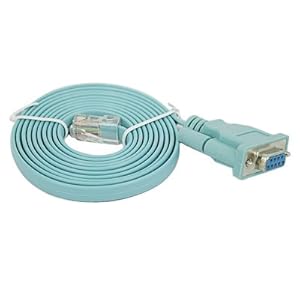
                Pity theres no LAN on it. Although I do have this little lead ive never used before.

                This is the exact same as mines. Any thoughts?


                HDE 9-Pin Serial Port to RJ45 Cat5 Ethernet LAN Adapter Cable


                Connect your computer's serial port to the RJ45 console port on routers
                RS232 9-Pin to RJ45 Cat5 Ethernet
                Compatible with Cisco routers, including the 600, 800, 1600, and 1700 series
                Length: 1.8m (approx 6ft) from end to end; Color: Blue
                HDE? is a registered trademark and is the only authorized seller of HDE branded products

                Comment

                • DOUGALMCD
                  V.I.P. Member
                  • May 2011
                  • 3229

                  #23
                  I'll dig the box out first as I cant remember what the menu is like but never tried the cable you have.

                  Comment

                  • M T Glass
                    DK Veteran
                    • Jul 2013
                    • 733

                    #24
                    Silver Crest products are sold through Lidl (I've had a few of them) so I'd say you would have to point your dish to 19 east to get a satellite update of firmware, if any are available.


                    If you click on the 4th. link down (the one that starts with PDF) it will automatically download the Silver Crest PDF.
                    Last edited by M T Glass; 6 January, 2014, 00:16.
                    Official Meat-Head Fan Club Member (member number 14300)

                    Comment

                    • redondo5
                      Senior Member
                      • Sep 2008
                      • 277

                      #25
                      Does it have a CI slot?

                      Diablo wifi is one way to get cccam running over the net... but obviously the diablo cards are pretty expensive

                      Comment

                      • Frogger
                        DK Veteran
                        • Oct 2012
                        • 422

                        #26
                        Originally posted by redondo5
                        Does it have a CI slot?

                        Diablo wifi is one way to get cccam running over the net... but obviously the diablo cards are pretty expensive
                        Nope................Back to F3 for me

                        Comment

                        • DOUGALMCD
                          V.I.P. Member
                          • May 2011
                          • 3229

                          #27
                          Well I dug it out and it's not the 35 it's the sl65/12

                          Comment

                          • Frogger
                            DK Veteran
                            • Oct 2012
                            • 422

                            #28
                            Originally posted by DOUGALMCD
                            Well I dug it out and it's not the 35 it's the sl65/12
                            I thought that. Now my remotes b0ll0xed ffs. Grrrrr..... F3 kicking again....

                            Comment

                            Working...