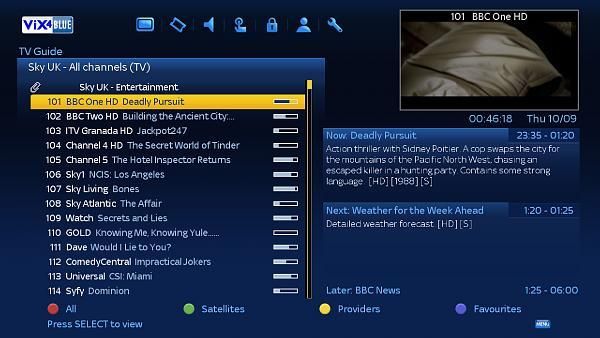
Zgemma H1 & S2 Vix4 Official firmware with Blue Sky skin & blue complete Picons(mint)

Collapse
X
 
  • Time
  • Show
Clear All
new posts
  • hall-e
    Junior Member
    • Oct 2009
    • 27

    #1

    Zgemma H1 & S2 Vix4 Official firmware with Blue Sky skin & blue complete Picons(mint)

    I tried the new Official Vix4 Firmware and thought it was excellent, I find it better and smoother than the Original Vix Firmware. The Blue Sky theme is automatically setup and it supports the front led display. Also I have uploaded a complete custom blue Picons that goes with the theme really well. I thought I would share it because I find it brilliant and am really happy with the setup I have. Hope you guys like it. A pic is uploaded so you can see what it looks like


    Official Zgemma S2 Vix4 Firmware


    Official Zgemma H1 Vix4 Firmware


    Blue_picon_set_22_06_2015.zip
    Last edited by digicon; 24 June, 2015, 11:35. Reason: No Links to Advertising sites/Online Shops
  • digicon
    V.I.P. Member
    • Jul 2009
    • 8261

    #2
    Please do not post Links to certain Online retailers which your links go to.

    If you want to add images that are far to big for the forums server then upload to one of the many free Upload sites and then post the links

    Comment

    • hall-e
      Junior Member
      • Oct 2009
      • 27

      #3
      No problem, sorry

      Comment

      • neilesh
        Newbie
        • Apr 2014
        • 5

        #4
        hi i have just bought a zgemma star 2s..
        how can i install this file on it?
        thanks

        Comment

        • jonathan321
          Newbie
          • Dec 2013
          • 17

          #5
          Does Vix4E2 firmware support Service Named Picons (SNP?)

          Comment

          • johnsback
            Newbie
            • Feb 2012
            • 8

            #6
            hi, will this work on zgemma star s?
            thanks

            Comment

            • makster1978
              Top Poster
              • Jan 2009
              • 118

              #7
              need red skin please help

              Comment

              • martin035
                V.I.P. Member
                • Apr 2014
                • 1308

                #8
                Originally posted by makster1978
                need red skin please help
                On the remote:
                1. Menu-plugins 'Green button' to add, find Skins 'openvix - Red -hd' and install
                2. Menu-setup-system-user interface-skin-skin setup select and press Ok on 'Red-HD' Box will ask to restart Gui allow this to happen.

                Comment

                • makster1978
                  Top Poster
                  • Jan 2009
                  • 118

                  #9
                  cheers martin got most of that (gui allow this to happen? reboot or not? cheers

                  Comment

                  • rigsby71
                    DK Veteran
                    • Mar 2009
                    • 676

                    #10
                    in simple terms, reboot.

                    Then your new skin kicks in when you reboot

                    Comment

                    • rigsby71
                      DK Veteran
                      • Mar 2009
                      • 676

                      #11
                      in simple terms, the box will auto reboot, starting up in the new skin. So , just allow it to happen.

                      Comment

                      • petecostellouk
                        Newbie
                        • Sep 2015
                        • 1

                        #12
                        What does the skin look like

                        Originally posted by hall-e
                        I tried the new Official Vix4 Firmware and thought it was excellent, I find it better and smoother than the Original Vix Firmware. The Blue Sky theme is automatically setup and it supports the front led display. Also I have uploaded a complete custom blue Picons that goes with the theme really well. I thought I would share it because I find it brilliant and am really happy with the setup I have. Hope you guys like it. A pic is uploaded so you can see what it looks like


                        Official Zgemma S2 Vix4 Firmware


                        Official Zgemma H1 Vix4 Firmware


                        [ATTACH]319483[/ATTACH]
                        Is there a link somewhere to show what this looks like?

                        Comment

                        • martin035
                          V.I.P. Member
                          • Apr 2014
                          • 1308

                          #13
                          Originally posted by petecostellouk
                          Is there a link somewhere to show what this looks like?


                          Remember it's a skin, all the sky function icons at the top ie padlock, spanner and speaker don't do nothing

                          Comment

                          • hiranuk
                            Junior Member
                            • Aug 2010
                            • 32

                            #14
                            i cant seem to create a new thread so ive posted here

                            Hi

                            I have a Zgemma H1 and H2 on cable virgin media. The H2 workd fine and i get all channels, all the HD are woring. On the H1 i get all channels but the movies HD are not working and i get "tune failed" message. I cant figure out why. i Have set the tuner settings to the same as the H2, i have disabled tuner A as i have a******, i have tried deleting bouqets and re scanning but still get the same tune failed message.

                            can anyone help, as i missing a setting on the H1

                            Thanks in advance
                            Last edited by Johnner; 18 October, 2015, 21:48. Reason: Again...

                            Comment

                            • martin035
                              V.I.P. Member
                              • Apr 2014
                              • 1308

                              #15
                              Hiranuk, are you using Autobouquetsmaker? if you are then ensure that the following providers options are all set to No , Sky ROI, Sky UK and Freesat(UK)

                              Menu-setup-service searching-
                              Autobouquetsmaker-Providers
                              Last edited by martin035; 18 October, 2015, 18:16.

                              Comment

                              Working...