
Hi guys,could someone please walk me thru box settings on Zgemma H2S? Dish and motor are up,got my longitude and latitude,and channel lists loaded.cheers Matt.
-
-
Not to sound stupid......but are you asking how to input your long/lat & channel list on the box ?
If yes thats the easy part ......who set the dish up & what alignment did you start with due south ? 28.2? ect.......
Who channel list are you using ?
Long/lat will be setup/tuner congfig
channel list needs to be uploaded with VCC or Dreamboxedit or other software that does the same thing
Matt you should of bought a H2H......have you not read whats happening on 28.2.......http://www.digital-kaos.co.uk/forums...-end-maybe-notLast edited by P&D; 18 April, 2017, 22:30.
-
You can still get those channels on other sats P mate .Comment
-
Thanks for the reply,I don't have cable in my area yet.I set up the dish,loaded a channel lists from the boxes plugins.I have inputted my latitude and longitude,just not sure what to do next.I have spent hrs on google researching this.Dish has been sat stationary on 28.2 for months since "upgrading" from diy triple lnb set-up, which gave me 28.2,13 and 19.Comment
-
Have look in here i used this when i set mine up.....http://www.digital-kaos.co.uk/forums...motorised-dish
Comment
-
I have similar questions, I have an existing setup that used a protek box, and now have added a zgemma h.2s.
So i don't need to do the majority of the setup, but just add info into the zgemma and learn how to set it up to re-tune it, when it gets knocked by the wind, and to other sats.Comment
-
I think they want to know how to setup zgemma with motorised dish, i did ask this years back and still can't make it move my dish...or it will move it once and that is all... I gave up at the end.Comment
-
As long as your dish is aligned right just enter your long and lat tick send disq and thats it basicallyComment
-
As maca said. Quite easy really just get the basics rightsigpic
"Make it idiot proof and someone will make a better idiot."Comment
-
Borrowed from another forum......cannot link it
first of all make sure your lnb cable connect to right port see picture below
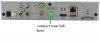
now press blue button on remote and scroll down to tuner set up
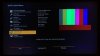
now press right arrow on remote to tuner configuration
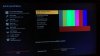
select tuner A
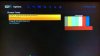
change the setting to picture below and add your longitude and latitude
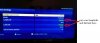
press green button to save
your motor should run fineLast edited by P&D; 4 May, 2017, 20:51.
Comment


Comment