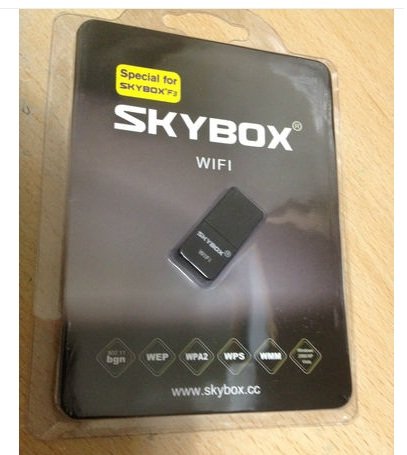
skybox f3 cant get tp-link wifi 2 work?

Collapse
X
 
  • Time
  • Show
Clear All
new posts
  • hashtagwarrior
    Newbie
    • Oct 2012
    • 2

    #1

    skybox f3 cant get tp-link wifi 2 work?

    just got my skybox f3 but got to wait a month for sky to sort my broadband out so in the mean time i was going to run it off my mates wireless next door.
    i bought a tp link wireless adapter but the box wouldnt pick up the adapter?
    so had a bit of a read and seen i had to download the wifi abs file or summin...so i did that and put the wifi abs file onto usb and installed it but its still not letting me get into wireless settings or the wireless adapter aint even flashing?
    this is pickling my head already and ive only been potching with it for a few hours
    oh and i lost all channels when i put the wifi abs file in??
    anyone able to help me out please guys and gals
  • nibblitz
    DK Veteran
    • May 2010
    • 1300

    #2
    You cant use that wifi dongle, you gotta use the specific dongle that works with your box...
    OFFICIAL150Mbps USBWiFi Wireless Adapter,PC,LAPTOP SKYBOX F3,OPENBOX X3+ANTENNA | eBay

    Comment

    • hashtagwarrior
      Newbie
      • Oct 2012
      • 2

      #3
      ahhh so the one i bought wont work. typical .
      will ave look at that proper one. cheers for that buddy

      Comment

      • Frogger
        DK Veteran
        • Oct 2012
        • 422

        #4
        Originally posted by hashtagwarrior
        ahhh so the one i bought wont work. typical .
        will ave look at that proper one. cheers for that buddy
        I got mines with my F3 box when I ordered it. I think it came from skybox.cc (is the url allowed?)

        Comment

        • DW190
          DK Veteran
          • May 2012
          • 1263

          #5
          Originally posted by nibblitz
          You cant use that wifi dongle, you gotta use the specific dongle that works with your box...
          OFFICIAL150Mbps USBWiFi Wireless Adapter,PC,LAPTOP SKYBOX F3,OPENBOX X3+ANTENNA | eBay
          I have the one below and it works perfectly. Did have to use one with an antenna for one that was a long way from the router.

          WIFI 150MBPS WIRELESS ADAPTOR 802.11 B G N LAN NETWORK MINI USB DONGLE ADAPTER | eBay

          Comment

          • Frogger
            DK Veteran
            • Oct 2012
            • 422

            #6
            Originally posted by nibblitz
            You cant use that wifi dongle, you gotta use the specific dongle that works with your box...
            OFFICIAL150Mbps USBWiFi Wireless Adapter,PC,LAPTOP SKYBOX F3,OPENBOX X3+ANTENNA | eBay
            I got this one for my F3 box.


            Does anyone know if I was stitched up?

            When I plug it in, the Wifi manager doesnt uncheck......I am assuming I need to put some sort of inf drivers on the stb via usb to get the Wifi going?

            Comment

            • saj87
              Junior Member
              • Mar 2011
              • 29

              #7
              Originally posted by Frogger
              I got this one for my F3 box.


              Does anyone know if I was stitched up?

              When I plug it in, the Wifi manager doesnt uncheck......I am assuming I need to put some sort of inf drivers on the stb via usb to get the Wifi going?
              I would like to know this as well.. As the one which I got with my f3 box does not seem to work.. I'm thinking I might buy the aerial USB adapter and try that out.. Has anyone tried that ?

              Comment

              • adichik
                Newbie
                • Oct 2012
                • 4

                #8
                Originally posted by hashtagwarrior
                just got my skybox f3 but got to wait a month for sky to sort my broadband out so in the mean time i was going to run it off my mates wireless next door.
                i bought a tp link wireless adapter but the box wouldnt pick up the adapter?
                so had a bit of a read and seen i had to download the wifi abs file or summin...so i did that and put the wifi abs file onto usb and installed it but its still not letting me get into wireless settings or the wireless adapter aint even flashing?
                this is pickling my head already and ive only been potching with it for a few hours
                oh and i lost all channels when i put the wifi abs file in??
                anyone able to help me out please guys and gals
                Hi! Just use the Skybox wifi adapter that is perfectly matching in compatibility issues! I bought the skybox f3 together with the wifi dongle (skybox wifi dongle) and it perfectly worked! Its cheap some more!

                Cheers!

                Comment

                • adichik
                  Newbie
                  • Oct 2012
                  • 4

                  #9
                  Originally posted by saj87
                  I would like to know this as well.. As the one which I got with my f3 box does not seem to work.. I'm thinking I might buy the aerial USB adapter and try that out.. Has anyone tried that ?
                  Hi! I am using the same type of wifi dongle as u. U have to insert first the usb wifi dongle to the box, reboot the system. Go to network setup, apply Wifi wireless! system will reboot again. go again in the network setup, under manager setup, select wifi on! after that if there are any wifi available it will display! Unless the wifi available is from the Free wifi hotspot, otherwise u cannot tap due to password set by the available wifi so called owner/owners!

                  The other solution u can on your own create a wifi spot in your home by using 3g router! Its more convenient and u don't have to use the wifi dongle if the router you connect it straight to this box using the LAN wired connection from the router! Any problem you may email me at [email protected]. I will try and help u, Insyaallah!

                  For your info u can also "login" the skybox f3 with the Android phone to gain access to watch telecast programs!

                  Cheers!

                  Comment

                  • saj87
                    Junior Member
                    • Mar 2011
                    • 29

                    #10
                    Originally posted by adichik
                    Hi! I am using the same type of wifi dongle as u. U have to insert first the usb wifi dongle to the box, reboot the system. Go to network setup, apply Wifi wireless! system will reboot again. go again in the network setup, under manager setup, select wifi on! after that if there are any wifi available it will display! Unless the wifi available is from the Free wifi hotspot, otherwise u cannot tap due to password set by the available wifi so called owner/owners!

                    The other solution u can on your own create a wifi spot in your home by using 3g router! Its more convenient and u don't have to use the wifi dongle if the router you connect it straight to this box using the LAN wired connection from the router! Any problem you may email me at [email protected]. I will try and help u, Insyaallah!

                    For your info u can also "login" the skybox f3 with the Android phone to gain access to watch telecast programs!


                    Cheers!
                    Emailed you bro

                    Comment

                    • question34in
                      Newbie
                      • Feb 2009
                      • 4

                      #11
                      Hi

                      I am keen to know how to use the Android phone to gain access to watch telecast programs.
                      Please advice.

                      cheers
                      q

                      Originally posted by adichik
                      Hi! I am using the same type of wifi dongle as u. U have to insert first the usb wifi dongle to the box, reboot the system. Go to network setup, apply Wifi wireless! system will reboot again. go again in the network setup, under manager setup, select wifi on! after that if there are any wifi available it will display! Unless the wifi available is from the Free wifi hotspot, otherwise u cannot tap due to password set by the available wifi so called owner/owners!

                      The other solution u can on your own create a wifi spot in your home by using 3g router! Its more convenient and u don't have to use the wifi dongle if the router you connect it straight to this box using the LAN wired connection from the router! Any problem you may email me at [email protected]. I will try and help u, Insyaallah!

                      For your info u can also "login" the skybox f3 with the Android phone to gain access to watch telecast programs!

                      Cheers!

                      Comment

                      • adichik
                        Newbie
                        • Oct 2012
                        • 4

                        #12
                        How to get skybox f3 "connected" by using Android hp.

                        I will illustrate by using my Samsung Android hp for this tutorial lesson.

                        1). Your android must already logged into the internet.
                        2). Go to your Android hp "settings". Go inside "Wireless n networks.
                        3). Go inside "Tethering and portable hotspot".
                        4). Tick "Mobile AP" and after that go inside "Mobile AP settings.
                        5). Go inside "Configure mobile AP".
                        6). Set your own user id and password and saved.

                        Now your phone is ready to be tapped by you and or other people that is waiting to tapped any wifi hotspot around! (but cannot due to your password set)...

                        Ok, now back to your SBF3 (skybox f3)...

                        1). Enter menu, go to Network setting.
                        2). Select Wifi and enter. (SBF3 will auto reboot)...
                        3). Go again to network setting, u will see the "Wifi" has a green button.
                        4). Select Manager setup.
                        5). Select Wifi enable. You will see "Wifi hotspot" within your range including yours! Say you have name it (your Android) "John", then you selct "John"...it will ask you for password that you have set just now. Enter the password...."You will see Connected"! Your skybox now has been connected!

                        Cheers!
                        Adichik
                        Last edited by adichik; 20 October, 2012, 04:25.

                        Comment

                        Working...