F5s locking up

Collapse
X
 
  • Time
  • Show
Clear All
new posts
  • genam
    Top Poster
    • Apr 2013
    • 176

    #1

    F5s locking up

    Just began having trouble with one of my F5s's.....boots up OK and begins showing a channel but after 20-30s the remote is no longer recognised and then about 10-15s later the picture completely freezes whilst displaying the channel info box.

    I managed to get it to stay active long enough to get it into menu mode and reloaded the firmware 22-1-14 but made no difference...factory reset didn't work either.

    Any ideas??
  • genam
    Top Poster
    • Apr 2013
    • 176

    #2
    OK...box is toast for anything satellite or HDMI related....works fine as a SCART output media player but as soon as the SAT cable is connected it freezes and now the HDMI port isn't working at all.

    I reckon sending it back is a waste of time but very much a case of once bitten twice shy...its replacement won't be a SKYBOX...just as well its a cheap box.

    Comment

    • mtv1
      The Stig PT
      • Apr 2008
      • 4413

      #3
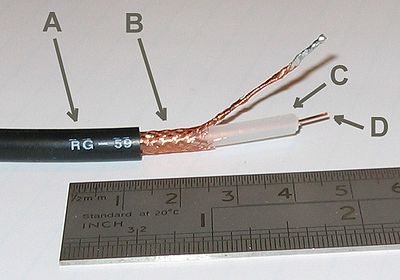
      ok its the feed you either have crossed poles or a break in the sat cable check all connections to the box take off the f type connectors cut back the cable at least 1 inch make sure the outer wires not touching the pole inner wire will be sweet seen it numerous times


      >>>>>>>>>>Dreambox Tools<<<<<<<<<<

      Comment

      • jambo862
        Junior Member
        • Feb 2014
        • 21

        #4
        Hi, just wondering if the OP ever found a fix for this. My box is doing this too and I just can't get it fixed.

        Thanks

        Jambo862

        Comment

        • genam
          Top Poster
          • Apr 2013
          • 176

          #5
          Nope.....tried everything I could from the USB etc...don't have a way of hooking up to the serial port to see if I can redo the firmware that way.

          Comment

          • jambo862
            Junior Member
            • Feb 2014
            • 21

            #6
            Originally posted by genam
            Nope.....tried everything I could from the USB etc...don't have a way of hooking up to the serial port to see if I can redo the firmware that way.
            I've tried that as well, tried replacing to a different psu, tried the serial port, tried booting it without the LNB, and get the same result everytime.

            Guess I need to by a different box

            Comment

            • sailsy
              Top Poster
              • Mar 2012
              • 145

              #7
              Same here was working fine for a while!

              I think it's something to do with satellite feed because box ok till you connect it to it!

              But sayjng that worked a good few hours before it started playing up?

              Do you reckon could be lnb it was later on in evening when all the house hold were watching there box's?

              It's ok when satellite feed is disconnected!

              Comment

              • mtv1
                The Stig PT
                • Apr 2008
                • 4413

                #8
                no its the coax cable poles are crossed or a break in the line


                causes the box to loop

                if not that its the lnb get your local sly fiyyer should get one handy

                most retailers charge too much foe them


                >>>>>>>>>>Dreambox Tools<<<<<<<<<<

                Comment

                Working...