Openbox Z5 (clone?) firmware update mess up (brick?)

Collapse
X
 
  • Time
  • Show
Clear All
new posts
  • zohaad
    Newbie
    • Aug 2014
    • 12

    #1

    Openbox Z5 (clone?) firmware update mess up (brick?)

    Hello,


    I have ordered an openbox Z5 from DH-gate so it could be a brick.

    I tried to update it from the FTP server but it did not work

    Then I updated from front usb port with this firmware: "Openbox_Z5_V1.1_20140606.bin"

    it's stuck in load mode since updating successfully and then rebooting. I turned it off and on after 5 mins and now it's stuck in load mode again

    I've read the sticky, but the sticky does not give information about the openbox Z5 specifically.

    This is the page I ordered it from: Post Openbox Z5 Upgrade from Openbox Set Top Box | Buy Wholesale On Line Direct from China


    Any help is appreciated,

    zohaad
  • zohaad
    Newbie
    • Aug 2014
    • 12

    #2
    Whenever I try to flash the firmware it says: Wrong file!

    Edit: I used the sticky about reviving a dead openbox
    Last edited by zohaad; 21 August, 2014, 22:27.

    Comment

    • zohaad
      Newbie
      • Aug 2014
      • 12

      #3
      Please guys, you must know something about this!

      Comment

      • stealth666
        Junior Member
        • Dec 2011
        • 22

        #4
        Why update the firmware.....?? Dabbling costs

        Comment

        • zohaad
          Newbie
          • Aug 2014
          • 12

          #5
          Program: http://www.mediafire.com/download/dy...v2.2.3.113.rar
          .bin file: http://www.yojiatech.com/a/Support/D.../0707/350.html

          This kept happening first:

          Connect Success!
          Please Open STB...
          Handshaking with Slave... (at this point turn the Openbox on)
          Send Connect Success!
          Send Head Success!
          CRC OK!
          Error: Time out in send data!

          While the Openbox's display showed U0%% , %% meaning on what percentage the flashing was going (U001 U002 etc.)

          But after a few tries it got to 99 percent and then it started going from U000 to U099 or U100 extremely fast.

          Waited a couple of minutes and it still kept going while the UartUpgradeTool said the process was complete.

          Then I restarted it and hooked it up on HDMI, still stuck on loAd mode.

          Currently trying to flash the older firmware.

          Older firmware: http://www.yojiatech.com/a/Support/D.../0617/346.html


          I'll keep you guys updated
          Last edited by zohaad; 21 August, 2014, 22:24.

          Comment

          • martin035
            V.I.P. Member
            • Apr 2014
            • 1308

            #6
            If its a clone then try this firmware, seems newer than the version your trying;
            Openbox Z5 Software(20140707)_Shenzhen Yojia Technology Co., Ltd.

            Comment

            • zohaad
              Newbie
              • Aug 2014
              • 12

              #7
              The first .bin file I linked is the same as yours. I tried both files from Yojiatech.

              Seems like the Z5 is relatively new and Yojiatech does not have anything besides those 2 files for the Z5.

              I guess I'll have to wait for Yojiatech to release the tools, I have e-mailed them about it aswell as the reseller and Sunplus (chipset maker). Right now my dad took the Openbox to his work and is trying to fix it.

              Basically what happens is after the flashing it keeps going from 0 to 100 extremely fast and it doesnt stop.
              Last edited by zohaad; 22 August, 2014, 13:53.

              Comment

              • zohaad
                Newbie
                • Aug 2014
                • 12

                #8
                Watch video to see what's going on

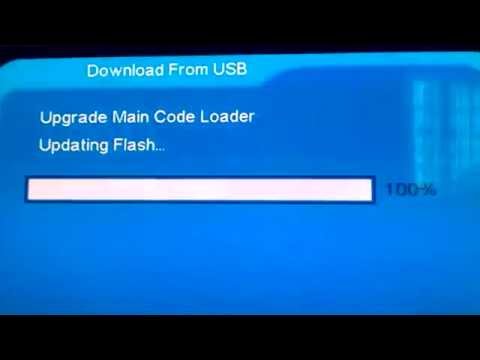
                Yojiatech has released a tutorial on how to update from USB for the Z5 specifically and new firmware (11MB, weird...). I followed it and hooked my Z5 up via HDMI to see what's happening. On the openbox itself loAd goes to lOAd and then from U000 to U100 rapidly twice, pauses and starts again. What happens on my TV is that a blue frame appears saying "Download From USB" and under that "Upgrade Main Code Loader". First it says "Erasing Flash..." and then it says "Updating Flash...", both go from 0 to 100 rapidly.


                Anyone got suggestions, or understands what is happening?
                Last edited by zohaad; 30 August, 2014, 14:44.

                Comment

                • zohaad
                  Newbie
                  • Aug 2014
                  • 12

                  #9
                  another video with more detail:


                  the difference in pause happens using different version (there are three) of firmware.

                  Comment

                  • djbozkurt68
                    Newbie
                    • Aug 2014
                    • 2

                    #10
                    Originally posted by zohaad
                    another video with more detail:


                    the difference in pause happens using different version (there are three) of firmware.
                    Good evening I'm the one who made this video, I find that all of posseseurs openbox z5 on this issue while one updated their device. I do not know what to do so if you have a solution I'm takers

                    Ps: I'm french so I use google translation

                    Comment

                    • zohaad
                      Newbie
                      • Aug 2014
                      • 12

                      #11
                      Hi! I have commented on your video, I leart a little French at school, but I'm not good.

                      Salut!! J?ai fait des remarques ? ton video, J'ai appris un peu francais ? mon ?cole, mais je ne suis pas tr?s fort.

                      I have tried all the software on Yojiatech (Download / Software / Openbox Z5_Shenzhen Yojia Technology Co., Ltd.) but none of them work, maybe one will for you.

                      I have also tried uploading through the RS232 cable, and have read the output when it's done uploading. I think the bootloader? refuses to write to the flash memory.

                      Comment

                      • djbozkurt68
                        Newbie
                        • Aug 2014
                        • 2

                        #12
                        Originally posted by zohaad
                        Hi! I have commented on your video, I leart a little French at school, but I'm not good.

                        Salut!! J?ai fait des remarques ? ton video, J'ai appris un peu francais ? mon ?cole, mais je ne suis pas tr?s fort.

                        I have tried all the software on Yojiatech (Download / Software / Openbox Z5_Shenzhen Yojia Technology Co., Ltd.) but none of them work, maybe one will for you.

                        I have also tried uploading through the RS232 cable, and have read the output when it's done uploading. I think the bootloader? refuses to write to the flash memory.
                        As I said in the comment I test the UART Upgrade Tool v2.2.3.113 and Sunplus Uart ISP1506 software neither works, may be a firmware issue is Yojiatech?

                        Comment

                        • zohaad
                          Newbie
                          • Aug 2014
                          • 12

                          #13
                          Looks like this spanish forum user says there is a killer bug:
                          Last edited by digicon; 30 October, 2014, 02:47. Reason: Forum Link removed

                          Comment

                          • pcuserkz
                            Newbie
                            • Oct 2014
                            • 2

                            #14
                            For additional information on subject please consider searching for similar thread at DVB dot Comelook dot net discussing identical Openbox Z5 problem.
                            Last edited by pcuserkz; 30 October, 2014, 08:13. Reason: Read the Rules about linking to other forums

                            Comment

                            • pcuserkz
                              Newbie
                              • Oct 2014
                              • 2

                              #15
                              By some reason dub-comelook-net and download-firmware websites are down for some time, and the topic is discussed at openboxforum dot com -- Openbox Z5 thread http://www.openboxforum.com/index.ph...c,10478.0.html

                              Comment

                              Working...