Dreambox Control Center Setup (DCC)

Collapse
X
 
  • Time
  • Show
Clear All
new posts
  • mtv1
    The Stig PT
    • Apr 2008
    • 4413

    #1

    Dreambox Control Center Setup (DCC)

    Unzip DCC to a folder and start the program with the DCC.exe


    First thing to do is select your Language.and enter your Dreambox password.
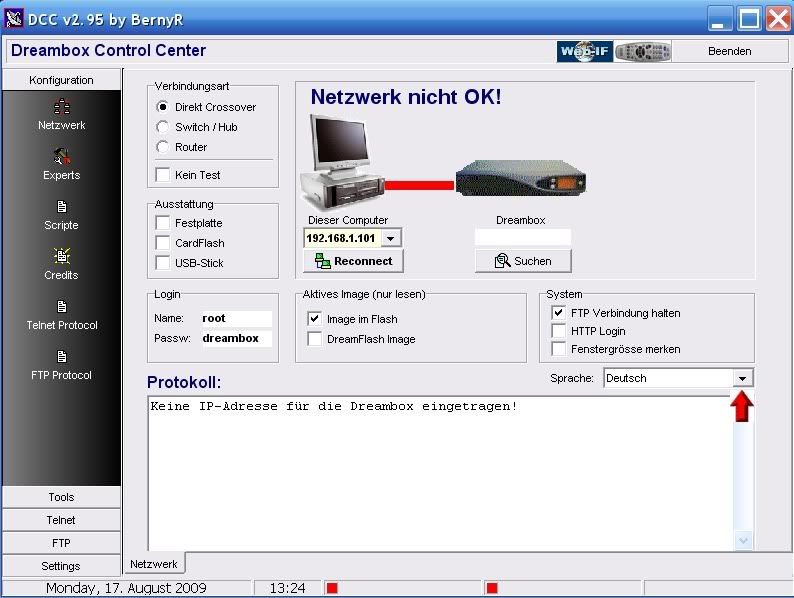


    Now we need to select your Network configuration, most of you will have a router so this will need to be selected.
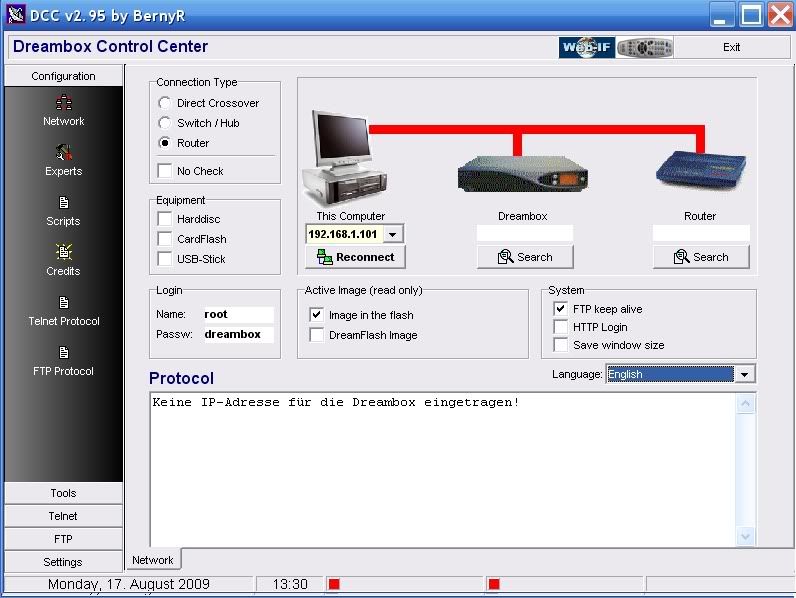


    At this point if you know your Dreambox and Router IP's enter them manually if not press the search button below the router and then the search button on the popup
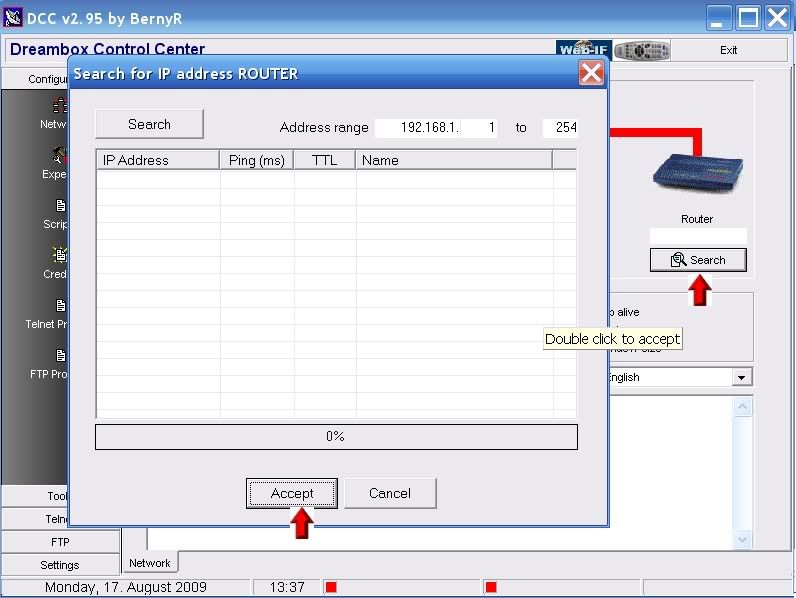


    When DCC has finished searching your router will normally be the lowest ip in a range so highlight it and press accept.also where is says 254 that can be changed to shorten or widen the search.
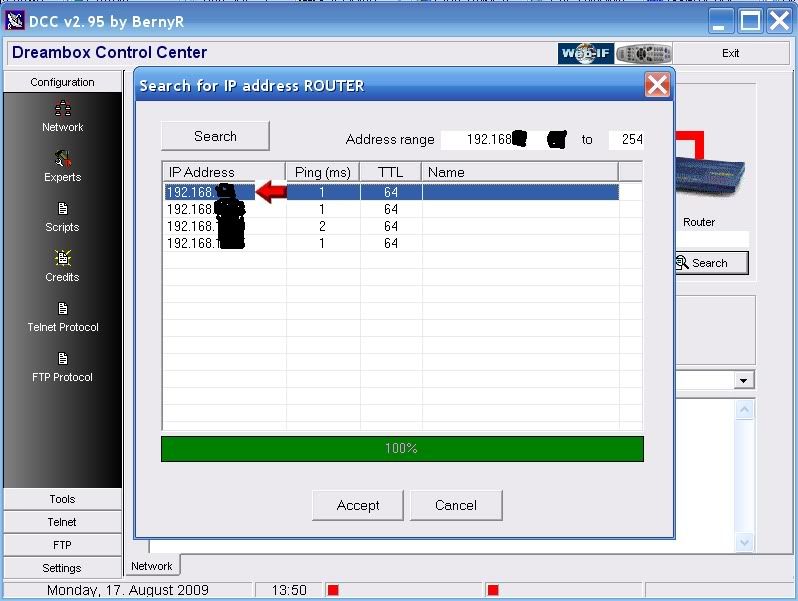


    You can now repeat this to find the Dreambox IP or use the following method.

    Menu-Setup-Expert Setup-Communication Setup.

    You'll see your IP at the top of the page make a note of this and enter this IP in DCC under the Dreambox ICON.

    Also untick the DHCP box so your Dreambox IP will never change and remain static.


    . After you have inserted the IP's click the reconnect button under the PC icon. If you have done this correctly all lines to the router and dreambox should now be green.


    DCC is now configured.
    Last edited by mtv1; 31 August, 2011, 00:10.


    >>>>>>>>>>Dreambox Tools<<<<<<<<<<
  • Lee_04
    Junior Member
    • Aug 2009
    • 21

    #2
    Hi,

    Followed all the steps above, but it seems the Dreambox still wont connect through Ethernet Cable, it "connects" for a second then disconnects.

    The Protocol says:

    Telnet Connected
    FTP Connected
    FTP Disconnected
    Telnet Disconnected

    AHH Please Help GOING MADDDD!!!

    Comment

    • andy91
      V.I.P. Member
      • Aug 2010
      • 3583

      #3
      Originally posted by Lee_04
      Hi,

      Followed all the steps above, but it seems the Dreambox still wont connect through Ethernet Cable, it "connects" for a second then disconnects.

      The Protocol says:

      Telnet Connected
      FTP Connected
      FTP Disconnected
      Telnet Disconnected

      AHH Please Help GOING MADDDD!!!
      Have you tried either Flashfxp or Fillzilla or any other ftp program?
      Sounds like to me that you havnt put in the correct network settings.
      What router are you using and what is the ip of your dreambox?

      Andy.
      New Members http://www.digital-kaos.co.uk/fo rums/f5/forum-rules-2/ A Good Place To Start

      Comment

      • mtv1
        The Stig PT
        • Apr 2008
        • 4413

        #4
        most likely password is wrong what image you using ??


        >>>>>>>>>>Dreambox Tools<<<<<<<<<<

        Comment

        • reddevil157
          DK Veteran
          • Jan 2010
          • 1427

          #5
          nice one stig, screams of "sticky" all over it m8
          sigpic

          Comment

          • Lee_04
            Junior Member
            • Aug 2009
            • 21

            #6
            Heyah!

            Figured it out, It was because I didnt disconnect the Ethernet and that prevented it going through the Router and making the connection. Thanks for all the advice tho!

            Comment

            • saj1985
              DK Veteran
              • Nov 2008
              • 785

              #7
              wicked guide mate, cheers!
              should be a sticky!
              Dreambox 800hd se/Dreambox 500s, 90cm Solid Dish, Tm2600 Motor, TM-1 Gold LNB!

              Comment

              • getsatgoing
                Junior Member
                • Sep 2009
                • 20

                #8
                hi, trying to connect dreambox to laptop with crossover cable and not uning a router, can anyone please tell me the settings i should have in the dreambox network settings section because currently the laptop wont recognise the dreambox via the dreambox control centre programme

                currently its

                IP 192.168.0.5
                b) Netmask: 255.255.255. 0
                c) Nameserver: pc ip address
                d) Gateway: pc ipaddress

                any help much appreciated

                Comment

                • monkey666
                  Newbie
                  • Sep 2012
                  • 4

                  #9
                  Great guide can I use this to connect to my dm500 which had a wifi dongle bridge ?

                  Comment

                  • engine007
                    Newbie
                    • Feb 2010
                    • 4

                    #10
                    When I open DCC and go into FTP, under the Commander tag, there are no folders shown, ie .tmp. The panel directly below the Commander tag just shows /
                    The green arrow dose not change anything!

                    How do I change this to get into the relevent folders ie .tmp .var .usr please?

                    Comment

                    • andy91
                      V.I.P. Member
                      • Aug 2010
                      • 3583

                      #11
                      Have you changed the ip settings to match your box?

                      Andy.
                      New Members http://www.digital-kaos.co.uk/fo rums/f5/forum-rules-2/ A Good Place To Start

                      Comment

                      • grogking
                        Member
                        • Jul 2010
                        • 69

                        #12
                        hi
                        for some reason my vu+duo running blackhole 2.0.7. has stopped connecting to DCC i have checked the ip on menu>setup>system>network>adaptor settings and the Ip matches the IP on DCC but it wont connect and i get an error saying error 10057 in function send socket is not connected

                        any ideas on why this is happening?

                        Comment

                        • digicon
                          V.I.P. Member
                          • Jul 2009
                          • 8261

                          #13
                          Originally posted by grogking
                          hi
                          for some reason my vu+duo running blackhole 2.0.7. has stopped connecting to DCC i have checked the ip on menu>setup>system>network>adaptor settings and the Ip matches the IP on DCC but it wont connect and i get an error saying error 10057 in function send socket is not connected

                          any ideas on why this is happening?

                          Try With VUCC (VU Control Centre) VUCC 0.7 - Downloads - Digital Kaos

                          Comment

                          • grogking
                            Member
                            • Jul 2010
                            • 69

                            #14
                            Originally posted by digicon
                            Try With VUCC (VU Control Centre) VUCC 0.7 - Downloads - Digital Kaos
                            i still get an error
                            access violation at address 0052B202 in module 'VUCC.exe'
                            rread of adress 00000000

                            Comment

                            • digicon
                              V.I.P. Member
                              • Jul 2009
                              • 8261

                              #15
                              Try a Full Reboot on the Router as in switch off from mains and leave for around a minute then switch back on, also try switching DHCP off on your box reboot the receiver and then switch it on again followed by another reboot.

                              Comment

                              Working...
