dreambox 500 hd

Collapse
X
 
  • Time
  • Show
Clear All
new posts
  • benny/9
    V.I.P. Member
    • Nov 2008
    • 1964

    #1

    dreambox 500 hd

    can i ask for views on this model does anyone
    have one or seen tests on them etc: i want to
    buy this model but just want to certain i get it right
    before i buy, i'm not interested in any clone model.
    Please Read Carefully!
    No Sky UK NDS Videoguard Hacking Discussions.
    Viewing Pay TV without a valid subscription is illegal
    the files available are kept for experimental & educational purpose only
    original vu duo2 /vu zero/ tm-nano-se. v-box / 36v /1.2 dish,
  • alunfennell
    V.I.P. Member
    • Oct 2008
    • 1525

    #2
    Hi Benny,

    I bought one just before the World Cup ! Loaded up Dream Elite and for 2-3 Days I had green screens and Crashing all the time ! (I thought Here we Go again ).

    Loaded up Gemini 5.0 and it has not crash once in three Months, Its the most stable receiver I have bought in years , Very Fat functionaly, Zapping etc.

    HD Picture running the Gemini Image it is crystal clear and by far better than the current 800HD, The Broadcom chip on the New Tuners makes a big Differance I suppose because the Main Processor is Broadcom as well ! the two are in tune with each other that little bit better, Fantastic Picture and Upscaling of SD is far beyond what my expectations were before buying it.

    Connected to a Esata HDD works realy well, for PVR function, Playback of Movies and Music pretty standard with some nice features of the Dreambox 8000 in Menu and functionality works realy well.

    The only Down side is there is no USB as standard, but a simple Mod and you can get at least two to function, one Internaly (I have WIFI stick Internaly Fitted )and the other on the rear of the case.

    In summary you are getting a Baby Dreambox 8000 as the Dreambox 500HD can not be put in the same class as the Current 800HD, Its a far superior bit of Kit and If the New 800HD-SE fails to impress & with a high Price for in theory two USB ports and a little screen the 500HD is the best of both options.
    **The Worlds Best Interactive F1 Strategy Game**
    sigpic

    Comment

    • benny/9
      V.I.P. Member
      • Nov 2008
      • 1964

      #3
      many thanks for the info alun. i had thought about the new 800hd
      as well as the 500hd but i think from reading your post i'm going to
      for the 500hd.
      Please Read Carefully!
      No Sky UK NDS Videoguard Hacking Discussions.
      Viewing Pay TV without a valid subscription is illegal
      the files available are kept for experimental & educational purpose only
      original vu duo2 /vu zero/ tm-nano-se. v-box / 36v /1.2 dish,

      Comment

      • gji25
        DK Veteran
        • Feb 2010
        • 353

        #4
        go for the 500hd as its a cracking box and as said above the hd is excellent on a full 1080pi lcd
        dm500hd -dm500hd v2-vu+duo- triax 1.1m - inverto lnb - technomate 2300 motor- linksys ddwrt router

        Comment

        • mapex
          Top Poster +
          • Jul 2010
          • 209

          #5
          I've had mine a few weeks now after having a 800hd
          clone the 500hd blows the clone away. Picture quality
          is 2nd to none, i really see the difference in quality.
          Had a few teething problems but its running sweet
          now and in quality i put it in the same team as my
          cyrus hifi.

          Comment

          • 215liverpool
            Member
            • Oct 2009
            • 69

            #6
            Originally posted by alunfennell
            Hi Benny,

            I bought one just before the World Cup ! Loaded up Dream Elite and for 2-3 Days I had green screens and Crashing all the time ! (I thought Here we Go again ).

            Loaded up Gemini 5.0 and it has not crash once in three Months, Its the most stable receiver I have bought in years , Very Fat functionaly, Zapping etc.

            HD Picture running the Gemini Image it is crystal clear and by far better than the current 800HD, The Broadcom chip on the New Tuners makes a big Differance I suppose because the Main Processor is Broadcom as well ! the two are in tune with each other that little bit better, Fantastic Picture and Upscaling of SD is far beyond what my expectations were before buying it.

            Connected to a Esata HDD works realy well, for PVR function, Playback of Movies and Music pretty standard with some nice features of the Dreambox 8000 in Menu and functionality works realy well.

            The only Down side is there is no USB as standard, but a simple Mod and you can get at least two to function, one Internaly (I have WIFI stick Internaly Fitted )and the other on the rear of the case.

            In summary you are getting a Baby Dreambox 8000 as the Dreambox 500HD can not be put in the same class as the Current 800HD, Its a far superior bit of Kit and If the New 800HD-SE fails to impress & with a high Price for in theory two USB ports and a little screen the 500HD is the best of both options.
            I agree with Alun Fennell. I put Gemini 5.0 on my DM500HD and it's been purring away nicely ever since. No probs

            Comment

            • benny/9
              V.I.P. Member
              • Nov 2008
              • 1964

              #7
              my dreambox 500hd arrived today and i need help
              getting it set up, first what cables do i need?
              i have a cat5 ethernet cable to connect to my router
              do i need a cable for the service connector this looks
              like a mini usb port, if i do what is it i need to buy?
              i have connected the receiver to the tv,dish etc but
              apart from a picture or the receiver that appears on the tv screen
              on boot up i cant get access to the menus etc. and does the receiver
              need to be flash first, before i try and set it up for sats and chns etc:
              i have tried Pressing and holding the power button. and Switched on
              with the power switch on the rear to get the next free DHCP IP address
              from my router but nothing happens, and i just wonder am i missing
              something obvious,
              Please Read Carefully!
              No Sky UK NDS Videoguard Hacking Discussions.
              Viewing Pay TV without a valid subscription is illegal
              the files available are kept for experimental & educational purpose only
              original vu duo2 /vu zero/ tm-nano-se. v-box / 36v /1.2 dish,

              Comment

              • alunfennell
                V.I.P. Member
                • Oct 2008
                • 1525

                #8
                What you need to update the firmware:

                You need a image for the DM 500HD that has the extension *. NFI.

                Connect your Dreambox to your Switch / hub / router.

                Turn off the dreambox, use the switch on the rear of the receiver.

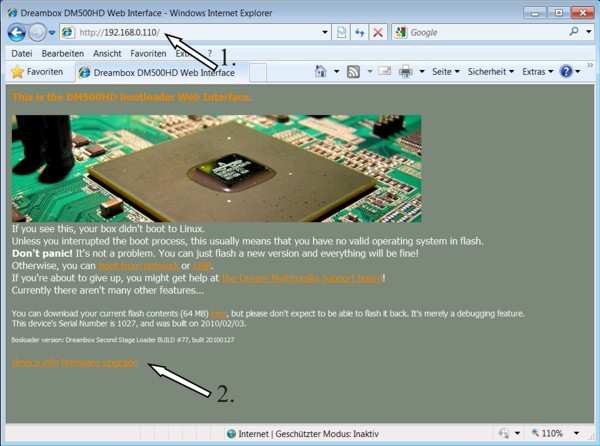
                1. Press the button on the front panel and hold it down with one hand Then turn on the Dreambox via the switch on the back with the other.
                3. your Dreambox now get the next free DHCP IP address from your router.

                Go to your Browser Firefox etc, Enter the Next IP address on your Router, if your PC IP address is 192.168.1.101 then the next will be 102 then 103 104 and so on

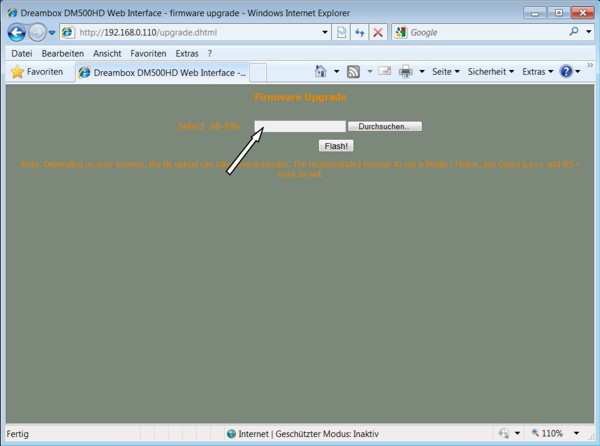
                This screen will then appear

                Select your Image

                And select Flash
                Last edited by alunfennell; 2 September, 2010, 01:10.
                **The Worlds Best Interactive F1 Strategy Game**
                sigpic

                Comment

                • shere
                  Member
                  • Apr 2008
                  • 57

                  #9
                  Where did you guys buy the dm500hd from?

                  Comment

                  • benny/9
                    V.I.P. Member
                    • Nov 2008
                    • 1964

                    #10
                    Originally posted by alunfennell
                    What you need to update the firmware:

                    You need a image for the DM 500HD that has the extension *. NFI.

                    Connect your Dreambox to your Switch / hub / router.

                    Turn off the dreambox, use the switch on the rear of the receiver.

                    1. Press the button on the front panel and hold it down with one hand Then turn on the Dreambox via the switch on the back with the other.
                    3. your Dreambox now get the next free DHCP IP address from your router.

                    Go to your Browser Firefox etc, Enter the Next IP address on your Router, if your PC IP address is 192.168.1.101 then the next will be 102 then 103 104 and so on

                    This screen will then appear

                    Select your Image

                    And select Flash
                    ***********************************************
                    hi alun.
                    can i ask do i need the usb cable connected from the mini port
                    on the box to the computer at the same time as the cat5 to the router,
                    next i get nothing when i hold the front button and turn on at the rear switch
                    the sat box turns and tv screen just stays black
                    i tried the ip ddress that was in the network section in the box menu
                    and it takes me to dreambox web control page not to the one you posted
                    that i need to load a image. also do i need to scan the sats and chns before
                    loading a image,
                    Please Read Carefully!
                    No Sky UK NDS Videoguard Hacking Discussions.
                    Viewing Pay TV without a valid subscription is illegal
                    the files available are kept for experimental & educational purpose only
                    original vu duo2 /vu zero/ tm-nano-se. v-box / 36v /1.2 dish,

                    Comment

                    • alunfennell
                      V.I.P. Member
                      • Oct 2008
                      • 1525

                      #11
                      Originally posted by benny/9
                      ***********************************************
                      hi alun.
                      can i ask do i need the usb cable connected from the mini port
                      on the box to the computer at the same time as the cat5 to the router,
                      next i get nothing when i hold the front button and turn on at the rear switch
                      the sat box turns and tv screen just stays black
                      i tried the ip ddress that was in the network section in the box menu
                      and it takes me to dreambox web control page not to the one you posted
                      that i need to load a image. also do i need to scan the sats and chns before
                      loading a image,

                      No you will never use the USB mini Port, and using Dreamup is not Required for Flashing.

                      But you can if it its easer for you:

                      Manual update firmware DM 500HD via mini-usb & Lan Network

                      Items required:
                      1) mini-usb male to male USB & Cat5 Network Cable


                      2) Universal DreamUP 1.3.3.5

                      Process:

                      1)Unplugged the Dream 500HD

                      2)We connect the cable for its part mini-usb port and "Service" of the Dream 500HD and the USB to a USB port on your PC and also the Lan Cable from your Router

                      3)Just plug it in, the PC will detect new hardware connected to the system:

                      4)The PC will ask the driver for this new component, Windows 7 will download the driver Auto

                      5)Open the Windows Device Manager, and you will see the new hardware installed, will appear as COM port (even a USB cable). In the following example, is recognized as the cable into the port COM4.


                      6)We opened the universal DreamUP 1.3.3.5 (for example) and select the update COM port (like any other model of Dreambox). At this point, we choose the COM port that we appeared in the previous step (COM4 in this example).

                      7)Press the Connect button the DreamUP universal and we can turn
                      the Dream 500HD to start loading new firmware.


                      So there are the Two ways to flash the Receiver, and Yes a Previous Copy of E2 Channel List is the best way to upload the Channel List, or you will have to scan each one Independantly.
                      **The Worlds Best Interactive F1 Strategy Game**
                      sigpic

                      Comment

                      • 215liverpool
                        Member
                        • Oct 2009
                        • 69

                        #12
                        Originally posted by shere
                        Where did you guys buy the dm500hd from?
                        I bought mine from dreamboxshop.co.uk.

                        It was ?319 but they are that much pretty much that price everywhere.

                        Best piece of electrical equipment that I have ever bought.

                        Comment

                        • benny/9
                          V.I.P. Member
                          • Nov 2008
                          • 1964

                          #13
                          Originally posted by 215liverpool
                          I bought mine from dreamboxshop.co.uk.

                          It was ?319 but they are that much pretty much that price everywhere.

                          Best piece of electrical equipment that I have ever bought.
                          *********************************************
                          so i got a good buy then from wizard ?290 and next day delivery
                          and now i have it more or less sorted i agree a great box,
                          Please Read Carefully!
                          No Sky UK NDS Videoguard Hacking Discussions.
                          Viewing Pay TV without a valid subscription is illegal
                          the files available are kept for experimental & educational purpose only
                          original vu duo2 /vu zero/ tm-nano-se. v-box / 36v /1.2 dish,

                          Comment

                          • benny/9
                            V.I.P. Member
                            • Nov 2008
                            • 1964

                            #14
                            Originally posted by alunfennell
                            No you will never use the USB mini Port, and using Dreamup is not Required for Flashing.

                            But you can if it its easer for you:

                            Manual update firmware DM 500HD via mini-usb & Lan Network

                            Items required:
                            1) mini-usb male to male USB & Cat5 Network Cable


                            2) Universal DreamUP 1.3.3.5

                            Process:

                            1)Unplugged the Dream 500HD

                            2)We connect the cable for its part mini-usb port and "Service" of the Dream 500HD and the USB to a USB port on your PC and also the Lan Cable from your Router

                            3)Just plug it in, the PC will detect new hardware connected to the system:

                            4)The PC will ask the driver for this new component, Windows 7 will download the driver Auto

                            5)Open the Windows Device Manager, and you will see the new hardware installed, will appear as COM port (even a USB cable). In the following example, is recognized as the cable into the port COM4.


                            6)We opened the universal DreamUP 1.3.3.5 (for example) and select the update COM port (like any other model of Dreambox). At this point, we choose the COM port that we appeared in the previous step (COM4 in this example).

                            7)Press the Connect button the DreamUP universal and we can turn
                            the Dream 500HD to start loading new firmware.


                            So there are the Two ways to flash the Receiver, and Yes a Previous Copy of E2 Channel List is the best way to upload the Channel List, or you will have to scan each one Independantly.
                            *********************************
                            thanks for the help alun i have the image flashed
                            i got it sorted this way, turn off and wait 30secs then hold
                            hold the front button for about 1 min then while holding the
                            button turn on and and hold for anouther 1 min release and
                            type the ip from the network section in the box menu in to
                            firefox and it went to the correct page then i flashed the box
                            now it's setting to work with a v-box and a 36v motor on diseqv 1.2
                            and get the sats and chns scanned
                            Please Read Carefully!
                            No Sky UK NDS Videoguard Hacking Discussions.
                            Viewing Pay TV without a valid subscription is illegal
                            the files available are kept for experimental & educational purpose only
                            original vu duo2 /vu zero/ tm-nano-se. v-box / 36v /1.2 dish,

                            Comment

                            • alunfennell
                              V.I.P. Member
                              • Oct 2008
                              • 1525

                              #15
                              Great to hear your up and running M8, What Image are you using ?
                              **The Worlds Best Interactive F1 Strategy Game**
                              sigpic

                              Comment

                              Working...