PLEASE HELP!..key problem

Collapse
X
 
  • Time
  • Show
Clear All
new posts
  • Bang
    Newbie
    • Feb 2010
    • 12

    #1

    PLEASE HELP!..key problem

    I have dm 500s gemini 4.7 i have installed new camd evocamd...
    I am sending the key file to var/tuxboxx/scce
    and the key files to var/key....but it doesnt work...I have tested with newcamd...the key files are [email protected] want too watch zee tv on hotbird 13...using dcc 2.95....

    WHATS WRONG! PLEASE HELP ME!

    i am going to be crazy....
  • kevin64
    Top Poster
    • Dec 2009
    • 170

    #2
    try scam 3.58 or mMgcam 1.35a i have just test here and working here
    TV Globo= 01
    Rai February
    Rai March
    MediaTech 4?W
    Fantasy channel (9?E)
    Add via2.6 keys Dorecel TV Satisfaction S1-S8 for scam
    key Update
    use these keys
    Attached Files

    Comment

    • Bang
      Newbie
      • Feb 2010
      • 12

      #3
      Can You explain for me where i should place the key in the Scam or mgcam....Please describe it in a very easy way for a dummy...must i put both key folder and scce folder to mgcam and same with scam...plz describe...

      can i download Mgcam 1.35 in gemini 4.7 or i need older
      version...

      can anyone kindly try Zee tv...if its works...Which gemini do you have?

      Comment

      • kevin64
        Top Poster
        • Dec 2009
        • 170

        #4
        looks to me as though you are putting them in the right place just open the folder and seen them to var/keys reboot cam or dreambox i donot use gem m8 but there all pretty much the same as any other image i no on gem if you use ccam that you also have to download cfg file as weell to make ccam work but not sure about other cams as say gemni used to bomb clone boxs so people stopped useing there images for that reson

        Comment

        • Bang
          Newbie
          • Feb 2010
          • 12

          #5
          Thank u my friend but it doesnt work for me...I tried with the both cams....very kind of you...

          In var/key files there was a file named "nagra_roms" I deleted the file and puted key files and puted scce files to scce and reeboted the box...I used dcc2,95

          What can be wrong...do i need something else...
          Which image do you use...please can you test zee tv with this files if you have time.

          After i puted the files and reeboted, how long time need i wait too the picture...I have only bougt the box too try with ZEE tv and Zee cinema on hotbirdl...

          THANKS A LOT!!!!!!!!!

          I am ready too flash another image or version...

          Comment

          • theGh0st
            Member
            • Mar 2009
            • 61

            #6
            Originally posted by Bang
            Thank u my friend but it doesnt work for me...I tried with the both cams....very kind of you...

            In var/key files there was a file named "nagra_roms" I deleted the file and puted key files and puted scce files to scce and reeboted the box...I used dcc2,95

            What can be wrong...do i need something else...
            Which image do you use...please can you test zee tv with this files if you have time.

            After i puted the files and reeboted, how long time need i wait too the picture...I have only bougt the box too try with ZEE tv and Zee cinema on hotbirdl...

            THANKS A LOT!!!!!!!!!

            I am ready too flash another image or version...
            You also have to restart the cam before it takes effect, I have attached a full keys and scce folder for you which includes the files that kevin64 posted.

            Hope this helps ya out.
            Attached Files
            System:
            DM7000s | 120gb HDD | Gemini 4.7 | 1m - Multi |
            SpiderBox 9000 HD | SKY+ HD

            System Cable:
            None

            System Broadband:
            Virgin Media 50mb
            ---------------------
            | Help is at hand. |
            ---------------------

            Comment

            • Manic01
              Banned
              • Dec 2008
              • 5117

              #7
              cccam 2.1.4 has the via 2.6 built in.

              Comment

              • Bang
                Newbie
                • Feb 2010
                • 12

                #8
                Originally posted by theGh0st
                You also have to restart the cam before it takes effect, I have attached a full keys and scce folder for you which includes the files that kevin64 posted.

                Hope this helps ya out.


                Thank u very much but it doesnt work...i tried with mg 1,35 and scam 3,58 and ccam 2,14....

                I puted the file too key folder and scce files too scce...but didnt work.....then i rebooted and restarted the cam....Please can you try if you can watch zee tv with this files...

                If you can find any other idea i am ready too try....

                Thanks a lot people....

                Comment

                • Bang
                  Newbie
                  • Feb 2010
                  • 12

                  #9
                  Very strange...Am i missing something???
                  I tried with pli jade 3 too but without results...I tried too watch boomerang and tv1000 on 13e...but they didnt work too....

                  I lost 4 hours today without results...so come with new idea...Very thankful to people who wants help other people...

                  Comment

                  • kevin64
                    Top Poster
                    • Dec 2009
                    • 170

                    #10
                    load a nabloi image on m8 and once you downloaded your cam to image press the bule button then the red button it will download and unpark your keys to the right folders n your dreambox thats easy way for you if you cant work it out

                    Comment

                    • kevin64
                      Top Poster
                      • Dec 2009
                      • 170

                      #11
                      Thanks to FERRET for this post
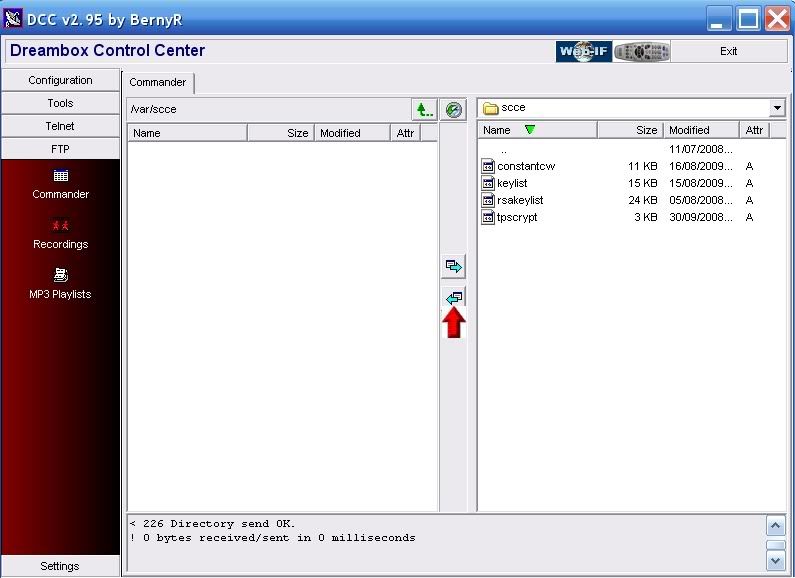
                      Manually Transfer Keys To Your Dreambox


                      1. Extract the keys of your choices to a folder

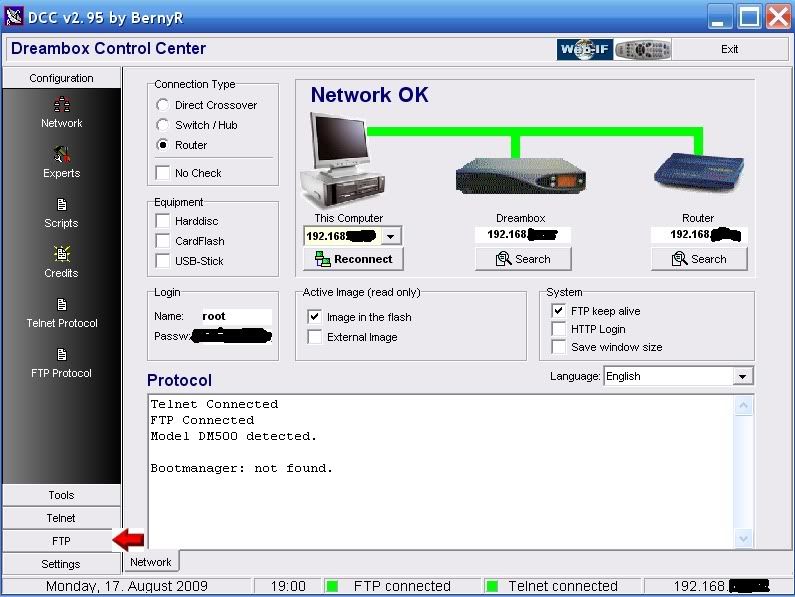
                      2. Start DCC295 and click on the FTP tab.


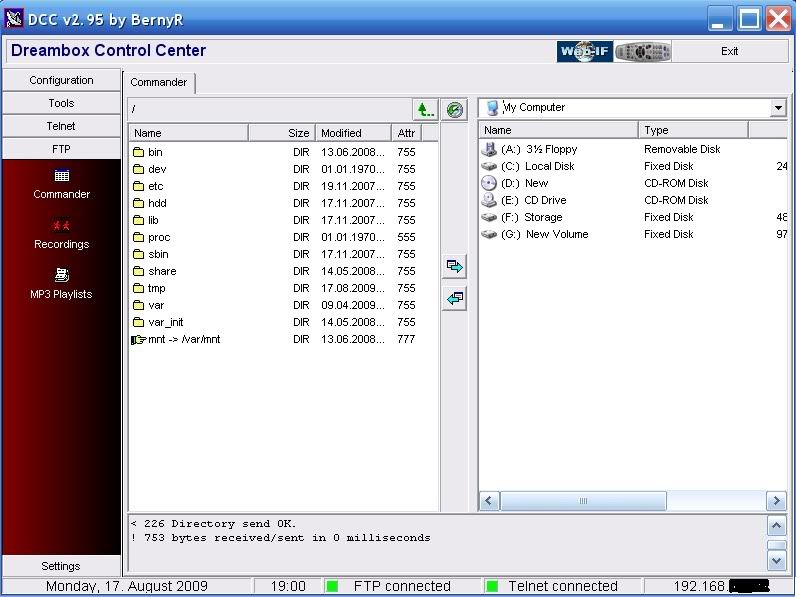
                      3. In the Left hand window of DCC you will see the folders on your Dreambox and in the right hand window the folders on your PC.


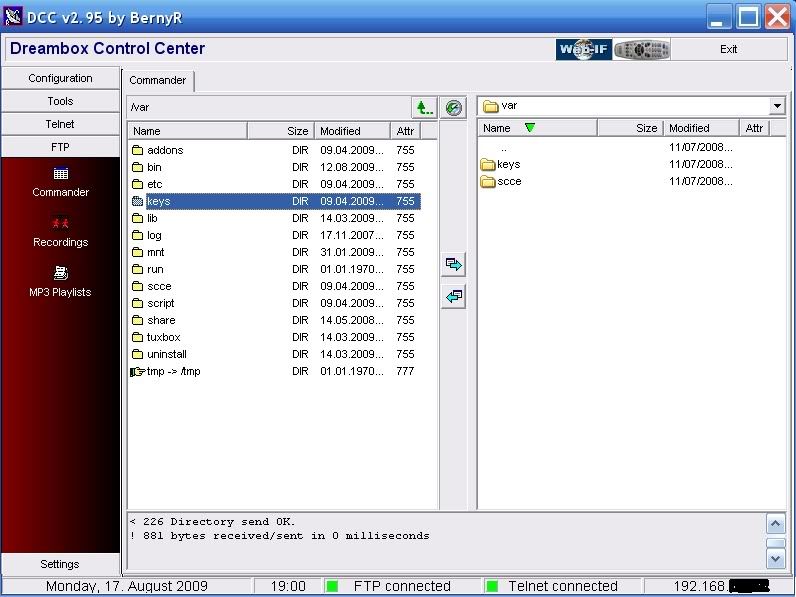
                      4. In the right hand window off DCC navigate to where you extracted your Dreambox keys go in one level so you can see the keys and scce folders and in the left hand window navigate to var/keys.


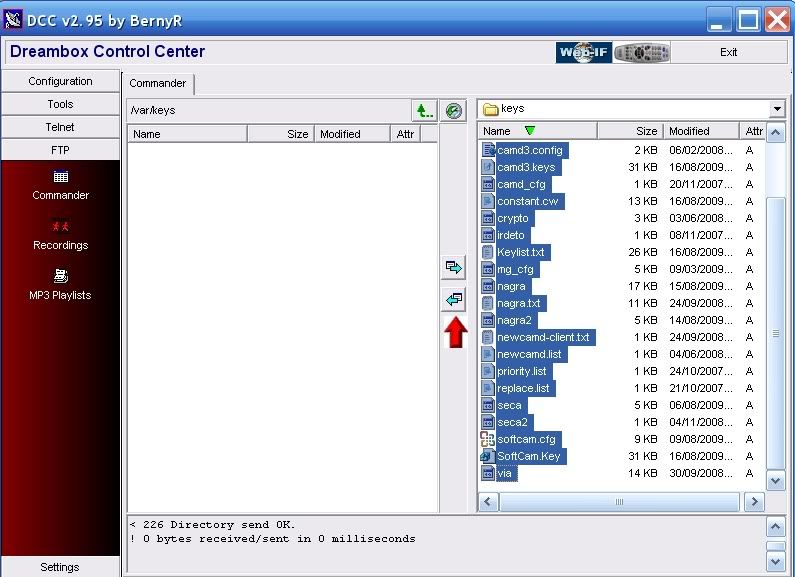
                      5. In the right hand window enter the keys folder and select them all. Now press the Transfer arrow to transfer the files over to var/keys in the right hand window.


                      6. Now go up a level in both window so you have var/scce in the left hand window and enter the scce folder in the right hand window. Now press the Transfer arrow to transfer the files over to var/scce in the right hand window.


                      7. Now reboot your Dreambox Menu-shutdown-reboot now.

                      Job done

                      Ferret
                      __________________

                      Comment

                      • Bang
                        Newbie
                        • Feb 2010
                        • 12

                        #12
                        Originally posted by kevin64
                        load a nabloi image on m8 and once you downloaded your cam to image press the bule button then the red button it will download and unpark your keys to the right folders n your dreambox thats easy way for you if you cant work it out

                        Thank u very much for the pic but i have already read this before and did exactly many many times....
                        Do you have any download link too nabilo image? which version? I have dm500s clone....which cam should i install? WHAT IS M8???

                        How i did with gemini and pli...

                        1. I flashed with dream up...

                        2. connected receiver too sat and choosed options 3 with diseq...the rotor doesnt work with dm500s because i think it is old 10 years nokia rotour...and searched on 13e and could watch fta channel...

                        3.i press bluepanel and communication is ok, i use netgear router..and goes too addons menu and installed cam only, no other configarations....i selected the cam to use...

                        4. I open the dcc 2.95 and there are green on communications...i goes to ftp and send the file as like the pic....i reebot and restart the cam...still no picture...

                        Comment

                        • kevin64
                          Top Poster
                          • Dec 2009
                          • 170

                          #13
                          http://www.dreamboxtool.com/Nabilosa...500-.htmlheres a nabloi image network your dm online once you loaded image

                          Comment

                          • Bang
                            Newbie
                            • Feb 2010
                            • 12

                            #14
                            The page has been removed...The page connecting too new page with many images and many models...


                            Which version??
                            Can i flash nabilo image with dreamup??

                            Comment

                            • kevin64
                              Top Poster
                              • Dec 2009
                              • 170

                              #15
                              Download Nabilo V08 MAXVAR for DM500 , Nabilo V08 MAXVAR for DM500 Download

                              Comment

                              Working...