
I have two DB800Se boxes and both work fine and have the BlackHole image on both. I am using one as a spare. I thought I would try a different image on the spare, so held down the start button until it showed 192.168.0.12. I then opened Firefox and used the browse to find the image, clicked flash (DreamEliteBH_DM800_133D.nfi) then nothing. I waited an hour and tried again with no AV or firewall. Still nothing. Tried IE 10 then Chrome. Always the same, it just sits with no image being uploaded. Any help appreciated
-
-
your box will be the same as this to flash bud should take 5mins to flash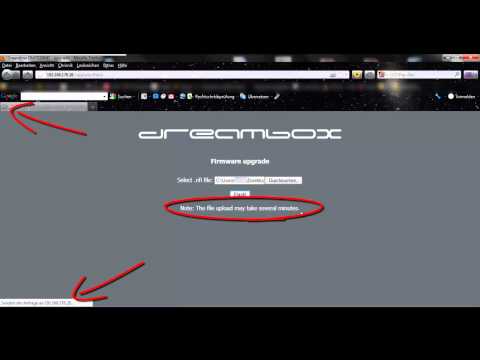
-
That is what I have been trying but there is no indication of movement at either the top left of the browser or the bottom left. Where those red arrows point. I can leave it for 30 mins and nothing. That was why I dropped the AV and Firewall because it looked like it was being held back. I have done this many times in the past but have never come across this problem. I was initially trying a new image but all I am trying to do now is reflash with the same blackhole that is already on the box.Comment
-
i dont know what to suggest then mate hopefully someone with knowledge will help you out.are you unraring the file?maybe try another pc or laptop.Comment
-
Try connecting the usb from dm to pc then flash it..Comment
-
How do I go about this ? I have never heard of that beforeComment
-
how to update the dreambox dm800 hd se dm800hd se - YouTube do what you did before but withe usb connected .Comment
-
I will give that a try tomorrow. That looks like the same as using the serial port procedure with a null modem cable doesn't it ? I have one of those.Comment
-
m8 i thing its Firefox i had this problem befor and then use Internet Explorer it work fine or try latest firefox 23.0.1 this work for me it should work 4 uComment
-
I have the latest Firefox and the latest (10) IE and Chrome. I have tried them allComment
-
Are you using home plugs? Or wireless? If so replace with Ethernet cable, if that don't work connect Ethernet straight from PC to dreambox and try getting an i-p like that
Comment
-
I had it wired for this operation like so. Ethernet from router to Dreambox and Ethernet from Router into Ethernet port at the back of the PC. I am seeing an ip address when I stop the box. It shows as 192.168.0.12. It is only when I click "Flash" that it just waits. I have left it for an hour but nothing happens.Comment
-
hi m8 try flashing this ssl firstif i helped hit the thanks btnComment
-
Well I went back to the beginning.
I was getting nowhere on Windows 8 and IE or Firefox or Chrome. No AV or Firewall.
So I looked out an old hard drive, Installed Windows 7.
I flashed the dreambox first go !!!
I have no idea why this was happening on Win 8 but the next time I format and reinstall Windows 8, I will try flashing the box again on a bare bones system.
Thanks all, for your time and patienceComment


Comment