how to set up wireless dm800se?

Collapse
X
 
  • Time
  • Show
Clear All
new posts
  • cboyer
    Senior Member
    • Feb 2012
    • 271

    #1

    how to set up wireless dm800se?

    hi peeps just got my new box its a sim210 and im running SIM2 backup uk OpenPLi-4.0-beta-dm800se #ssl84d

    when i bought the box i paid an extra 5 quid to add wireless but i aint got a clue how to set it up wireless?

    i have been using google and trying to read up but they all seam to be talking about usb dongles etc?

    any advice would be hugely greatfull as once i got this sorted then everything is working perfectly as love this image etc
    "I've got it made. I've got a wife and a TV set -- and they're both working."
  • mtv1
    The Stig PT
    • Apr 2008
    • 4413

    #2
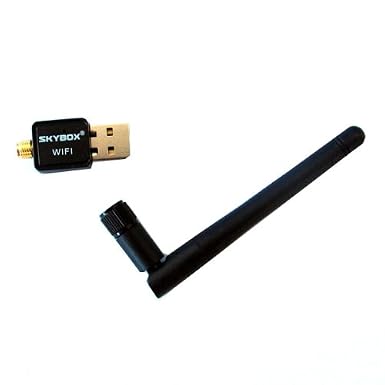
    does it have one of these on it ??


    if so go to network setup change the lan setting to wireless put the wireless key in { make sure you put wpa or wpa2 depending on what your router is set up for )


    >>>>>>>>>>Dreambox Tools<<<<<<<<<<

    Comment

    • lombard
      DK Veteran
      • Aug 2008
      • 793

      #3
      Originally posted by mtv1
      does it have one of these on it ??


      if so go to network setup change the lan setting to wireless put the wireless key in { make sure you put wpa or wpa2 depending on what your router is set up for )
      i have that wifi dongle on dm800se with openpli 4.0 , it works but its not fully compatible , glitches , the signal is out of 72, when it should be 100, i used same wifi in normal dm800 with openpli 3.0 and works perfect in extact same location , and gives signal out of 100, so dont think the drivers are right in openpli 4.0 for this dongle

      Comment

      • mtv1
        The Stig PT
        • Apr 2008
        • 4413

        #4
        invest in home plugs mate best way out if wifi is poor

        Buy TP Link 500MBPS Twin Nano Powerline. at Argos.ie- Your Online Shop for .

        thats my local argos look closer to home


        >>>>>>>>>>Dreambox Tools<<<<<<<<<<

        Comment

        • southpaw
          V.I.P. Member
          • Dec 2009
          • 2233

          #5
          that image has all the wifi drivers removed, as per the details in the thread, you can re-download them , or maybe a simple software update (menu-setup-software update) may re-install them,
          NOTE !
          You can use the update function, but if the PLi team switches to a new driver or ssl you may end up with a non functional box (which is an easy fix).
          or as above, pick up a cheap set of homeplugs, seen them for as little as ?15, and gives a solid wired connection,

          Comment

          • cboyer
            Senior Member
            • Feb 2012
            • 271

            #6
            thanks peeps yes it is the same as in the pics but when i try to turn on the wireless on the box it says i dont have the wireless plug in but i wouldnt know which is the correct plug in to get?

            southpaw i do have a couple of home plugs they are these http://www.amazon.co.uk/TL-PA251KIT-...meplug+tp+link im just wondering if i could buy 1 more that would link up to those? as the others are used for xbox
            "I've got it made. I've got a wife and a TV set -- and they're both working."

            Comment

            • southpaw
              V.I.P. Member
              • Dec 2009
              • 2233

              #7
              Originally posted by cboyer
              thanks peeps yes it is the same as in the pics but when i try to turn on the wireless on the box it says i dont have the wireless plug in but i wouldnt know which is the correct plug in to get?

              southpaw i do have a couple of home plugs they are these TP Link TL-PA251KIT AV200+ Multi-Streaming Powerline Starter Kit with AC Pass Through (UK Plug Only): Amazon.co.uk: Computers & Accessories im just wondering if i could buy 1 more that would link up to those? as the others are used for xbox
              I believe you can add additional plugs to your network, however there is no industry standard so you will need to check the specs as some manufacturers plugs aren't compatable with others

              Comment

              • cboyer
                Senior Member
                • Feb 2012
                • 271

                #8
                thanks a lot mate i might try and do an update then 1st see if it works if not i can always reflash the image then buy an extra homeplug
                "I've got it made. I've got a wife and a TV set -- and they're both working."

                Comment

                • cboyer
                  Senior Member
                  • Feb 2012
                  • 271

                  #9
                  did an update and seams fine it has changed my bootup screen but it is smart . I will set up wireless soon just waiting for little lad to watch in the night garden

                  :edit still doesnt have the wireless lan plugin so just going to buy a new homeplug
                  Last edited by cboyer; 2 January, 2014, 20:00.
                  "I've got it made. I've got a wife and a TV set -- and they're both working."

                  Comment

                  • lombard
                    DK Veteran
                    • Aug 2008
                    • 793

                    #10
                    the update dont make any difference, when using same stick on Vix 3.0 image on vu solo you can download wifi drivers for difference usb sticks and it works perfect on that image, shame vix aint made for dreamboxes

                    Comment

                    • cboyer
                      Senior Member
                      • Feb 2012
                      • 271

                      #11
                      i know mate i only hear good things about those vix images
                      "I've got it made. I've got a wife and a TV set -- and they're both working."

                      Comment

                      Working...