If this is your first visit, be sure to
check out the FAQ by clicking the
link above. You may have to register
before you can post: click the register link above to proceed. To start viewing messages,
select the forum that you want to visit from the selection below.
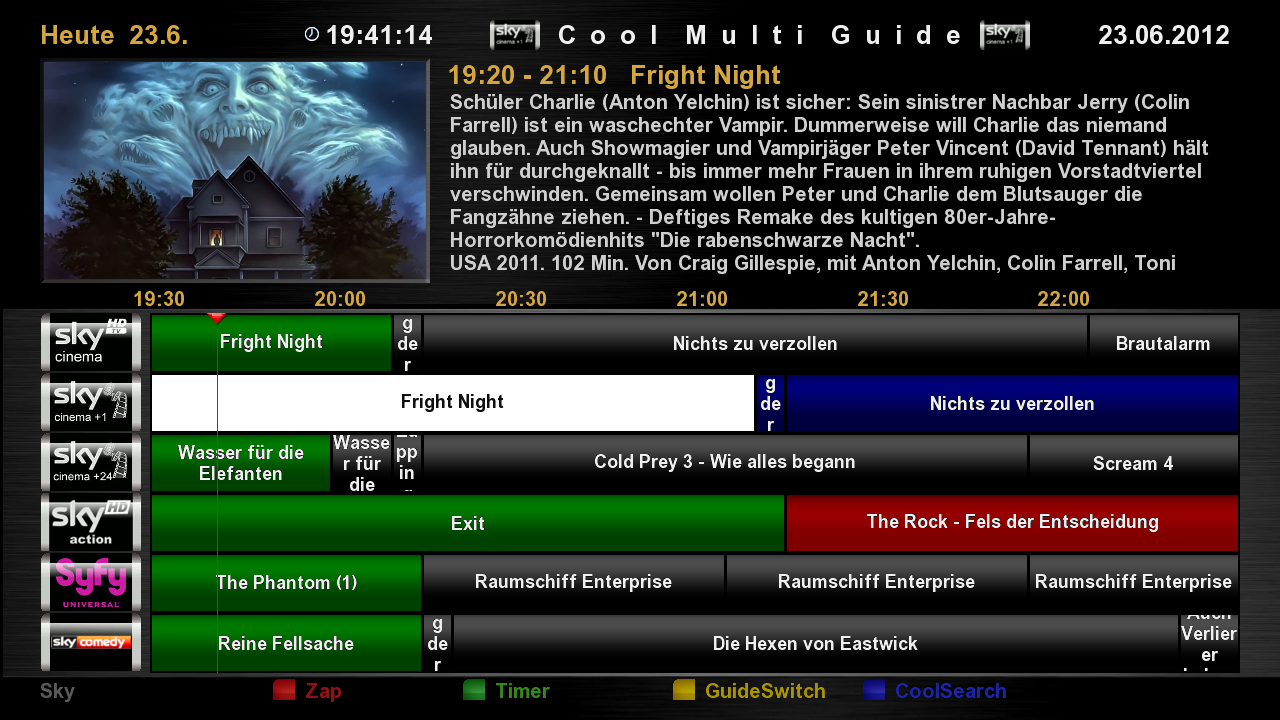
downloaded latest cool tv guide from website but want to know how to get the icons on the side as it shows on the website page (picture below of what I mean, on left hand side where says sky cineme etc )
Dont take this the wrong way but would you like someone to call round to your house and do this for you.
Dougalmcd and cactikid have pretty much explained what you need to do to get what you call Icons to match the Channel ident.
1. you will need a USB stick placed into the rear of your box with a Folder called 'picon' inside it
2. do a search for the 'Picons' (Channel Icons) for what ever satellite you want say 28.2? east for instance
3. place these inside the 'picon' folder on USB stick and reboot your box making sure that the USB stick was correctly mounted in the first place.
Dont get me wrong here but with this thread and your other asking about streaming on a Vu Solo2 might i suggest that you so call walk before you can run or you are in danger of information overload.
You need to Grasp the basics of a Linux receiver and understand it's working's before you go leaping into unknown territory.
Dont take this the wrong way but would you like someone to call round to your house and do this for you.
Dougalmcd and cactikid have pretty much explained what you need to do to get what you call Icons to match the Channel ident.
1. you will need a USB stick placed into the rear of your box with a Folder called 'picon' inside it
2. do a search for the 'Picons' (Channel Icons) for what ever satellite you want say 28.2? east for instance
3. place these inside the 'picon' folder on USB stick and reboot your box making sure that the USB stick was correctly mounted in the first place.
Dont get me wrong here but with this thread and your other asking about streaming on a Vu Solo2 might i suggest that you so call walk before you can run or you are in danger of information overload.
You need to Grasp the basics of a Linux receiver and understand it's working's before you go leaping into unknown territory.
Regards
can I put on box hard drive instead as don't want to have to leave usb in all the time



Comment