Guide: How to use FlashFXP to FTP to your Dreambox

Collapse
This is a sticky topic.
X
X
 
  • Time
  • Show
Clear All
new posts
  • matski303
    Newbie
    • Jul 2008
    • 2

    #61
    ftp problem

    i cant connect
    i think whoever flashed the box may have changed the username and password so only they could fix it ?????????

    any idea how i can check the username/password or reset them?

    i have also tried dreambox control center to try and ftp
    see image
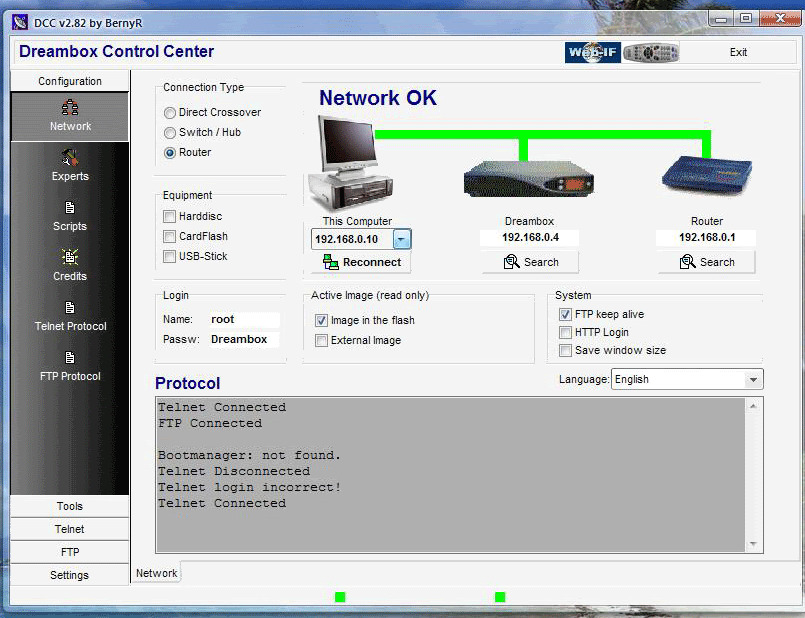

    look like networks ok but wont log in?
    any ideas

    Comment

    • witko
      Member
      • Jul 2008
      • 52

      #62
      hi chaps ftp the new files over to box all seemd to go fine but still cant recieve scrambled channels , rebooted box ,went to premium ch amd waited ,nothing tried again ,same as before ,any hints please

      Comment

      • Devilfish
        Administrator
        • Feb 2008
        • 7872

        #63
        @matski303, the password is 'dreambox' not 'Dreambox'.

        @witko,

        Download the files from here....

        RapidShare: Easy Filehosting

        Empty the contents of the /var/keys and /var/scce on your box. Copy the contents from the keys folder to the keys folder on the box and same with the scce folder. Go to sky sports 1 and reboot box. When it reboots, go to sky sports 2 then back to sky sports 1....wait....wait...wait....there you go . See how that goes.

        Comment

        • witko
          Member
          • Jul 2008
          • 52

          #64
          tried to night again still no joy, tried overwriting the files,and trans the new ones still nothing ,how do you empty the old files from the box ,didnt want to delete them in case I made a right bo@@ox of it ,so still in limboland any help would be much appreciated ,thanks

          <--witko added 1 Minutes and 50 Seconds later...-->

          oh just one more thing can you flash any image using dreamup
          Last edited by witko; 23 July, 2008, 21:15. Reason: Automerged Doublepost

          Comment

          • matski303
            Newbie
            • Jul 2008
            • 2

            #65
            Originally posted by Devilfish
            @matski303, the password is 'dreambox' not 'Dreambox'.
            cheers for the help devilfish but i had tried dreambox,Dreambox,dbox,Dbox
            the list goes on .... but i shouldnt have posted that image without checking the password was at default ... Doh!!!!
            the main reason was just to show you that the network was ok

            as it turned out whoever flashed the box changed the password so only he could fix it ...idiot ????????????

            ive manage to install a really great image and my d 500c is purring like a kitten!! still cant get it to ftp in flash fxp tho hmmmmm

            anyways i can ftp with dcc no prbs now if needed so all is well

            Comment

            • ttcube
              Newbie
              • Aug 2008
              • 11

              #66
              Originally posted by thommo
              right ive seen too many people thinking that they need to add a new image, nothing is further from the truth, you only need to add the new fix file to your old image.

              now im presuming that some people might find the idea of flash fxp (ftp) a bit daunting if they have not used it before so heres a little help.

              this is based on my set up of pc/router/dreambox . pc goes to router,dreambox goes to router (note the ethernet lead port on the back of your dreambox.)


              right to start we need to fire up flash fxp, it will look like this once you start it.


              once its opened you will see on the right hand box a sybol that looks like a thunder strike, click on that then quick connect and you will see a box like this.


              right at this part you need your ip addy of your dream box, to find this go into the menu on your dreambox, scroll to setup then scroll down to expert setup,then communication setup, theres your dream box ip, write it down and go back to your flash fxp.

              enter your ip into the server or url box.
              under user name enter root
              under password enter dreambox
              click connect.

              presto a list of files from your dreambox should appear in that right hand box that looks like the pic below, you are connect to your dream, good job!!.


              now we need to navigate to var, look down that list of files in the right hand box till you see var, click on it, now you should see a list of new files, look down that list and you will see keys, click on that, again a new list of files will appear like this.


              now we need to add the new file for the fix.

              so now look into the left hand box in flash fxp these are places on your pc, you need to navigate to the place you downloaded the fix file to (if its easier leave the unrared/un zipped file on your desktop), once you have found the file select it by clicking on it, once selected right click on it with your mouse and a drop down box will appear, at the top of that box you will see the words transfer. click on that and it will show a pop up box saying something like overwrite same content, select yes (this overwrites the old file with the fix file.


              once this is done shut down the fxp software and reboot your box and or emu.

              congrats you,ve just fixed your box and not spent a penny doing it.
              Thanks thommo and all the kaos members at first l was saying these guys are crazy how can they say its easy as ABC but hey after a few days l have done the ftping thingy.Thanx once again yo help is much apreciated.

              At first it was saying failed to connect all the way.Wat made me fail more was that l was scared to ask coz already some people where calling others dummies of which it was hard to take though educating in a way that if yu learn the hard way it will make it easy for yu on the long run if yu are to face a similar problem .

              Comment

              • wert2009
                Newbie
                • Aug 2008
                • 14

                #67
                hi

                got it conneted to my rooter but no luck wont connet to d box 2 ip adress
                does it work with dbox2 and sagems
                Last edited by wert2009; 19 August, 2008, 19:28.

                Comment

                • piggy
                  Newbie
                  • Sep 2008
                  • 4

                  #68
                  hi guy,

                  I've read the above but still not sure what ip address go where?


                  Microsoft Windows XP [Version 5.1.2600] (C) Copyright 1985-2001 Microsoft Corp. F:\Documents and Settings\Darrin>ipconfig/all Windows IP Configuration Host Name . . . . . . . . . . . . : lmp-8ee2c7ea170 Primary Dns Suffix . . . . . . . : Node Type . . . . . . . . . . . . : Unknown IP Routing Enabled. . . . . . . . : No WINS Proxy Enabled. . . . . . . . : No Ethernet adapter Local Area Connection 2: Connection-specific DNS Suffix . : Description . . . . . . . . . . . : Marvell Yukon 88E8056 PCI-E Gigabit Ethernet Controller Physical Address. . . . . . . . . : 00-1A-92-9C-DB-ED Dhcp Enabled. . . . . . . . . . . : Yes Autoconfiguration Enabled . . . . : Yes IP Address. . . . . . . . . . . . : 77.97.73.158 Subnet Mask . . . . . . . . . . . : 255.255.255.0 Default Gateway . . . . . . . . . : 77.97.73.1 DHCP Server . . . . . . . . . . . : 62.31.176.116 DNS Servers . . . . . . . . . . . : 62.31.176.39 194.117.134.19 195.188.53.175 Lease Obtained. . . . . . . . . . : 14 September 2008 09:13:14 Lease Expires . . . . . . . . . . : 18 September 2008 07:47:43 Ethernet adapter Local Area Connection: Connection-specific DNS Suffix . : Description . . . . . . . . . . . : Marvell Yukon 88E8001/8003/8010 PCI Gigabit Ethernet Controller Physical Address. . . . . . . . . : 00-1A-92-9C-D9-F9 Dhcp Enabled. . . . . . . . . . . : No IP Address. . . . . . . . . . . . : 192.168.0.24 Subnet Mask . . . . . . . . . . . : 255.255.255.0 Default Gateway . . . . . . . . . : F:\Documents and Settings\Darrin>

                  <--piggy added 5 Minutes and 36 Seconds later...-->

                  yippe yippeeeee i've done it
                  Last edited by piggy; 14 September, 2008, 11:16. Reason: Automerged Doublepost

                  Comment

                  • scuba
                    Top Poster
                    • Sep 2008
                    • 198

                    #69
                    hello thanks for the post,done everything as u said can see the dream directory with flashfxp but it won`t allow me to transfer any files to it?? is there some sort of a block on a dream that i have to take off??

                    Comment

                    • Devilfish
                      Administrator
                      • Feb 2008
                      • 7872

                      #70
                      You can only transfer files to the /var and /tmp folder, all other folders are read-only. Where are you trying to transfer files?

                      Comment

                      • scuba
                        Top Poster
                        • Sep 2008
                        • 198

                        #71
                        Originally posted by Devilfish
                        You can only transfer files to the /var and /tmp folder, all other folders are read-only. Where are you trying to transfer files?
                        trying to transfer keys,var_init folder then in to keys nothing happens

                        Comment

                        • scuba
                          Top Poster
                          • Sep 2008
                          • 198

                          #72
                          was trying to drag and drop them just as it says in total spoonfed newbies guide to dreambox 500c, nothing happened just keeps on failing so i don`t know how did he managed to do it?? But just as u said did get the keys and scce folder in to tmp folder in my dream can u tell me how to get them in to wright dir ??
                          Last edited by scuba; 29 September, 2008, 14:46.

                          Comment

                          • Devilfish
                            Administrator
                            • Feb 2008
                            • 7872

                            #73
                            The files go in /var/keys and /var/scce, not /var_init.

                            Comment

                            • scuba
                              Top Poster
                              • Sep 2008
                              • 198

                              #74
                              Originally posted by Devilfish
                              The files go in /var/keys and /var/scce, not /var_init.
                              all done restarted box, on sky sports for the past 15 minutes and nothing is clearing
                              Last edited by scuba; 29 September, 2008, 17:59.

                              Comment

                              • Devilfish
                                Administrator
                                • Feb 2008
                                • 7872

                                #75
                                So you've done the following?

                                Delete everything from /var/keys and /var/scce.
                                Download the files from RapidShare: Easy Filehosting
                                Copy the contents of the keys folder to /var/keys
                                Copy the contents of the scce folder to /var/scce
                                Go to Sky sports 1
                                Press MENU > SHUTDOWN > reboot now
                                Wait when it reboots for a few mins

                                Comment

                                Working...