
I tried but nothing!!
-
-
Does anyone know who created the program 'Jtagdm500.zip'Comment
-
That Will Be Great Have To Check That.
================================================== ============================
Universal Bootloader downloader
- Version : 1.4
- Release date : 04/20/2008 (EU)
- Available models :
dm500 DMM Dreambox 500s
- Usages : jtag -m model [-t #] [-c] [-h]
-m model : select model ( dm500)
-e xx:xx:xx:xx:xx:xx change dm500 MAC Address [00:09:34:AA:0B:CC]
-d [alps(defalut) | philips | terr] change dm500 tuner type (caution!)
-i Prints Configuration Area and exits
-t # : time out. # is number. default is 1
-X : Delete the whole flash
-c : check flash after program
-h : show this help message
================================================== ============================
jtagdm500 -m dm500 -e 00:09:34:1c:2c:3c -c
jtagdm500 -m dm500 -d philips -e 00:09:34:1c:2c:3c -cComment
-
Tested And Working Great, Made 3 Boxes. Better Than "jtag_windows",
But Take's 5-6 Min's,.Last edited by zubair4148; 1 May, 2008, 13:46.Comment
-
Hello all,
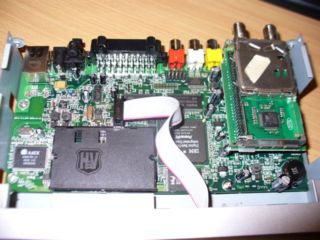
I have loaded the bootloader without a hitch and am having trouble identifying the tuner. Could anyone please identify this tuner?
Comment
-
Was the tuner like that when you removed the lid?they normallly have a metal cover on.
On top of the metal cover is a sticker,original dreams had alps/phillips tuners.Clones had phillips tuner stickers but who knows what make the tuner is?Checkout the RED stickies massive amount of info and effort been put into them.Comment
-
Thanks for the reply.
Actually, that is not my receiver, I was searching and searching for an answer and stumbled across that picture which is an exact representation of my tuner. That is exactly how it looks as I removed the cover. And, now I see that I'm not the only one with one. I bought my Dreambox beleiving whole heartedly that it was genuine, but alas, you see the results.Comment
-
Do you need to identify the tuner to jtag?dunno if thats your intention?I've got an original and clone,both are stickered with Philips tuner,and the cover extends the length of the tuner.
As for clones they work ok,just dont agree with people selling them as originals at original prices.
Also worthy of note the 500 production stopped well over 12mths ago.Checkout the RED stickies massive amount of info and effort been put into them.Comment
-
hi
if you connect your dm to jtag and use jtagdm500 you see if the tuner is alps or philps like this
--------------------------------------------------------------------------
C:\Jtagdm500>jtagdm500 -m dm500 -i
Dreambox Dm500 board initialize
Flash info. : INTEL JS28F640J3D75
[dm500] reading CA:03 ff 07 ff 0f ff 1f ff 3f ff 7f ff ff ff 00 10
[CA] Ho Ho! CloneWARS corrupted bootloader eh?! consider getting a IPBOX!
Readed Config Area
Configuration Area
Mac Address: 00:09:34:aa:0b:cc
Redunderant Mac Address: aa:0b:cc
Tuner Type alps
--------------------------------------------------------------------------Comment
-
Hello,
as many of you I had my bootloader erased. I failed to get it reflashed using the windows SW .
.
I just found this forum and this DOS tool
Hope it will make it better... thanks for sharing it anyway!
Comment
-
Hello again,
this is progressing very well: I got it back alive, but still need to fix the MAC address problem.
I managed to flash it with the Windows utility, following tips listed here: Dreambox Guides, Tips & Hints
It really described how to do it, and in my case worked at the first try!
I had found some mac address generator tool, that would generate some image with correct mac address burnt inside, but the generated images don't boot on my boot. So I'm gonna give it a try to the other DOS tool, once I have downloaded it.Comment
-
do u have a satellite or cable dm500,
what tuner do you have? did you try generating a mac using both tuner types? and it still didnt boot up?Comment
-
In the meantime, I also found this post on another forum: http://www.cardsharing.biz/forum/showthread.php?t=15870
Has anyone ever tried/known this? With success?Yes, some DreamBox 500S from Chinese are using the same MAC address in spite of the problem appear after
I did not try this procedure personally; hope it will help you?
- You need to download using "Blue panel" the plug-in of "qSUB" and install it, after the MAC update you can remove it.
- Using DCC or similar software you need to browse to /var/etc and you will find file name "init", than you need to edit the two line bellow with your new MAC you wish to change.
"ifconfig eth0 down hw ether 00:12:25:2f:78:89
ifconfig eth0 up "Comment
-
I believe I have an issue with the DOS utility.
I tried following the recommendations to change the MAC address, but when I run the following command:
it displays this and then CPU goes to 100% occupancy and nothing happens for several minutes ....C:\tmp\Jtagdm500>jtagdm500 -m dm500 -e 00:09:34:3A:96:1E -c
Dreambox Dm500 board initialize
Flash info. : INTEL Unknown
[dm500] reading CA:ca 00 01 06 20 83 69 00 00 00 00 00 00 06 04 ff
[CA] 4th mac addr byte is not redunderant, fixing it
[CA] 5th mac addr byte is not redunderant, fixing it
[CA] 6th mac addr byte is not redunderant, fixing it
Readed Config Area
Configuration Area
Mac Address: 00:00:00:20:83:69
Redunderant Mac Address: 20:83:69
Tuner Type alps
Mac Address Change Requested
Commit Config Area
Configuration Area
Mac Address: 00:09:34:3a:96:1e
Redunderant Mac Address: 3a:96:1e
Tuner Type alps
Erase Flash done
What's wrong with it???Comment


Comment