Skybox F5

Collapse
X
 
  • Time
  • Show
Clear All
new posts
  • P&D
    DK Veteran
    • May 2010
    • 2686

    #31
    Before you go flashing the box ........did you checkout the video i sent the link to ?


    Also make sure DHCP is set to on.........

    How to........
    https://www.youtube.com/watch?v=O9R_rEjytZ4

    Comment

    • 1888
      Member
      • Oct 2016
      • 49

      #32
      Cant confirm as my box has not been delivered yet but i have a Kodi just now and you must make the choice between wireless and Ethernet. Even though you are wireless you are connected to the box and router via Ethernet cable. Do you need to set the box to Ethernet?

      Comment

      • P&D
        DK Veteran
        • May 2010
        • 2686

        #33
        Originally posted by 1888
        Cant confirm as my box has not been delivered yet but i have a Kodi just now and you must make the choice between wireless and Ethernet. Even though you are wireless you are connected to the box and router via Ethernet cable. Do you need to set the box to Ethernet?
        I think you & your avatar have been smoking to many of them special cigs

        Home plugs are a wired connection........NOT wireless
        when you go into the setting its already picked Ethernet......Wifi greyed out


        If the OP sets his DCPH on the box the problem will be solved........I'm sure but refuses to ........WHY.........?

        Last edited by P&D; 20 October, 2016, 22:26.

        Comment

        • Jayob10
          Junior Member
          • Oct 2013
          • 38

          #34
          Originally posted by P&D
          I think you & your avatar have been smoking to many of them special cigs

          Home plugs are a wired connection........NOT wireless
          when you go into the setting its already picked Ethernet......Wifi greyed out


          If the OP sets his DCPH on the box the problem will be solved........I'm sure but refuses to ........WHY.........?
          I'm not refusing to set my DCPH to on, its already set to on. That was the default setting.

          As far as i'm aware the box is not picking up the correct IP Address and it needs to be changed. But I cannot change it without a specified alternate DNS. In order to click apply you must have this (which I don't and is probably only available from my service provider).

          When I plug in my Laptop to the router it picks up one IP Address

          When I plug the box into the router its reading another IP Address (seems to be the one from the previous router). The new router has set us a new IP address which needs to be changed on the box but its proving problematic.

          Comment

          • Jayob10
            Junior Member
            • Oct 2013
            • 38

            #35
            Ive done exactly as that video says, ive done it a few times.

            I even have had the skybox f5 connected directly to my router today.

            Theres still no internet connection. Its to do with the IP address

            Comment

            • P&D
              DK Veteran
              • May 2010
              • 2686

              #36
              Switch DCPH to off...........reboot the box
              when the box starts turn it back on ......reboot the box

              This clears the old IP address & adds the new one
              job done

              who are you with VM.....BT......SLY??

              Right if I understand your answer in an early post.......you had it setup right
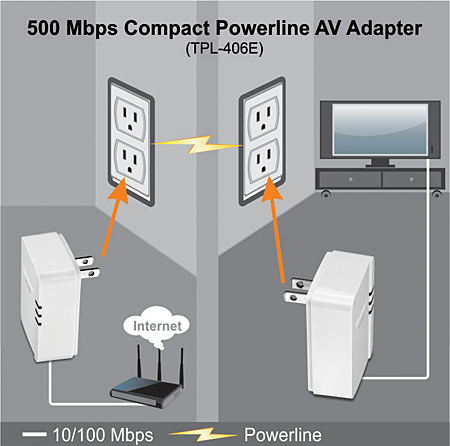
              kitchen.......home plug in the wall cable to the route...3 lights on
              living room.....home plug in the wall cable to the box...3 lights on

              setup right..........
              when setup like this turn the wifi off on your laptop........then connect the lappy via ethernet clabe that goes to the box.....see if you can connect to the internet
              if yes the home plugs setup ok


              Problem lies with the box
              Last edited by P&D; 20 October, 2016, 22:51.

              Comment

              • maca
                Mr. DK DJ
                • Feb 2009
                • 6310

                #37
                Do as P@D says but an even better idea is throw it in the bin better E2 boxes out there now...

                Comment

                • 1888
                  Member
                  • Oct 2016
                  • 49

                  #38
                  Originally posted by P&D
                  I think you & your avatar have been smoking to many of them special cigs

                  Home plugs are a wired connection........NOT wireless
                  when you go into the setting its already picked Ethernet......Wifi greyed out


                  If the OP sets his DCPH on the box the problem will be solved........I'm sure but refuses to ........WHY.........?
                  Noooooo i was meaning even though he is wireless. IE internet etc his home plugs are wired so look as settings as it may be set as wireless. If you read it again i did say do you need to set it to Ethernet. Now i also said i cant confirm about settings due to my box not arriving in time so i am unsure how the settings work. Its automatically detected what is nice unlike what i am used to (Kodi)

                  Almost four years since i went cold turkey on the fags and had half a spliff on my honeymoon some 14 years ago, prior to that it would have been early 90's. Very early Lol. Some of these emoticons are crap. Nice to see Celtic though.

                  Comment

                  • Jayob10
                    Junior Member
                    • Oct 2013
                    • 38

                    #39
                    Originally posted by P&D
                    Switch DCPH to off...........reboot the box
                    when the box starts turn it back on ......reboot the box

                    This clears the old IP address & adds the new one
                    job done

                    who are you with VM.....BT......SLY??

                    Right if I understand your answer in an early post.......you had it setup right
                    kitchen.......home plug in the wall cable to the route...3 lights on
                    living room.....home plug in the wall cable to the box...3 lights on

                    setup right..........
                    when setup like this turn the wifi off on your laptop........then connect the lappy via ethernet clabe that goes to the box.....see if you can connect to the internet
                    if yes the home plugs setup ok


                    Problem lies with the box
                    Ive connected the laptop via ethernet directly to router and also directly to TP-link in the other room (in which box will be located). I turned wifi off on computer and was able to access the internet on both via ethernet. So the plugs are good.

                    I cannot change to IP address without an alternate DNS. Which I will have to get from my provider, Imagine LTE. The box is stuck on the settings of my old set up and I can only hit "apply" when I have the alternate DNS.

                    Comment

                    • Jayob10
                      Junior Member
                      • Oct 2013
                      • 38

                      #40
                      What would be the best and most hassle free box to get should I choose to upgrade in the near future?

                      Comment

                      • maca
                        Mr. DK DJ
                        • Feb 2009
                        • 6310

                        #41
                        For cheap and value for money http://www.digital-kaos.co.uk/forums...3-Backup-Image

                        Comment

                        • dasteph
                          V.I.P. Member
                          • Nov 2008
                          • 1293

                          #42
                          have you checked that the skybox is using ethernet connection to access the internet and not wifi or gprs as all 3 are active but only 1 will be in use.
                          sigpic

                          Comment

                          • Nobby Nutz
                            Top Poster
                            • Apr 2012
                            • 191

                            #43
                            Originally posted by Jayob10
                            Ive connected the laptop via ethernet directly to router and also directly to TP-link in the other room (in which box will be located). I turned wifi off on computer and was able to access the internet on both via ethernet. So the plugs are good.

                            I cannot change to IP address without an alternate DNS. Which I will have to get from my provider, Imagine LTE. The box is stuck on the settings of my old set up and I can only hit "apply" when I have the alternate DNS.
                            DHCP provides an IP Address as P&D has already asked switch off DHCP on Skybox and reboot the Skybox. Switch DHCP back on this will allocate an alternate IP Address for your Skybox. This should work another check is to see if you have activity amber lights flashing on the Ethernet connection on Skybox if not your Ethernet port on Skybox maybe faulty .

                            Only other alternative if this doesn't work is to switch router and Skybox off and unplug from mains leave for 10-20 secs and power back on router first and then Skybox.

                            Comment

                            • P&D
                              DK Veteran
                              • May 2010
                              • 2686

                              #44
                              Well said Nobby.......it will sink in soon I think
                              as the old saying goes something about a horse & water

                              Comment

                              • Hadron
                                V.I.P. Member
                                • Nov 2012
                                • 2102

                                #45
                                Originally posted by Jayob10
                                ...When I plug in my Laptop to the router it picks up one IP Address

                                When I plug the box into the router its reading another IP Address (seems to be the one from the previous router). The new router has set us a new IP address which needs to be changed on the box but its proving problematic...
                                What IP address do you see on the laptop?

                                What IP address do you see on the F5?

                                Comment

                                Working...