Skybox F5

Collapse
X
 
  • Time
  • Show
Clear All
new posts
  • Jayob10
    Junior Member
    • Oct 2013
    • 38

    #1

    Skybox F5

    I recently changed my internet provider, same company different service. I had one of these skybox f5's hooked up in the sitting room, you could put apps on it and watch the free to air channels etc.. the kids used it for youtube etc.

    it worked fine on the old wifi, but now its stopped working. We cannot connect it to the internet at all. It was never directly connected to the router, we just had an wifi booster plug attached to it.

    How the hell do you connect it to the wifi in the house? Its probably something very simple but i'm drawing a blank
  • digicon
    V.I.P. Member
    • Jul 2009
    • 8261

    #2
    you will have to connect your wi-fi booster with user and password again to the new router you have, most have a wps button and the same again on the router which makes the 'marriage' of each device even easier

    Comment

    • martin035
      V.I.P. Member
      • Apr 2014
      • 1308

      #3
      You mentioned old wifi, have you got a new router and therefore don't use your wifi booster plug?

      Comment

      • Jayob10
        Junior Member
        • Oct 2013
        • 38

        #4
        we had a new router installed today, new password for our wifi, the lot.

        The box was connected to internet on our old wifi set up, but im unsure of how to connect it now. Thanks for the advice above but you are really talking to a novice here.

        The router is in the kitchen, the skybox f5 is hooked up in sitting room and plugged into wifi booster.

        Could someone give me a very basic step by step guide of what I will need to do?

        Comment

        • Jayob10
          Junior Member
          • Oct 2013
          • 38

          #5
          When I go to network settings theres an ethernet option (which we used before on our old wifi by plugging an internet booster into back of skybox f5) and theres a wifi option (but the wifi management part is greyed out- i'd imagine this is where I can enter a wifi password etc... but its greyed out and won't let me)

          Comment

          • P&D
            DK Veteran
            • May 2010
            • 2686

            #6
            I think you're mixed up & confusing members

            Wifi.....is a USB Ariel you plug in the box
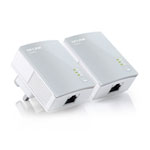
            internet booster.......I think you mean home plugs ?

            Do you mean these.........


            If yes...................

            1. Plug the adaptors into the power outlet
            2. Connect the device via the network cable to the router & box
            3. Press the pair buttons—and you're done!

            Also make sure DHCP is set to on.........

            How to........
            https://www.youtube.com/watch?v=O9R_rEjytZ4
            Last edited by P&D; 19 October, 2016, 22:35.

            Comment

            • Jayob10
              Junior Member
              • Oct 2013
              • 38

              #7
              is there any way to attach pics of the plugs I am using? I have 2 of them (one in each room). One is plugged into the wall with the cable into the router. Thats in the kitchen,

              in an adjoining room the other plug is plugged into the wall with the cable then running into the back of the box. The plugs I have look similar but they do not have the little stick on the back.

              They do have buttons on the front however.

              I am a complete idiot with this stuff but I still do not understand fully, I apologise. Do I need to bring the skybox f5 into the other room temporarily in order to connect it to the router?

              Are you telling me to plug bother adaptors into the wall beside the router, bring the box into the same room and connect both cables from both adaptors into the router and the skybox f5 at the same time?

              Comment

              • 1888
                Member
                • Oct 2016
                • 49

                #8
                Upload your pictures to a picture hosting site like flicker or photobucket. Once done open your picture in that site and look for the [img] tag and copy it and paste it to your post.

                Comment

                • Jayob10
                  Junior Member
                  • Oct 2013
                  • 38

                  #9
                  20161019_223529.jpg20161019_223541.jpgThese are the plugs I am using


                  Last edited by Jayob10; 19 October, 2016, 23:14.

                  Comment

                  • 1888
                    Member
                    • Oct 2016
                    • 49

                    #10
                    Press wps pair on your router then that booster and sit back till they pair.

                    Comment

                    • Jayob10
                      Junior Member
                      • Oct 2013
                      • 38

                      #11
                      But there is no WPS pair button (or indeed any button) on the router

                      Comment

                      • 1888
                        Member
                        • Oct 2016
                        • 49

                        #12
                        Originally posted by Jayob10
                        But there is no WPS pair button (or indeed any button) on the router
                        Sorry i am presuming it does as my sky one does. You cable from router to another booster? if so press pair on the router one first then the one on the skybox. They are not communicating due to your new broadband password.

                        Comment

                        • Jayob10
                          Junior Member
                          • Oct 2013
                          • 38

                          #13
                          And do I need to connect the router to the skybox? they are in separate rooms

                          or is it suffice to press the one connected to router first and then proceed into the next room to press that?

                          Will this solve the issue?

                          Comment

                          • 1888
                            Member
                            • Oct 2016
                            • 49

                            #14
                            Originally posted by Jayob10
                            And do I need to connect the router to the skybox? they are in separate rooms

                            or is it suffice to press the one connected to router first and then proceed into the next room to press that?

                            Will this solve the issue?
                            Just press pair should be enough unless you need to change DHCP like mentioned in post 6 but try the pair buttons first.

                            Comment

                            • Jayob10
                              Junior Member
                              • Oct 2013
                              • 38

                              #15
                              cheers ive just pressed them both now 10 seconds apart from each other (the time it took to walk into the next room)

                              I then turned box off and turned it back on so I will check now

                              Comment

                              Working...