
you can buy a special bracket for a dish to which to can attach two or more lnbs ,an example is one lnb recieves the signal from 19 east and the other recieves the signal from 13 east ,you would also need a diseqc switch to switch between the two. a standard small sky dish is to small for this so id leave that and get a second dish installed ,however having two dishes may not be an option in which case you would have to replace the standard sky dish with a motorized dish.
-
i love it when a dreambox comes together.
-
cheers, will look into diseqc swithes .Comment
-
I am having the same problem with the green light. What is a jtag?Comment
-
id try reflash before jtag mateComment
-
usually a green light is recoverable with a reflash .i love it when a dreambox comes together.Comment
-
If you look at posts above try and reflash it with Dreamup and image of choice, Andy.New Members http://www.digital-kaos.co.uk/fo rums/f5/forum-rules-2/ A Good Place To Start
Comment
-
-
You will need a Null modem cable to re-flash the Box
Comment
-
do you know how to use dream control center ? if you do you could try the root.cramfs method . you need to rename the image file to root.cramfs , you do that by right clicking on the image file and selecting rename , then rename the file root.cramfs , after that use dream control center to put the root.cramfs file into the tmp/ folder in your dreambox . then you go to the manual install panel in your box menu and the root.cramfs file should be there , select it and it should start installing .i love it when a dreambox comes together.Comment
-
hi mate a null serial cable is the simple way until you get into it you can buy these of fleabay for buttons but after you have managed to flash theres other things you need to do to get back all channels and youtube would help you or theres loads off setup help in downloads on this excellent site .Theres things were not aloud to mention but youtube willComment
-
well the thing is with your box stuck on a green light the box may be basicly bricked (dont worry this is easily fixed with a null modem cable ) and dream control center likely will not work , but I guess you could still try it and see .
you can download dream control center here
Dreambox Control Center - Downloads - Digital Kaos
you need to download the above file and open it , the file is very likely a .zip or .rar file which basicly means its compressed , this is just to make it easier and quicker for files to be uploaded and downloaded . so unzip the file , then click on the file to open it and you should see some thing similar to this .
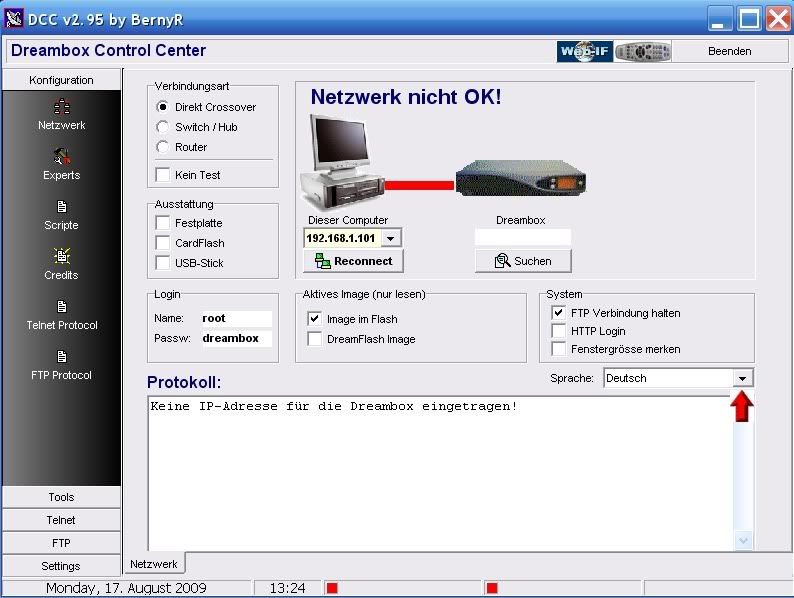
now if the language is not English as is the case in the picture above you can change the language , in the above picture you will see a red arrow pointing to a little arrow , click on the little arrow and language options will appear and then click on English .
now you have to set up dream control center (we will call this dcc to shorten it ) so it can connect with your box , as I say when you open dcc as is seen in the picture above it has a picture of a computer and a picture of a dreambox , now we need to add a third picture , we need to add a picture of a router . so look to the left of the picture of the computer and you will see 3 options
direct crossover
switch/hub
router
select router , now look and you should have added a picture of a router to the pictures of the computer and dreambox .
so now what you see onscreen should look like this
SelectRotuer.jpg
now below the picture of the router you will see the word search (click on that ) and you will see this
searchrouter2.jpg
now if you look in the top left corner you will see SEARCH FOR IP OF ROUTER and just below that is a box that says search (click on that ) and dream control center will search and find the ip address of your router , this will take about 30 seconds or so . when the search is over you should see an ip address in the box if so double click on the ip address to accept it , then you will be returned to where you can see the 3 pictures again . some times dcc will display 2 ip addresses , it may display the router and box ips together , router ips are usually either 192.168.1.1 or 192.168.1.254 so if you see two ips select the one that looks like the above ips .
now that you have your router ip you need to find your box ip , the process is exactly the same as above , so click on search under the picture of the box and do as you did above . when you have followed the instructions I mentioned above and got the ip address of your dreambox you will again be back where you can see the 3 pictures . now look under the picture of the computer and you will see RECONNECT (click on that ) and all being well you should see CHECKING NETWORK and that should be followed by NETWORK OK and then all being well you should see a thick green line that goes between all 3 pictures , so it should look like this
finished.jpg
if you see similar to the above picture dream control center has been set up successfully . if you still see a red line and not a green line that means the ips are wrong if after the search you were shown two ips then you need to go back to the router picture and click on search and when you get the ip address if you see two ip addresses double click on the second ip and then follow the above instructions and see if a green line appears , if it doesn't do the above with the picture of the dreambox and hopefully a green line will appear .
when you have dcc setup open it and click on FTP (its in the bottom left corner of the screen) then you should see some thing similar to this
18a9cd76a5bb8f9c21414822932486d24g.jpg
in the picture above you will see a box on the left containing files in your dreambox and in the box on the right it contains files in your computer , and in between the two boxes are two little arrows one points left the other points right .
look in the box on the left for the file called tmp/ and double click on it to open it . now look in the box on the right and find your image , now click on the image one time to highlight it , now right click on the image file and options should appear like view /edit /delete /rename (click on rename ) , then rename the file root.cramfs
now with the file renamed click on the file root.crafs one time to highlight it , now look between the boxes and click on the little arrow that points to the left , now look in the box on the left and all being well if you look you will see the root.cramfs file in there , if so your done here and you can close dcc . then go to your box and open the addons menu and you should see MANUAL INSTALL PANEL select that to open it and all being well the root.cramfs file should be in there , if it is select it and install it and follow any onscreen instructions such as it may say DO YOU WANT TO INSTALL if so say yes . when the image installs you will have to go through the installation process which is choosing your language /tv type / and scanning for channels etc . if you cant connect to your box using dcc that means your box is not connecting to your network and then you will have no option but to flash using a null modem cable .
IF ANY OF THE ABOVE PICTURES ARE SMALL CLICK ON THEM TO ENLARGE THEMi love it when a dreambox comes together.Comment
-
Thanks for that awesome guide. I am a complete noob when it comes to dream boxes, but I am facing this exact same problem. Green light is on, blue screen is on the TV, remote control is not able to do anything, no reaction from the box. Now everyone is saying: FLASH IT! REFLASH IT! But my question is, am I going to lose all my channel bouquets and set up if I were to flash it? I pay someone monthly to watch the channels, I don't want to screw it up you know what I mean. Any help is appreciated. Thanks.Comment


Comment