CrossEPG Full Sly EPG

Collapse
This is a sticky topic.
X
X
 
  • Time
  • Show
Clear All
new posts
  • canford
    Senior Member
    • Aug 2010
    • 263

    #61
    I uninstalled crossepg and installed crossepg_0.6.2-svn-260-r0_mipsel.ipk. but it never worked, have managed to install merlins epg and got that working,although not as user friendly as crossepg, its working and will stay with it until i can get crossepg working.

    Comment

    • xXGJSXx
      Newbie
      • Nov 2011
      • 3

      #62
      Thanks for all the posts above. I have been having problems getting crossepg to work, hopefully I can sort this now.

      Comment

      • makaveli101
        Newbie
        • Apr 2009
        • 2

        #63
        great tutorial thanks i managed to get full epg for each channel... only problem is...

        when i click 'multi EPG' (info>blue button) it doesn't load the multi epg... single epg works fine tho

        any sugguestions?

        Comment

        • austenerife
          Junior Member
          • Aug 2011
          • 20

          #64
          great tutorial thanks i managed to get full epg for each channel... only problem is...

          when i click 'multi EPG' (info>blue button) it doesn't load the multi epg... single epg works fine tho

          any sugguestions?

          Hi, depending on your image you may have to enable multi epg,this is usually in the setup,customise menu.

          Good Luck
          Aus

          Comment

          • DMBoot
            Top Poster
            • Nov 2011
            • 114

            #65
            Originally posted by andy91
            Charming just added this line

            /usr/crossepg/crossepg_epgmove.sh
            Now my box only boots halfway and is stuck

            Andy,
            You edited it in wordpad or notepad?

            That screws it up as it messes with the text.

            Download the original enigma.sh from the link below abd it should boot again.

            git.opendreambox.org Git - enigma2.git/tree in /usr/bin

            Use notepad++ to edit it again.

            Comment

            • DMBoot
              Top Poster
              • Nov 2011
              • 114

              #66
              Originally posted by 2685danny
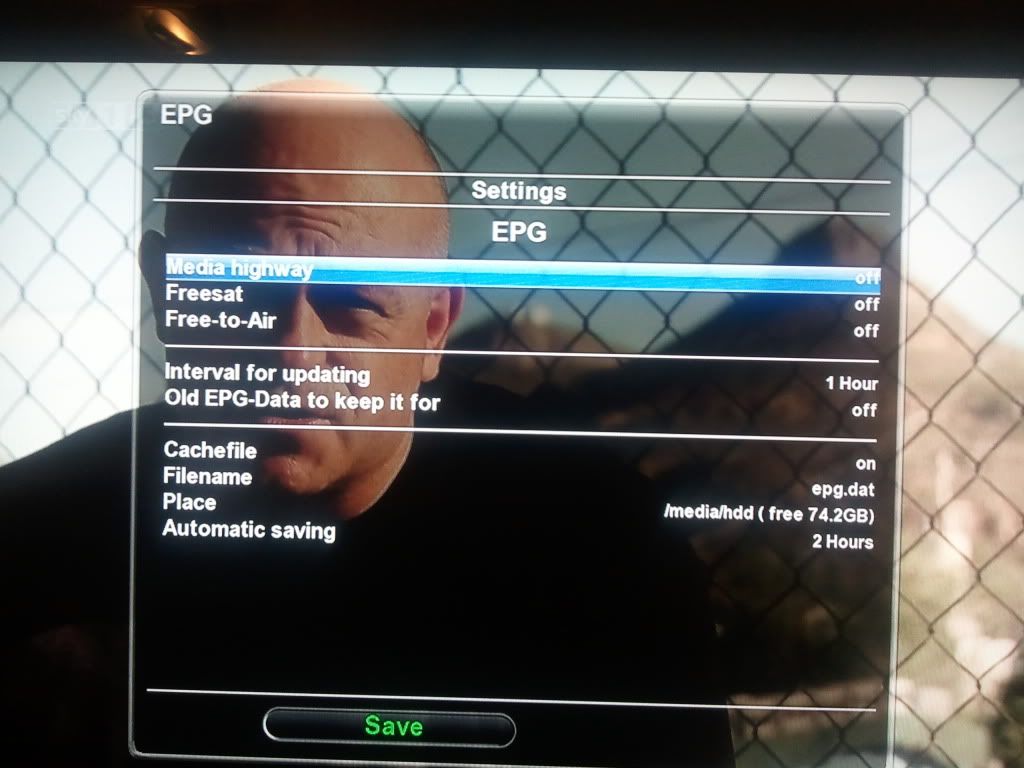
              In Gemini Blue panel --> settings --> EPG:
              Make sure the top EPG options are all off. In the bottom panel use:
              File cache ..... on
              change the filename ...... epg.dat
              location ..... /media/hdd
              Automatically save ..... off.


              YOU HAVE TO CHANGE THE CACHE FILE NAME TO EPG.DAT, otherwise it will not work.

              Restart again
              What do I press to get the the blue panel/menu above?

              It isn't the blue button on my remote as it does something else.

              Comment

              • makaveli101
                Newbie
                • Apr 2009
                • 2

                #67
                Originally posted by austenerife
                great tutorial thanks i managed to get full epg for each channel... only problem is...

                when i click 'multi EPG' (info>blue button) it doesn't load the multi epg... single epg works fine tho

                any sugguestions?

                Hi, depending on your image you may have to enable multi epg,this is usually in the setup,customise menu.

                Good Luck
                Aus
                thanks for replying i'll have a look around & see what i can do

                i'm using latest gemini 5.10 image
                Last edited by makaveli101; 4 December, 2011, 00:01.

                Comment

                • kenny_c
                  Junior Member
                  • Aug 2008
                  • 36

                  #68
                  I followed all insturctions and it works, but when ever i restart my dreambox it now crashes, i have full epg working but the restart creates a log file when it crashes, any idea why? i can post log file is needed...

                  Comment

                  • AndySav
                    Newbie
                    • Dec 2011
                    • 12

                    #69
                    Hiya everyone.

                    does this work with a black hole image? i think im running BH 0.12 if that helps?

                    my mate said he thinks it does and it can be installed via the control panel but im lost at how to do this because im not that clued up on these things.

                    cheers

                    Comment

                    • ukm
                      Newbie
                      • Dec 2011
                      • 4

                      #70
                      Thanks for all info in this thread. I finally managed to get 7 day guide working.

                      Just need to work on getting a view similar to pic on 1st page

                      Mine isn't in the style of having the time line down it.
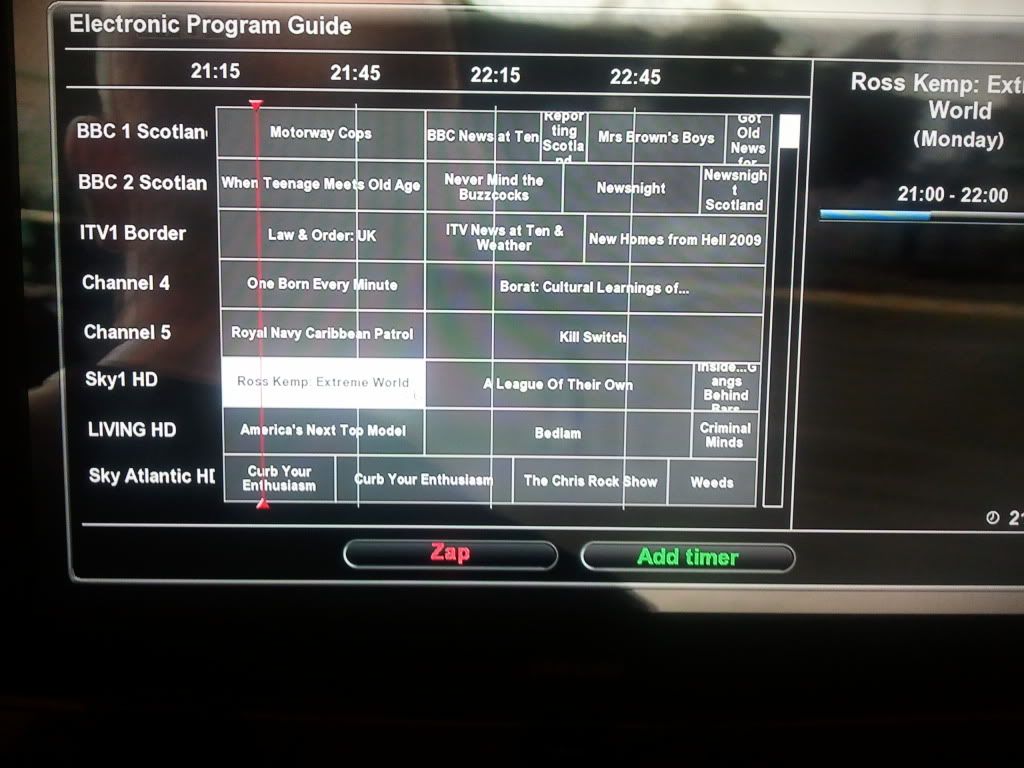


                      Instead it looks like this
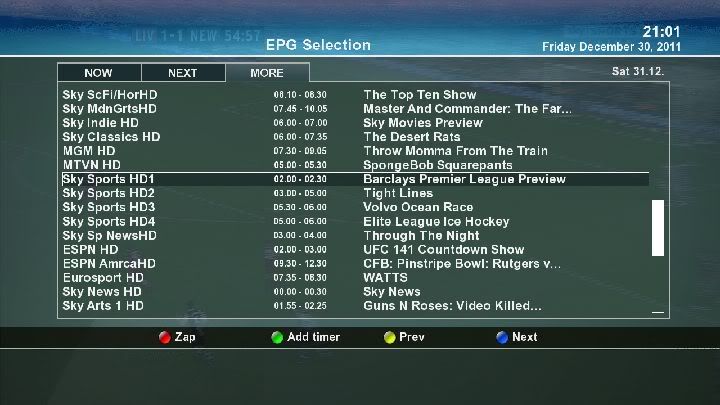


                      Not sure if its just my version of crossepg or perhaps a setting that needs changed.

                      I am running crossepg_0.62+git274+3e635ee-ro (Well thats what shows up in downloads via TSPanel )

                      Any help much appreciated

                      Mike

                      Comment

                      • smirnoff_rules
                        V.I.P. Member
                        • Mar 2008
                        • 8603

                        #71
                        wot image is it
                        any information provided is for educational/experimental purposes only.

                        Comment

                        • marcus1975
                          Top Poster +
                          • Jul 2011
                          • 248

                          #72
                          epg

                          hi

                          Great just go this working.

                          I am using Merlin 2 image

                          Best Regards
                          [I]Dreambox 800HDse,SUPERIOR DARK MOTOR METAL GEAR DiSEqC 1.2 ,Gibertini 1m Satellite Dish,FaVal TWIN LNB 0.1dB Universal Edition V2 HD SD TV

                          Comment

                          • ukm
                            Newbie
                            • Dec 2011
                            • 4

                            #73
                            Originally posted by smirnoff_rules
                            wot image is it


                            image is gemini

                            SIM2.01-dm800-SSL82-EN-S2-GP51

                            Mike
                            Last edited by ukm; 1 January, 2012, 15:51.

                            Comment

                            • ukm
                              Newbie
                              • Dec 2011
                              • 4

                              #74
                              Any ideas anyone ??

                              Comment

                              • marcus1975
                                Top Poster +
                                • Jul 2011
                                • 248

                                #75
                                Originally posted by ukm
                                Any ideas anyone ??
                                Hi what for ?
                                [I]Dreambox 800HDse,SUPERIOR DARK MOTOR METAL GEAR DiSEqC 1.2 ,Gibertini 1m Satellite Dish,FaVal TWIN LNB 0.1dB Universal Edition V2 HD SD TV

                                Comment

                                Working...