CrossEPG Full Sly EPG

Collapse
This is a sticky topic.
X
X
 
  • Time
  • Show
Clear All
new posts
  • ukm
    Newbie
    • Dec 2011
    • 4

    #76
    Apologies Marcus should have been more clear.
    I was referring to my post at the top of this page (6)
    How to get my epg view to look like (or similair ) to the
    one on page 1

    Mike
    Last edited by ukm; 8 January, 2012, 09:41. Reason: Typo

    Comment

    • andiewill
      DK Veteran
      • Aug 2008
      • 490

      #77
      Originally posted by ukm
      Apologies Marcus should have been more clear.
      I was referring to my post at the top of this page (6)
      How to get my epg view to look like (or similair ) to the
      one on page 1

      Mike
      On the Newnigma2 image it is blue button > graphical multi epg.

      if you dont have that you may find it in the plugins download.

      or you can download coolepg from the tspanle which does the same sort of view but colour codded.

      ITgate TGM220 (swapable tuner), Dreambox 800 pro, Dreambox 500c x 2, DBox, Popbox media player.

      Comment

      • sparkyjenkins
        Newbie
        • Jan 2012
        • 1

        #78
        Im having difficulty with the addon downloader on DE 1.33DV3 Phoenix. Wont see any plugins on the catalogue. Any tops plz?

        Comment

        • pjmorie
          Member
          • Mar 2012
          • 45

          #79
          pjmorie

          Hi all, I new to all this and recently setup a DM500s. The EPG on it only shows whats on now and next and was wondering is there a verison of this 'Cross EPG' that will work on the DM500s to give a 7-day guide?

          Comment

          • smirnoff_rules
            V.I.P. Member
            • Mar 2008
            • 8603

            #80
            Originally posted by pjmorie
            Hi all, I new to all this and recently setup a DM500s. The EPG on it only shows whats on now and next and was wondering is there a verison of this 'Cross EPG' that will work on the DM500s to give a 7-day guide?
            http://www.digital-kaos.co.uk/forums...elease-260519/ this has 7 days .. u need to have a good read to see if u have the skills to install and setup
            any information provided is for educational/experimental purposes only.

            Comment

            • pjmorie
              Member
              • Mar 2012
              • 45

              #81
              pjmorie

              Thanks for the info 'smirnoff_rules', I might try it out and see how I get on with that image. I can always re-flash the box with my current 'Nabilo V8' image if I find it un-usable as there seems to be a lot of issues mentioned in the thread you gave.

              Comment

              • smirnoff_rules
                V.I.P. Member
                • Mar 2008
                • 8603

                #82
                Originally posted by pjmorie
                Thanks for the info 'smirnoff_rules', I might try it out and see how I get on with that image. I can always re-flash the box with my current 'Nabilo V8' image if I find it un-usable as there seems to be a lot of issues mentioned in the thread you gave.
                u will get help on that thread m8 there the makers and leave feedback on there too
                any information provided is for educational/experimental purposes only.

                Comment

                • barrox
                  Newbie
                  • Apr 2012
                  • 3

                  #83
                  Hi Danny,

                  Now I've done everything to the letter by your guide apart from this bit below... I just can't find the settings to change the file name to epg.dat, I don't have access to EPG settings like shown below from my Blue panel... Where can I find them??

                  Thanks

                  In Gemini Blue panel --> settings --> EPG:
                  Make sure the top EPG options are all off. In the bottom panel use:
                  File cache ..... on
                  change the filename ...... epg.dat
                  location ..... /media/hdd
                  Automatically save ..... off.

                  This image has been resized. Click this bar to view the full image. The original image is sized 1024x768.
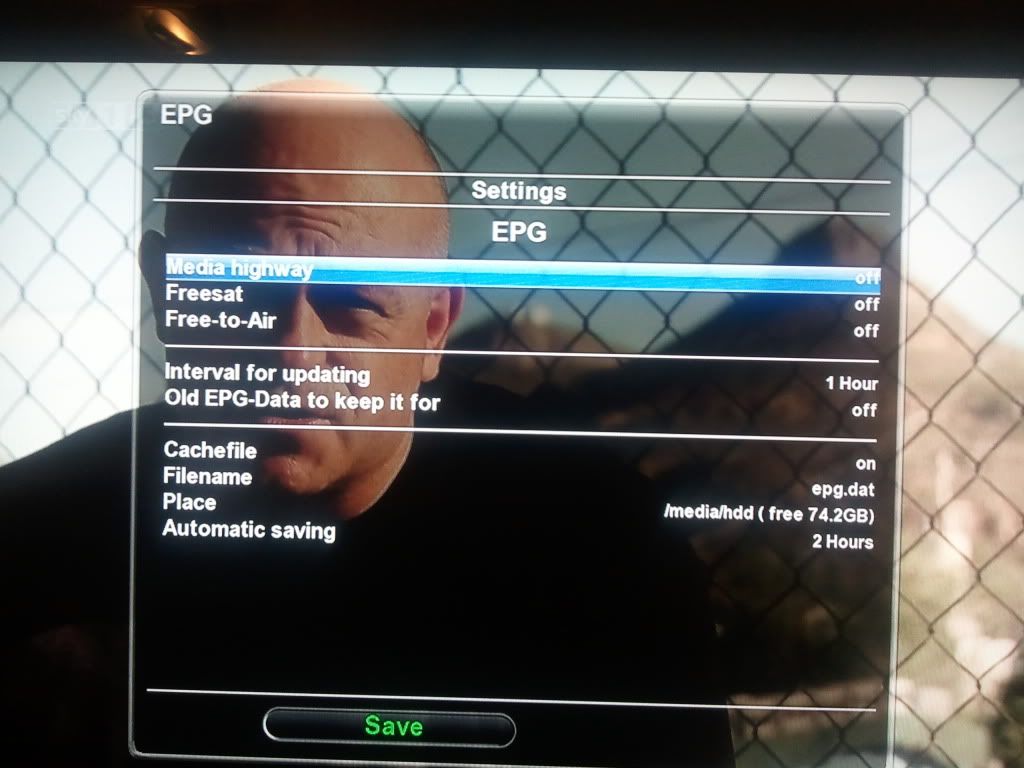
                  YOU HAVE TO CHANGE THE CACHE FILE NAME TO EPG.DAT, otherwise it will not work.

                  Restart again

                  now goto menu>setup >crossepg>download now.
                  it will run and retrive epg data

                  Restart again

                  Comment

                  • abufijli
                    Newbie
                    • May 2012
                    • 1

                    #84
                    Cant seem to get it to work, I have followed all the steps, I download the epg data and it converts and does everything but then when i check there is no data available, Im using a DM500HD with newnigma2 image and Im a total noob so could be doing something wrong.... any advice?

                    Comment

                    • jahangir07
                      Newbie
                      • Jul 2012
                      • 1

                      #85
                      will this wark on gm4.7

                      Comment

                      • darguewin
                        Top Poster
                        • Feb 2010
                        • 116

                        #86
                        my cross gpg has stopped working is every ones working ok? i download the epg and then no epg is on the chan list this used to work. but now nothing. any help would be good. thanks d

                        Comment

                        • smirnoff_rules
                          V.I.P. Member
                          • Mar 2008
                          • 8603

                          #87
                          go into crossepg setting and see if it's changed to internal flash if it has change to USB or hard drive and try again


                          Sent from my iPhone using Tapatalk
                          any information provided is for educational/experimental purposes only.

                          Comment

                          • john107
                            Newbie
                            • Aug 2008
                            • 7

                            #88
                            brilliant guide.!!!! thanks so much for the info.......

                            Comment

                            • pavlosdem
                              Newbie
                              • Jun 2011
                              • 1

                              #89
                              Does it work with Network Storage?

                              I have no local HDD on my DBOX but use a Network Share. Will this work?

                              Comment

                              • d2onk
                                Newbie
                                • Oct 2012
                                • 1

                                #90
                                great

                                thanks for that, nice work....

                                Comment

                                Working...